web
You’re offline. This is a read only version of the page.
close
Skip to main content

Notifications

Announcements

No record found.

Community site session details

Community site session details

Session Id :
Microsoft Dynamics CRM (Archived)

Wrong form appears on Contact/Account records

(0) ShareShare
ReportReport
Posted on by

Hello.

When I am viewing the "Contact" view of a particular Contact or Account record and want to modify the fields in some way, I click on "Form", but when the form pops up, it is not the form for the view I am viewing. It is always the "Donation Management" view.  This is a recent issue which I think may be tied to the recent upgrade we had to D365, but I am unsure. I am wondering what's going on, if anyone else has had this issue, and how one could fix it.

Thank you.
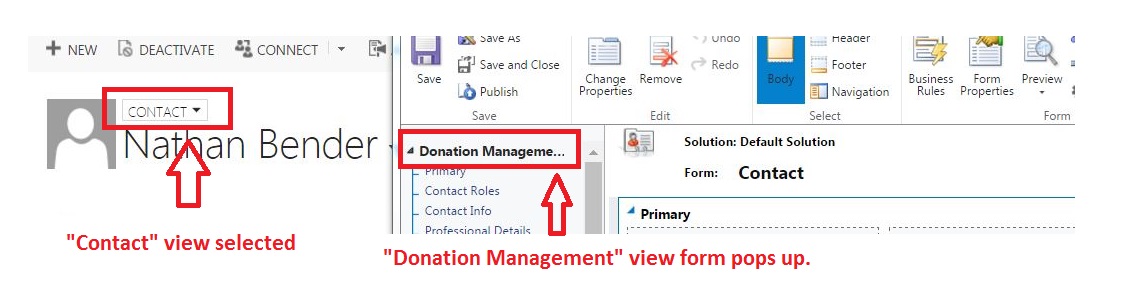
Form-issue.JPG

*This post is locked for comments

I have the same question (0)
  • Suggested answer
    ashlega Profile Picture
    34,477 on at

    Hi,

     you can always open the form you need if you go to the Settings->Customizations->Customize the System->Account->Forms.

     I think something has changed in 365 - it used to open the right form in the previous versions (noticed this, too)

  • Community Member Profile Picture
    on at

    I have been doing that, but where it becomes more annoying is doing bulk edits of Contact/Account records. If the field I want to edit on the "Contact" view is not on the "Donation Management" view I have to add it, and I'd rather not have to change the "Donation Management" view to be exactly like the Contact view in order to do bulk edits.

  • Verified answer
    ashlega Profile Picture
    34,477 on at

    Could you check the order of those forms in the customizations area?

    It seems that the form that shows up by default is the one that's on top of others in the form order dialog

    https://technet.microsoft.com/en-us/library/dn531143.aspx?f=255&MSPPError=-2147217396#BKMK_FormOrder

    Not sure it would be a very practical solution to change the order, but, at least, that's how it seems to work now

  • Community Member Profile Picture
    on at

    Brilliant!  Thank you Alex.

  • John Heaphy Profile Picture
    on at

    Thanks Alex

    Worked for me.

Under review

Thank you for your reply! To ensure a great experience for everyone, your content is awaiting approval by our Community Managers. Please check back later.

Helpful resources

Quick Links

Responsible AI policies

As AI tools become more common, we’re introducing a Responsible AI Use…

Neeraj Kumar – Community Spotlight

We are honored to recognize Neeraj Kumar as our Community Spotlight honoree for…

Leaderboard > 🔒一 Microsoft Dynamics CRM (Archived)

#1
SA-08121319-0 Profile Picture

SA-08121319-0 4

#1
Calum MacFarlane Profile Picture

Calum MacFarlane 4

#3
Alex Fun Wei Jie Profile Picture

Alex Fun Wei Jie 2

Last 30 days Overall leaderboard

Featured topics

Product updates

Dynamics 365 release plans



