web
You’re offline. This is a read only version of the page.
close
Skip to main content

Announcements

No record found.

News and Announcements icon
Community site session details

Community site session details

Session Id :
Microsoft Dynamics AX (Archived)

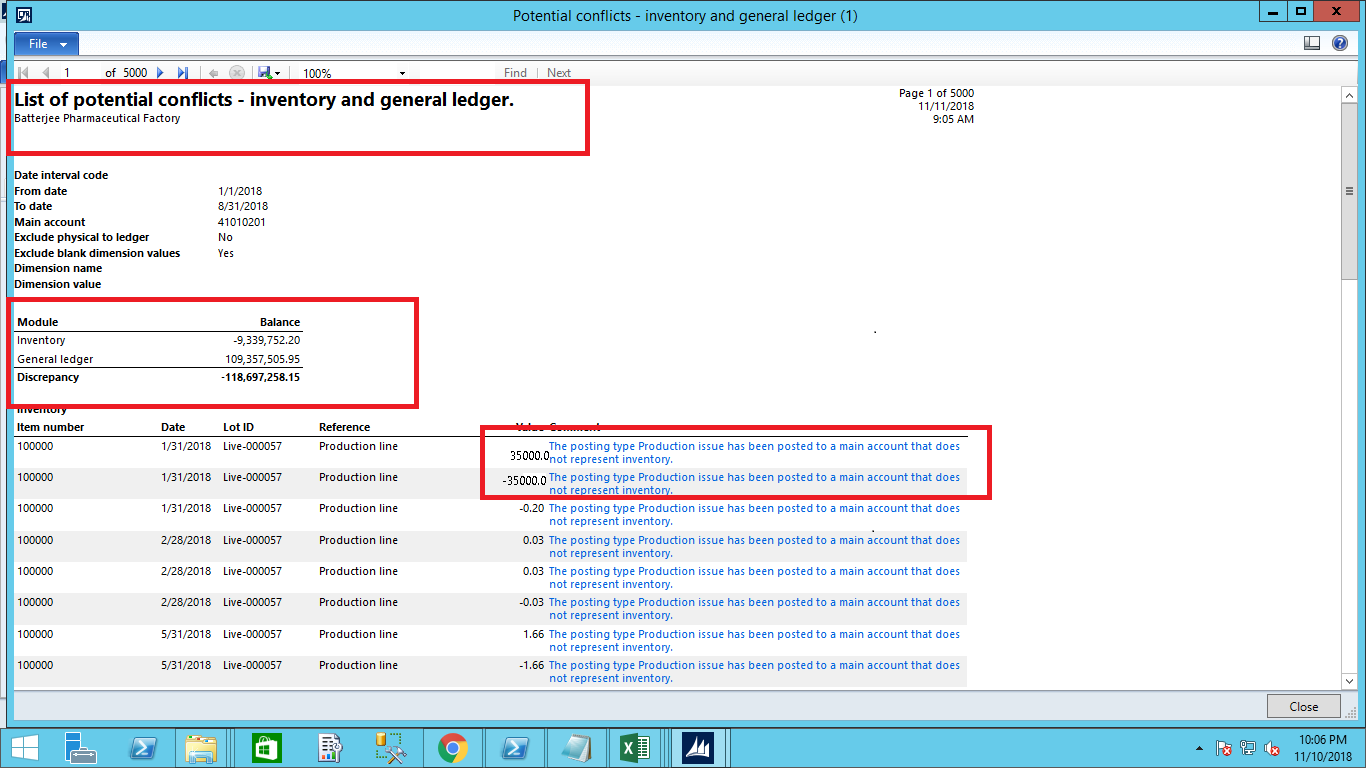
The posting type Production issue has been posted to a main account that does not represent inventory

(0) ShareShare
ReportReport
Posted on by 3,124

1667.List-of-Potential-confilicts_2D00_inventory-and-general-ledger.png

Dear Experts, 

Please help in the shown issue in screenshot "The posting type Production issue has been posted to a main account that does not represent inventory". The issue is occurring after running Report"List of Potential  - Inventory and General Ledger.

Thanks and Regards,

Shabir Ahmad

*This post is locked for comments

I have the same question (0)
  • Verified answer
    Ludwig Reinhard Profile Picture
    Microsoft Employee on at

    Hello Shabir,

    In the potential conflict report you are able to select a summary inventory account from your COA. Is the account included in this summary (total) account?

    In addition, is the account still included in the inventory posting profile?

    Best regards

    Ludwig

  • Shabir Ahmad Profile Picture
    3,124 on at

    Confilict1.pngConfilict1.png

    Doctor,

    Please check the image, and what is your view on this??As i am facing this problem first time, means to say our company is closing first time.Further, when i click on the issue error message that take me to that (Transaction form). So, please give me full explanation so i take action for this issue??

    Thanks and Regards,

    Shabir Ahmad

  • Suggested answer
    Ludwig Reinhard Profile Picture
    Microsoft Employee on at

    Hello Shabir Ahmad,

    What I would do in this case it taking a look at item no. 100000 and the item/inventory model group that has been setup for this item.

    The message says that the post physical inventory parameter might not be set correctly for this item.

    Can you share details of the item and the item/inventory model group setup for this item?

    Many thanks and best regards,

    Ludwig

  • Shabir Ahmad Profile Picture
    3,124 on at

    Doctor,

    I already resolve this issue, I was not here in this company in the time of implementation of Microsoft dynamics ax(So vendor of this company wrongly setup item model group and i share it with all the company members.But i will be happy if you give me more info about this issue as i was not here when dynamics ax was implemented so i found this issue. If i want to resolve this issue, could you help me doctor, just give me one reply and tell me all of the steps one by one). Now, coming to your reply, Yes, your anytime right. Thanks for your completely support.I already verified your answer.

    Thanks and Regards,

    Shabir Ahmad

  • Suggested answer
    Ludwig Reinhard Profile Picture
    Microsoft Employee on at

    Hello Shabir Ahmad,

    If something is listed in the potential conflict report it does not necessarily mean that something is wrong with your setup.

    Sometimes setup choices are made in a specific way that must not be in line with best practice setups.

    As a result, the potential conflict report might show something that does not apply to your environment because a setup has been made differently.

    However, when it comes to error messages related to item model groups, you should sit down with your inventory experts and discuss why a setup has possibly made in a specific way because item model groups have an important and significant impact on your complete inventory valuation.

    Before trying to make a change, I would thus recommend that you discuss this issue with your inventory experts.

    Best regards,

    Ludwig

  • Shabir Ahmad Profile Picture
    3,124 on at

    4478.unchecked-Post.png

    Doctor,
    I respect your view always!
    But as i watch the error message, which is completely referring to that place the error message is "The setting of the Post Physical inventory check box is not correct for the item model group C in the item model group form in the inventory Management" and also watch the item model group in the image.

    Thanks and Regards,

    Shabir Ahmad

  • Suggested answer
    Ludwig Reinhard Profile Picture
    Microsoft Employee on at

    Hello Shabir Ahmad,

    I assume that you have the AP/AR parameters 'post packing slip in ledger' active, right?

    Assuming that this is the case, the warning makes sense because (a) the item model group C has the stocked products parameter turned on but (b) does not want to have a physical inventory posting because the post physical inventory parameter is turned off.

    Do you know why the post phyiscal inventory posting parameter was not turned on?

    Best regards,

    Ludwig

  • Shabir Ahmad Profile Picture
    3,124 on at

    Post-packing-slip-in-ledger.png

    Doctor,

    Thanks for your prompt reply, please check the screenshot of the AR setup of parameters.

    Thanks and Regards,

    Shabir Ahmad

  • Ludwig Reinhard Profile Picture
    Microsoft Employee on at

    Hello Shabir Ahmad,

    This is interesting.

    Do all of your item model groups have the physical inventory parameter turned off?

    Best regards,

    Ludwig

  • Shabir Ahmad Profile Picture
    3,124 on at

    Doctor,

    Thanks for showing your interest,

    In the time of implementation of dynamics ax in our company i was not here, so i think that vendors did intentionally, as all of our users are very new to ax.

    Answer to your question, No some of item model group has been checked "Post Physical inventory" but few has missed this checked, again these are physical inventory.

    Thanks and Regards,

    Shabir Ahmad

Under review

Thank you for your reply! To ensure a great experience for everyone, your content is awaiting approval by our Community Managers. Please check back later.

Helpful resources

Quick Links

Introducing the 2026 Season 1 community Super Users

Congratulations to our 2026 Super Stars!

Meet the Microsoft Dynamics 365 Contact Center Champions

We are thrilled to have these Champions in our Community!

Congratulations to the March Top 10 Community Leaders

These are the community rock stars!

Leaderboard > 🔒一 Microsoft Dynamics AX (Archived)

#1
Joris dG Profile Picture

Joris dG 5

#2
Alexey Lekanov Profile Picture

Alexey Lekanov 2

#2
Henrik Nordlöf Profile Picture

Henrik Nordlöf 2 User Group Leader

Last 30 days Overall leaderboard

Featured topics

Product updates

Dynamics 365 release plans
