web
You’re offline. This is a read only version of the page.
close
Skip to main content

Notifications

Announcements

No record found.

Community site session details

Community site session details

Session Id :
Microsoft Dynamics CRM (Archived)

Business Process flow - change lookup filter base on a parameter on Change events

(0) ShareShare
ReportReport
Posted on by 1,532

Hi,

I have a business process flow that seem to only work if the field (Reason) that I need to do the FILTER lookup on exist in the first stage.
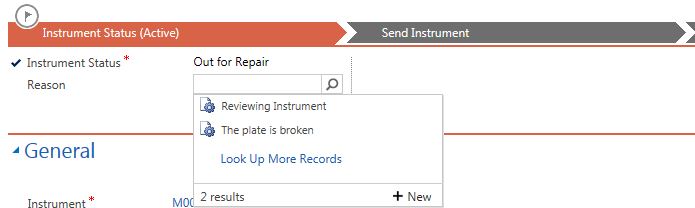
FirstStage.JPG

When I remove the Reason field from the first stage to the second stage the FILTER no longer works.
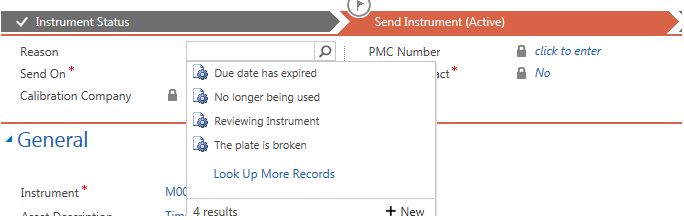
0640.Capture.JPG

The below logic is working on the first stage.

if (Xrm.Page.getControl("header_process_new_reasonid") != null) {
 
    Xrm.Page.getControl("header_process_new_reasonid").removePreSearch(addLookupFilter);
 
    Xrm.Page.getControl("header_process_new_reasonid").addPreSearch(addLookupFilter);
}

I thought if I added the below logic to trigger on a stage change using OnLoad or OnSave still no luck.

Xrm.Page.data.process.addOnStageChange(stageChange);
Xrm.Page.data.process.addOnStageSelected(stageChange);

function stageChange() {
    Xrm.Page.getControl("header_process_new_reasonid").addPreSearch(addLookupFilter);
}

Does javascript logic only work on the first stage.

Any ideal on what I am doing wrong.

Thanks

*This post is locked for comments

I have the same question (0)
  • Suggested answer
    gdas Profile Picture
    50,091 Moderator on at

    Hi Thompson,

    If my understanding is correct you are using same field in both the stage?Make sure the fields are exists in the form . However I would suggest following , you are calling same function so you dont need to addOnStageChange method.Also call  stageChangeOnSelected() method in onload event as well. Try with this 

    Xrm.Page.data.process.addOnStageSelected(stageChangeOnSelected);
    
    function stageChangeOnSelected() {
        //Assuming that the reason field exists in the Main Form
        if (Xrm.Page.getControl("new_reasonid") != null) {
    
            Xrm.Page.getControl("new_reasonid").addPreSearch(
            function () {
                addLookupFilter();
            });     
        }
        //For BPF field
        if (Xrm.Page.getControl("header_process_new_reasonid") != null) {       
    
            Xrm.Page.getControl("header_process_new_reasonid").addPreSearch(
           function () {
               addLookupFilter();
           });
        }
    
    }
    
    
    function addLookupFilter()
    {
        //Implement the logic 
        // Xrm.Page.getControl("header_process_new_reasonid").addCustomFilter(fetchQuery);
        // Xrm.Page.getControl("new_reasonid").addCustomFilter(fetchQuery);
    
    
    }
    

  • Suggested answer
    RaviKashyap Profile Picture
    55,410 Moderator on at

    Hi,

    The code looks fine, if you have added onstatechange & onstageselected then it should work. Is the condition mentioned in the filter is satisfied.

    If the field is added more than once that the schema name for that field will change. For example, if you add the reason field twice in the BPF the schema name for the second field will be header_process_new_reasonid_1.

    Hope this helps.

  • rthompson Profile Picture
    1,532 on at

    Hi,

    I am sorry I did not explain myself well.  The "Reason" field will only exist 1 time on the form.

    My logic is working correct when the "Reason" field only exist on the first stage.

    When I remove the "Reason" field from the first stage and  put the "Reason" field on the second stage. The logic is not longer working.

    The addLookupFilter is getting triggered when the "Reason" field is on the first stage.  But the addLookupFilter is not getting triggered on the second stage (Send Instrument (active).

    The OnLoad logic is being executed on the second stage.

    65764.Capture.JPG

    Onload Form (working)

    //OnLoad Form
    function filterLookup() {
    
      if (Xrm.Page.getControl("header_process_new_reasonid") != null) {

    Xrm.Page.getControl("header_process_new_reasonid").addPreSearch(addLookupFilter);

    //Or this logic
            Xrm.Page.data.process.addOnStageSelected(stageSelected); 
    }
    }


    Stage Selected (working)

    //Stage Selected
    function stageSelected() {
    
        filterOnSetting = "Reason";
        Xrm.Page.getControl("header_process_new_reasonid").addPreSearch(addLookupFilter);
    }


    AddLookupFilter (Not working on second stage (Send Instrument (Active)

    function addLookupFilter() {
       var statusCode = Xrm.Page.getAttribute("statuscode").getSelectedOption();
    
       var categoryId = null;
       var categoryUiName = null;
       switch (statusCode.value.toString()) {
          case "100000004":  //Out for Calibration
             categoryId = "{8ED431D5-2D9C-E811-80DC-005056BA7CE0}";
             categoryUiName = "Out for Calibration";
             break;
          case "100000003":  //Out for Repair
             categoryId = "{03A8C797-2E9C-E811-80DC-005056BA7CE0}";
             categoryUiName = "Out for Repair";
             break;
          case "100000002":  //Remove from Service
             categoryId = "{6C6CC53D-2E9C-E811-80DC-005056BA7CE0}";
             categoryUiName = "Remove from Service";
             break;
        }
    
        //Prepare Condition for the filter
        fetchXml = "<filter type='and'>" +
                     "<condition attribute='new_categoryid' value='" + categoryId + "' uitype='category' uiname='" + categoryUiName + "' operator='eq'/>" +
                   "</filter>";
    
       //Apply Filter to the lookup field
       Xrm.Page.getControl("header_process_new_reasonid").addCustomFilter(fetchXml);
    }
  • RaviKashyap Profile Picture
    55,410 Moderator on at

    Hi,

    Could you please also confirm that you are settign the filer on stagechange event as well?

  • rthompson Profile Picture
    1,532 on at

    Hi,

    My logic is working correct when the "Reason" field only exist on the first stage.

    When I remove the "Reason" field from the first stage and  put the "Reason" field on the second stage. The logic is not longer working.

    The addLookupFilter is getting triggered when the "Reason" field is on the first stage.  But the addLookupFilter is not getting triggered on the second stage (Send Instrument (active).

    I have tried allow 3 options OnLoad form.  They are all working on the first stage but not on the second stage

    1. Xrm.Page.getControl("header_process_new_reasonid").addPreSearch(addLookupFilter);
    2. Xrm.Page.data.process.addOnStageSelected(stageSelected); 
    3. Xrm.Page.data.process.addOnStageChange(stageChange); 


    The OnLoad logic is being executed on the second stage.

    Onload Form (working)

    function filterLookup() {
    
      if (Xrm.Page.getControl("header_process_new_reasonid") != null) {
    
            Xrm.Page.getControl("header_process_new_reasonid").addPreSearch(addLookupFilter);
    
            //Or this logic
    
            Xrm.Page.data.process.addOnStageSelected(stageSelected); 
    
           //Or this logic
    
            Xrm.Page.data.process.addOnStageChange(stageChange); 
    
      }
    }


    stageSelected

    //Stage Selected
    function stageSelected() {
    
        filterOnSetting = "Reason";
        Xrm.Page.getControl("header_process_new_reasonid").addPreSearch(addLookupFilter);
    }


    stageChange

    //Stage Change
    function stageChange() {
    
        filterOnSetting = "Reason";
        Xrm.Page.getControl("header_process_new_reasonid").addPreSearch(addLookupFilter);
    }


    AddLookupFilter 

    (Not working on second stage (Send Instrument (Active)

    function addLookupFilter() {

       var statusCode = Xrm.Page.getAttribute("statuscode").getSelectedOption();
    
       var categoryId = null;
       var categoryUiName = null;
       switch (statusCode.value.toString()) {
          case "100000004":  //Out for Calibration
             categoryId = "{8ED431D5-2D9C-E811-80DC-005056BA7CE0}";
             categoryUiName = "Out for Calibration";
             break;
          case "100000003":  //Out for Repair
             categoryId = "{03A8C797-2E9C-E811-80DC-005056BA7CE0}";
             categoryUiName = "Out for Repair";
             break;
          case "100000002":  //Remove from Service
             categoryId = "{6C6CC53D-2E9C-E811-80DC-005056BA7CE0}";
             categoryUiName = "Remove from Service";
             break;
        }
    
        //Prepare Condition for the filter
        fetchXml = "<filter type='and'>" +
                     "<condition attribute='new_categoryid' value='" + categoryId + "' uitype='category' uiname='" + categoryUiName + "' operator='eq'/>" +
                   "</filter>";
    
       //Apply Filter to the lookup field
       Xrm.Page.getControl("header_process_new_reasonid").addCustomFilter(fetchXml);
    }


  • Suggested answer
    gdas Profile Picture
    50,091 Moderator on at

    Hi Thompson,

    Try with this code , make sure you added the reason field in the form itself and regeister formOnload in the onload event of the form. I have putted some alert you will receive alert when the filter is applying or you can debug your code . Below code should work  -

            // Register the function in Onload Method
    
            function formOnload()
            {
                Xrm.Page.data.process.addOnStageSelected(stageChange);
                Xrm.Page.data.process.addOnStageChange(stageChange);
            }


            //Stage Change
            function stageChange() {
                alert("Stage Change got fired");
                if (Xrm.Page.getControl("new_reasonid") != null) {
                    Xrm.Page.getControl("new_reasonid").addPreSearch(
                    function () {
                        alert("Applying filter ton Form Field");
                        addLookupFilter();
                    });
                }
                if (Xrm.Page.getControl("header_process_new_reasonid") != null && Xrm.Page.getControl("header_process_new_reasonid") != undefined) {
                    Xrm.Page.getControl("header_process_new_reasonid").addPreSearch(
                   function () {
                       alert("Applying filter ton BPF Field");
                       addLookupFilter();
                   });
                }
            }
    
            function addLookupFilter() {
                if (Xrm.Page.getControl("statuscode") != null && Xrm.Page.getControl("statuscode").getAttribute().getValue() != null) {
                    var statusCode = Xrm.Page.getAttribute("statuscode").getSelectedOption();
                    var categoryId = null;
                    var categoryUiName = null;
                    switch (statusCode.value.toString()) {
                        case "100000004":  //Out for Calibration
                            categoryId = "{8ED431D5-2D9C-E811-80DC-005056BA7CE0}";
                            categoryUiName = "Out for Calibration";
                            break;
                        case "100000003":  //Out for Repair
                            categoryId = "{03A8C797-2E9C-E811-80DC-005056BA7CE0}";
                            categoryUiName = "Out for Repair";
                            break;
                        case "100000002":  //Remove from Service
                            categoryId = "{6C6CC53D-2E9C-E811-80DC-005056BA7CE0}";
                            categoryUiName = "Remove from Service";
                            break;
                    }
    
                    //Prepare Condition for the filter
                    fetchXml = "<filter type='and'>" +
                                 "<condition attribute='new_categoryid' value='" + categoryId + "' uitype='category' uiname='" + categoryUiName + "' operator='eq'/>" +
                               "</filter>";
    
                    //Apply Filter to the FORM lookup field
                    if (Xrm.Page.getControl("new_reasonid") != null && Xrm.Page.getControl("new_reasonid") != undefined) {
                        alert("Filter apply successfully in form field");
                        Xrm.Page.getControl("new_reasonid").addCustomFilter(fetchQuery);
                    }
                    //Apply Filter to the BPF lookup field
                    if (Xrm.Page.getControl("header_process_new_reasonid") != null && Xrm.Page.getControl("header_process_new_reasonid") != undefined) {
                        alert("Filter apply successfully in BPF field");
                        Xrm.Page.getControl("header_process_new_reasonid").addCustomFilter(fetchXml);
                    }
                }
            }


  • rthompson Profile Picture
    1,532 on at

    Hi Goutam,

    The hook is not firing.

    I have added the "Reason" on the form and that is working.

    But the BPF second stage "Reason" the "addLookupFilter" just will not fire.

    HookNotWorking.JPG

  • gdas Profile Picture
    50,091 Moderator on at

    How you know its not firing ? You are not getting alert?

  • rthompson Profile Picture
    1,532 on at

    Yes.  I am only getting the "Stage Change got fired"

  • Suggested answer
    gdas Profile Picture
    50,091 Moderator on at

    Ok remove the alert and check you can get next function alert or not.

     //Stage Change
            function stageChange() {
                alert("Stage Change got fired");
                if (Xrm.Page.getControl("new_reasonid") != null) {
                    Xrm.Page.getControl("new_reasonid").addPreSearch(
                    function () {                
                        addLookupFilter();
                    });
                }
                if (Xrm.Page.getControl("header_process_new_reasonid") != null && Xrm.Page.getControl("header_process_new_reasonid") != undefined) {
                    Xrm.Page.getControl("header_process_new_reasonid").addPreSearch(
                   function () {              
                       addLookupFilter();
                   });
                }
            }


Under review

Thank you for your reply! To ensure a great experience for everyone, your content is awaiting approval by our Community Managers. Please check back later.

Helpful resources

Quick Links

Responsible AI policies

As AI tools become more common, we’re introducing a Responsible AI Use…

Neeraj Kumar – Community Spotlight

We are honored to recognize Neeraj Kumar as our Community Spotlight honoree for…

Leaderboard > 🔒一 Microsoft Dynamics CRM (Archived)

#1
SA-08121319-0 Profile Picture

SA-08121319-0 4

#1
Calum MacFarlane Profile Picture

Calum MacFarlane 4

#3
Alex Fun Wei Jie Profile Picture

Alex Fun Wei Jie 2

Last 30 days Overall leaderboard

Featured topics

Product updates

Dynamics 365 release plans



