web
You’re offline. This is a read only version of the page.
close
Skip to main content

Notifications

Announcements

No record found.

Community site session details

Community site session details

Session Id :
Small and medium business | Business Central, N...
Suggested Answer

Connect BC20 on-prem to CRM online - Failed to acquire access token

(0) ShareShare
ReportReport
Posted on by 1,106

When trying to use the Dataverse Connection Setup in BC20 on-premise to connect to Dataverse/CRM...It prompts me for admin credentials and then asks me to give admin consent to the various permissions needed. I check the box, it spins for a moment and then sends me back to BC with this error:  "Failed to acquire an access token for ____.crm.dynamics.com."

What I've tried...

I've followed all of these steps: https://learn.microsoft.com/en-us/dynamics365/business-central/admin-how-to-set-up-a-dynamics-crm-connection

I've also tried Marco Mels  suggestions from here:    

I'm signing into the prompt with a userid that is SUPER in BC, Admin in M365, and System Administrator in D365CE.

I've restarted the service tier multiple times. I also tried restarting the entire middle-tier server.

My app has the following permissions:
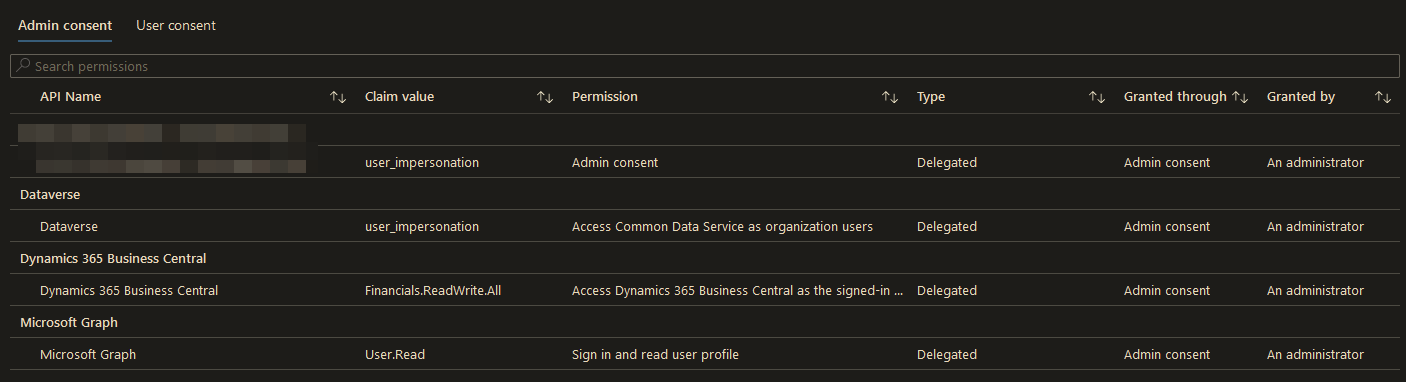
pastedimage1672267265545v3.png

What happens...

Test Connection works. And it did have me setup Data Encryption.

Event Logs show this error:

Message No access token or authorization error code received.
ProcessId: 16380
Tag: 0000C11
CustomParameters: {"Category": "AL Dataverse Integration"}

AAD Application sign-in logs show an "interrupted" sign-in and then a "successful" sign in.

pastedimage1672266606167v2.png

I have the same question (0)
  • Suggested answer
    YUN ZHU Profile Picture
    95,329 Super User 2025 Season 2 on at

    Hi, This looks like a problem with OAuth authentication with Microsoft Dataverse.

    Sorry I haven't tested it, hope you can find some hints in the link below.

    https://learn.microsoft.com/en-us/power-apps/developer/data-platform/authenticate-oauth

    Or you can raise a support request directly with Microsoft and work on the issue with them.

    Hope this helps.

    Thanks.

    ZHU

  • Markus_1991 Profile Picture
    15 on at

    Hi Greg,

    we just had exactly the same problem you had.

    Could you please share if you solved the problem and if so, how?

    Thank you in advance.

    Markus

  • Suggested answer
    Greg Enns Profile Picture
    1,106 on at

    It was indeed an OAuth setup issue. I think the key was to set the scope of the Azure Application to multi-tenant. 

  • Markus_1991 Profile Picture
    15 on at

    Thank you for your quick reply, Greg.

    I have recreated the app registry again as I had made changes to the API Permissions after the fact.

    Apparently the token is not updated with the permissions when it was originally and first used with different/less permissions.

    Furthermore I added the validAudience in the BC Server instance:

    Set-NAVServerConfiguration -ServerInstance BC -KeyName ValidAudiences -KeyValue "api.businesscentral.dynamics.com"

    For more information, see:

    www.kauffmann.nl/.../

    With this, I was now able to successfully connect from Business Central to Dataverse.

Under review

Thank you for your reply! To ensure a great experience for everyone, your content is awaiting approval by our Community Managers. Please check back later.

Helpful resources

Quick Links

Responsible AI policies

As AI tools become more common, we’re introducing a Responsible AI Use…

Neeraj Kumar – Community Spotlight

We are honored to recognize Neeraj Kumar as our Community Spotlight honoree for…

Leaderboard > Small and medium business | Business Central, NAV, RMS

#1
OussamaSabbouh Profile Picture

OussamaSabbouh 3,226

#2
Jainam M. Kothari Profile Picture

Jainam M. Kothari 2,047 Super User 2025 Season 2

#3
YUN ZHU Profile Picture

YUN ZHU 1,257 Super User 2025 Season 2

Last 30 days Overall leaderboard

Featured topics

Product updates

Dynamics 365 release plans
