web
You’re offline. This is a read only version of the page.
close
Skip to main content

Notifications

Announcements

No record found.

Community site session details

Community site session details

Session Id :
Small and medium business | Business Central, N...
Suggested Answer

How can I loop records displayed in a page?

(0) ShareShare
ReportReport
Posted on by

Hello,

I'm trying to loop all records displayed in a page, from the selected one to the end of the rows:
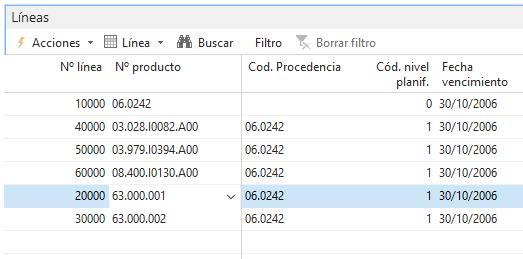
pastedimage1669453277791v1.png

For example here, as I'm selecting only the 5th row it will loop through 5th and 6th row (as there are no more rows below)

What I've been trying is this:


ProdOrderLine := Rec;

REPEAT
UNTIL ProdOrderLine.NEXT = 0;

But it will loop through all records in the table which are not even displayed in the page...

How can I loop only the page records from the selected one to the latest?

I have the same question (0)
  • Suggested answer
    DAnny3211 Profile Picture
    11,397 on at

    hi

    this is the correct code:

    CurrPage.SETSELECTIONFILTER(ProdOrderLine);

    REPEAT

    UNTIL ProdOrderLine.NEXT = 0;

    is the page that must assign the filters to your variable of type Record

    check my answer if it helped you, thanks

    DAniele

  • Suggested answer
    YUN ZHU Profile Picture
    95,329 Super User 2025 Season 2 on at

    Hi, the key method is SETSELECTIONFILTER Function

    https://learn.microsoft.com/en-us/dynamics-nav/setselectionfilter-function

    Below are some simple examples that hopefully give you some hints.

    https://yzhums.com/5625/

    https://yzhums.com/27561/

    https://yzhums.com/27185/

    Thanks

    ZHU

  • Kuhicop Profile Picture
    on at

    Hello ZHU, the problem is that SETSELECTIONFILTER will only loop the selected record, but I want to loop from the selected record to the latest record displayed, in the example, selecting row 5th it will loop 5th and 6th

  • Suggested answer
    DAnny3211 Profile Picture
    11,397 on at

    hi

    try this

    CurrPage.SETSELECTIONFILTER(ProdOrderLine );

    IF ProdOrderLine .FINDFIRST THEN

    BEGIN

     ProdOrderLine .SETFILTER("Line No.",'%1..',ProdOrderLine . "Line No.");

     IF ProdOrderLine .FINDFIRST THEN

     REPEAT

     UNTIL ProdOrderLine .NEXT=0;

    END;

    check my answer if it helped you, thanks

    DAniele

  • Kuhicop Profile Picture
    on at

    Hello, there's a problem with that code... the lines are not ordered by line no.

  • Kuhicop Profile Picture
    on at

    This worked making COPY instead of assign:

    ProdOrderLine.COPY(Rec);

    REPEAT

    UNTIL ProdOrderLine.NEXT = 0;

  • Suggested answer
    YUN ZHU Profile Picture
    95,329 Super User 2025 Season 2 on at

    Hi, is the last line distinguished by Line No.? I think you can first get the Line no. of the currently selected line (Using SETSELECTIONFILTER), then use Findlast to get the Line No. of the last line, and finally use setrange or setfilter to filter this range, and the loop will work.

    Hope this can give you some hints.

    Thanks.

    ZHU

Under review

Thank you for your reply! To ensure a great experience for everyone, your content is awaiting approval by our Community Managers. Please check back later.

Helpful resources

Quick Links

Responsible AI policies

As AI tools become more common, we’re introducing a Responsible AI Use…

Neeraj Kumar – Community Spotlight

We are honored to recognize Neeraj Kumar as our Community Spotlight honoree for…

Leaderboard > Small and medium business | Business Central, NAV, RMS

#1
OussamaSabbouh Profile Picture

OussamaSabbouh 3,229

#2
Jainam M. Kothari Profile Picture

Jainam M. Kothari 1,867 Super User 2025 Season 2

#3
YUN ZHU Profile Picture

YUN ZHU 1,153 Super User 2025 Season 2

Last 30 days Overall leaderboard

Featured topics

Product updates

Dynamics 365 release plans



