web
You’re offline. This is a read only version of the page.
close
Skip to main content

Notifications

Announcements

No record found.

Community site session details

Community site session details

Session Id :
Microsoft Dynamics AX (Archived)

Error when opening POS screen layout designer -> "Exception has been thrown by the target of an invocation."

(0) ShareShare
ReportReport
Posted on by

When we open the Screen layout designer for POS we retrieve 2 errors.  Retail->Setup->POS->Screen layout->Designer.

"Exception has been thrown by the target of an invocation."

There's nothing logged to the event viewer and it doesn't seem to cause any problem but we would like to know why we retrieve the error and how to resolve it. 
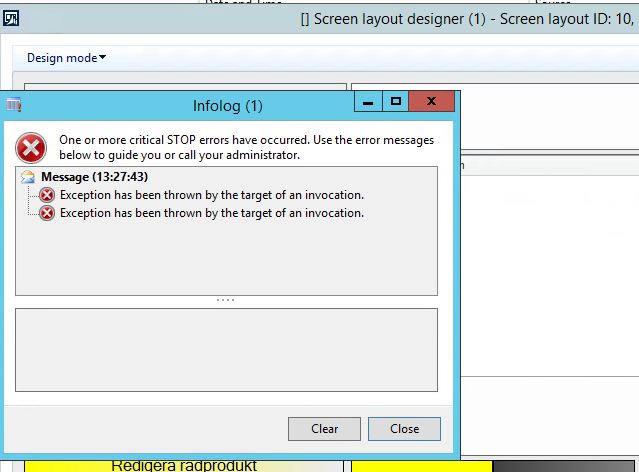
ScreenLayout.JPG

*This post is locked for comments

I have the same question (0)
  • Neeraj Chawla Profile Picture
    1,147 on at

    I am getting the same error. Please let me know in case you have found the solution for the same?

  • Community Member Profile Picture
    on at

    I think you should use the same username and password that areconfigured on the Retail Store database

  • Community Member Profile Picture
    on at

    Any resolution of this?

  • Neeraj Chawla Profile Picture
    1,147 on at

    Hi,

    It has nothing to do with Store Database. It is more of the AX user rights.

  • Community Member Profile Picture
    on at

    No still no resolution.

  • Suggested answer
    Community Member Profile Picture
    on at

    Run .net CIL, it will resolve the issue. Please share your findings.

  • Neeraj Chawla Profile Picture
    1,147 on at

    Same error after running CIL.

  • Community Member Profile Picture
    on at

    Have you tried re-installing Retail Headquarters? I had the same issue and I fixed it by re-installing Retail Headquarters. Please try and let us know your findings.

  • tabarret Profile Picture
    on at

    We hade the same issue, and were able to resolve by following the steps below:

    Download and install the “Microsoft Expression Blend Software Development Kit (SDK) for .NET 4“ package from www.microsoft.com/.../details.aspx

    Copy Microsoft.Expression.Interactions.dll and System.Windows.Interactivity.dll from “C:\Program Files (x86)\Microsoft SDKs\Expression\Blend\.NETFramework\v4.0\Libraries” to “C:\Program Files (x86)\Microsoft Dynamics AX\60\Client\Bin” folder

  • Humayun Iqbal Profile Picture
    10 on at

    Thanks tabarret. Its useful

Under review

Thank you for your reply! To ensure a great experience for everyone, your content is awaiting approval by our Community Managers. Please check back later.

Helpful resources

Quick Links

Responsible AI policies

As AI tools become more common, we’re introducing a Responsible AI Use…

Neeraj Kumar – Community Spotlight

We are honored to recognize Neeraj Kumar as our Community Spotlight honoree for…

Leaderboard > 🔒一 Microsoft Dynamics AX (Archived)

#1
Martin Dráb Profile Picture

Martin Dráb 4 Most Valuable Professional

#1
Priya_K Profile Picture

Priya_K 4

#3
MyDynamicsNAV Profile Picture

MyDynamicsNAV 2

Last 30 days Overall leaderboard

Featured topics

Product updates

Dynamics 365 release plans
