web
You’re offline. This is a read only version of the page.
close
Skip to main content

Notifications

Announcements

No record found.

Community site session details

Community site session details

Session Id :
Microsoft Dynamics GP (Archived)

receivable apply document posting through to the GL

(0) ShareShare
ReportReport
Posted on by 1,970

Hi,

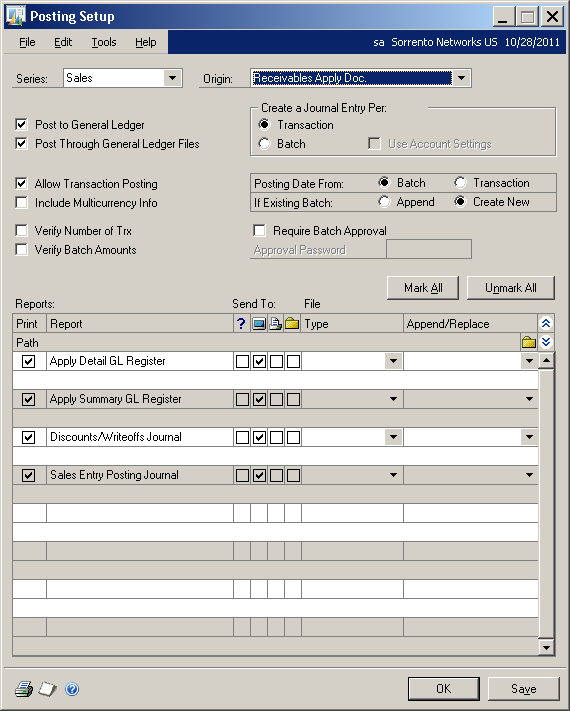
I'm trying to change one of our settings so that JEs created when applying payments in Receivables to Invoices (after the payment is posted) will post through the GL. I've changed the setting in Posting Setup but batches still up getting created and not posting all the way through. Is there another setting that I need to change or is this normal or do I need to run a check links? This is what I've changed:
*This post is locked for comments

I have the same question (0)
  • Community Member Profile Picture
    on at

    Please be sure that you are posting batches and not transaction level posting.   Regardless of what the settings are here, a transaction level posting will not Post Through.   If you turn off transaction level posing, then you are forcing batch posting.   Suggest you try that and see if the batches are posting through.

    Warren

  • Sharon Burley Profile Picture
    1,970 on at

    Hi Warren,

    This is after the batch with the cash receipts is posted. We use multicurrency and have to apply payments to invoices in currencies other than USD after the cash receipt batch is posted. The JE is for realized gain/loss or write off/terms taken. There is no batch for the apply receivable documents window. But I'm pretty sure these use to post through on their own a few years ago and that we had turned off the setting.

  • Ian Richardson Profile Picture
    4,150 on at

    We are experiencing the same issue in GP 2010.

    Is it that as Warren alludes to that since there is no batch in use when you apply multi currency payments GP interprets that as transaction level posting?

    We have hundreds of applications of multicurrency payments each day.  Each one creating their own G/L batch.  I'd love to get them to post automatically (through to use GP terminology).

    Ian

  • L Vail Profile Picture
    65,271 on at

    What you are showing is apply window, how are settings for the cash receipts window?

  • Community Member Profile Picture
    on at

    I can confirm this occurs with batch posting not just transaction posting - even though all posting settings incl cash apply & cash receipts etc  are all set to post through.  My testing shows this is 'normal' or standard GP practice.  Its not ideal so if there is some obscure setting that will enable these to post through - please pass along.  Turning off transaction level posting isn't really a viable option for us so I had not tested it.

    Thanks!  

  • Verified answer
    Sharon Burley Profile Picture
    1,970 on at

    since there is no batch, it does not post through. there is no obscure setting to change this. however, in GP 2013, the user can apply at same time as entering the cash receipt for multicurrency transactions, so I think this issue will go away after upgrading to GP 2013.

  • Community Member Profile Picture
    on at

    Ah yes - I didn't think of the Forex transaction as separate from the Cash Receipt but since its multicurrency the apply can't be done at the same time - thus - the Forex gain/loss is created as a separate transaction from the Apply - and not part of the batch entry of the Cash Receipt.  

    It is funny - I noticed others also had the impression this used to get posted together with the batch - but in hindsight it couldn't have.

    Good to know this is fixed in 2013. Thanks!

Under review

Thank you for your reply! To ensure a great experience for everyone, your content is awaiting approval by our Community Managers. Please check back later.

Helpful resources

Quick Links

Responsible AI policies

As AI tools become more common, we’re introducing a Responsible AI Use…

Neeraj Kumar – Community Spotlight

We are honored to recognize Neeraj Kumar as our Community Spotlight honoree for…

Leaderboard > 🔒一 Microsoft Dynamics GP (Archived)

#1
mtabor Profile Picture

mtabor 1

Last 30 days Overall leaderboard

Featured topics

Product updates

Dynamics 365 release plans



