web
You’re offline. This is a read only version of the page.
close
Skip to main content

Notifications

Announcements

No record found.

Community site session details

Community site session details

Session Id :
Small and medium business | Business Central, N...
Suggested Answer

Indent string field based on indentation (BOM)

(0) ShareShare
ReportReport
Posted on by 130

Hi All,

I am trying to create an indented BOM in BC. The closest I get is when I show BOM from assembly item, giving an image like the below. Ideally - I want the "No." field name to be indented based on indentation level value 

My AL code is below as well, as a page extension for BOM STRUCTURE....however it doesn't seem to do anything on the page...what am i missing?
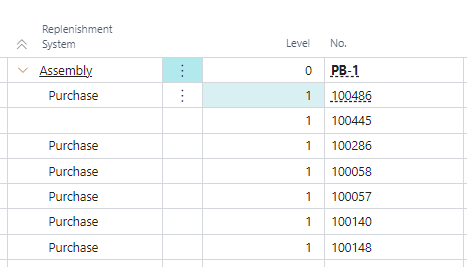
pastedimage1683678756628v1.png

    trigger OnOpenPage()
    var
        levelOneIndent: Text[20];
        levelTwoIndent: Text[20];
    begin
        levelOneIndent := '     ';
        levelTwoIndent := '          ';
        repeat
            if rec.Indentation = 1 then
                rec."No." := levelOneIndent   rec."No.";
            if rec.Indentation = 2 then
                rec."No." := levelTwoIndent   rec."No.";
            rec.Modify()
        until rec.Next() = 0;
    end;

I have the same question (0)
  • KasparsSemjonovs Profile Picture
    4,780 Super User 2025 Season 2 on at

    As the Replenishment System is already field where indendation works, I would advice just to Copy/compare that part with Your field No.

  • Robert Jolliffe Profile Picture
    885 on at

    If you look at the Cost Shares page (under an Item | Navigate | BOM | Cost Shares) that is a good example of an indented BOM structure.

  • Suggested answer
    Govinda Kumar Profile Picture
    2,304 Moderator on at

    Do you mean you want to use your "No." field as an indentation field like Replenishment field in your picture? if not then simply adding the field should get indented with all the other fields.. you don't have to add extra empty space.. also why don't you try the OnAfterGetCurrRecord trigger? and instead of using Indentation, you can look at the "Low-Level Code" field..

  • Suggested answer
    YUN ZHU Profile Picture
    95,748 Super User 2025 Season 2 on at

    Hi, there is a very good example in the post below, hopefully it will give you some hints.

    https://businesscentralgeek.com/tree-view-property-business-central

    Thanks

    ZHU

  • SammySevens Profile Picture
    130 on at

    Thank you all, and Zhu thank you for the example, now I understand it. 

    My only question is how do I persist this indentation when exporting to excel? It seems like when I export to an excel spreadsheet, the indentation is gone. Please see below (based on existing replenishment system)

    Thank you

    pastedimage1683772554646v1.png

  • Suggested answer
    Govinda Kumar Profile Picture
    2,304 Moderator on at

    I believe when you export the data to Excel, you won't be able to keep the same indentation as in BC. You'll need to manually select the columns that contain the indentation level and format them to be indented in Excel. 

    pastedimage1683815000615v1.png

  • Suggested answer
    YUN ZHU Profile Picture
    95,748 Super User 2025 Season 2 on at

    Hi, I tested copying and pasting directly to Excel, same problem. So unfortunately, as Govinda mentioned, this can only be done manually.

    pastedimage1683854308008v1.png

    pastedimage1683854314039v2.png

    Hope this helps.

    Thanks.

    ZHU

Under review

Thank you for your reply! To ensure a great experience for everyone, your content is awaiting approval by our Community Managers. Please check back later.

Helpful resources

Quick Links

Responsible AI policies

As AI tools become more common, we’re introducing a Responsible AI Use…

Neeraj Kumar – Community Spotlight

We are honored to recognize Neeraj Kumar as our Community Spotlight honoree for…

Leaderboard > Small and medium business | Business Central, NAV, RMS

#1
OussamaSabbouh Profile Picture

OussamaSabbouh 2,066

#2
YUN ZHU Profile Picture

YUN ZHU 658 Super User 2025 Season 2

#3
Sumit Singh Profile Picture

Sumit Singh 595

Last 30 days Overall leaderboard

Featured topics

Product updates

Dynamics 365 release plans
