web
You’re offline. This is a read only version of the page.
close
Skip to main content

Announcements

No record found.

News and Announcements icon
Community site session details

Community site session details

Session Id :
Small and medium business | Business Central, N...
Suggested Answer

Item Sales by Customer Report Discrepancy

(0) ShareShare
ReportReport
Posted on by 15

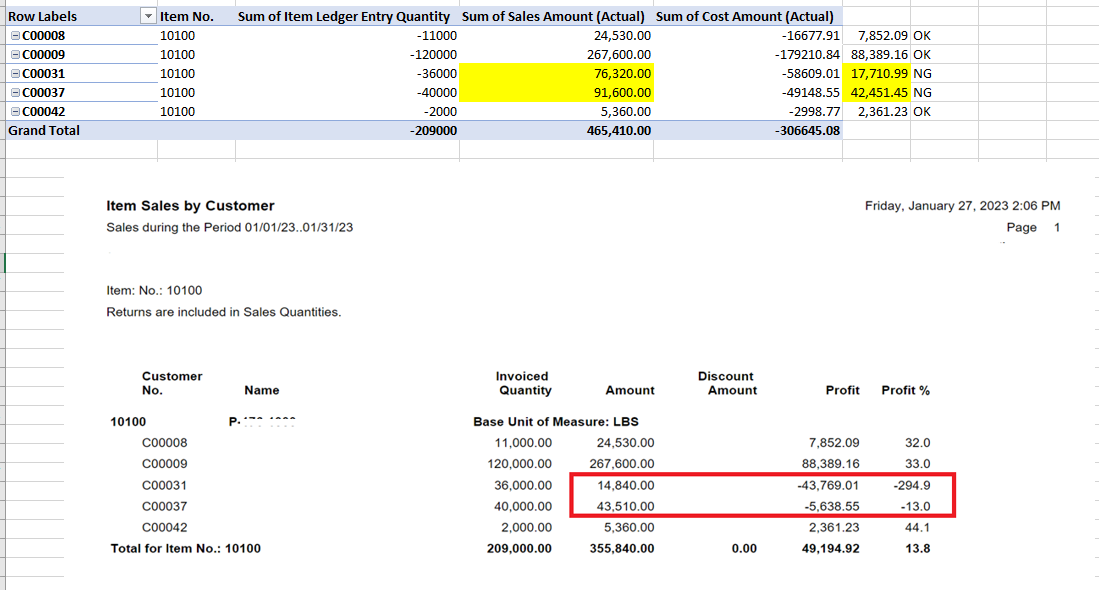
I'm trying to figure out the logic behind of the Item Sales by Customer report. When I run the report for specific date range, all the customers had sales record for the date selected were showed up per item on the report. However, the amounts on the report did not tie to the actual sales amount posted in the system. 
It seemed the report looks up the sales amount (Actual) in the value entry table. However, some of the customer sales amounts were not correct and not calculated into the amount on the report. 
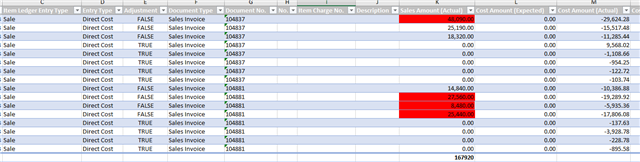
Below is one of the sample data having sales discrepancy between the report and the total calculated on the value entry. 

Does anyone have the same issue? Is it one of report bug? I appreciate if anyone can advise how to fix this amount calculation on the report. 
pastedimage1675382437370v2.png

pastedimage1675382409891v1.png_2D00_640x480.png_2D00_640x480.png

Thank you.

I have the same question (0)
  • DAnny3211 Profile Picture
    11,421 Super User 2026 Season 1 on at

    hi

    look documentation

    learn.microsoft.com/.../sales-reports

    Daniele

  • cmatsuta Profile Picture
    15 on at

    Hi Daniele,

    Thank you for your reply. I checked the documentation link but couldn't find the detail logic of Item Sales by Customer report and still do not know why sales amount on this report didn't tie to the actual sales amount posted within the system.

  • Suggested answer
    Marco Mels Profile Picture
    Microsoft Employee on at

    Hello,

    If you see an issue with the report, please verify in standard CRONUS company without any extensions and if it reproduces, feel free to raise the issue to Microsoft via your partner or CSP.

    Thank you.

Under review

Thank you for your reply! To ensure a great experience for everyone, your content is awaiting approval by our Community Managers. Please check back later.

Helpful resources

Quick Links

Introducing the 2026 Season 1 community Super Users

Congratulations to our 2026 Super Stars!

Meet the Microsoft Dynamics 365 Contact Center Champions

We are thrilled to have these Champions in our Community!

Congratulations to the April Top 10 Community Leaders

These are the community rock stars!

Leaderboard > Small and medium business | Business Central, NAV, RMS

#1
OussamaSabbouh Profile Picture

OussamaSabbouh 1,872 Super User 2026 Season 1

#2
YUN ZHU Profile Picture

YUN ZHU 1,110 Super User 2026 Season 1

#3
AndrewThomas81 Profile Picture

AndrewThomas81 892

Last 30 days Overall leaderboard

Featured topics

Product updates

Dynamics 365 release plans