web
You’re offline. This is a read only version of the page.
close
Skip to main content

Announcements

No record found.

News and Announcements icon
Community site session details

Community site session details

Session Id :
Small and medium business | Business Central, N...
Suggested Answer

Using Deferral Code for Vendor Account Type in Purchase Journal

(0) ShareShare
ReportReport
Posted on by 30

Hello all, 

Is it possible to use a Deferral Code in a purchase journal line when the account type is vendor? Currently, I am getting the error below:

Validation Results:

Account Type must be equal to 'G/L Account' in Gen. Journal Line: Journal Template Name=PURCHASES, Journal Batch Name=DEFAULT, Line No.=20000. Current value is 'Vendor'.

Thanks!

Chris

I have the same question (0)
  • Suggested answer
    YUN ZHU Profile Picture
    100,212 Super User 2026 Season 1 on at

    Hi, I checked the standard code and unfortunately the standard doesn't allow this.

    When "Deferral Code" is not empty, the system will verify whether "Account Type" is "G/L Account", if not, it will prompt the above error.

    pastedimage1673393054750v1.png

    Hope this helps.

    Thanks.

    ZHU

  • Suggested answer
    Gavin Profile Picture
    2,510 on at

    Hi Chris,

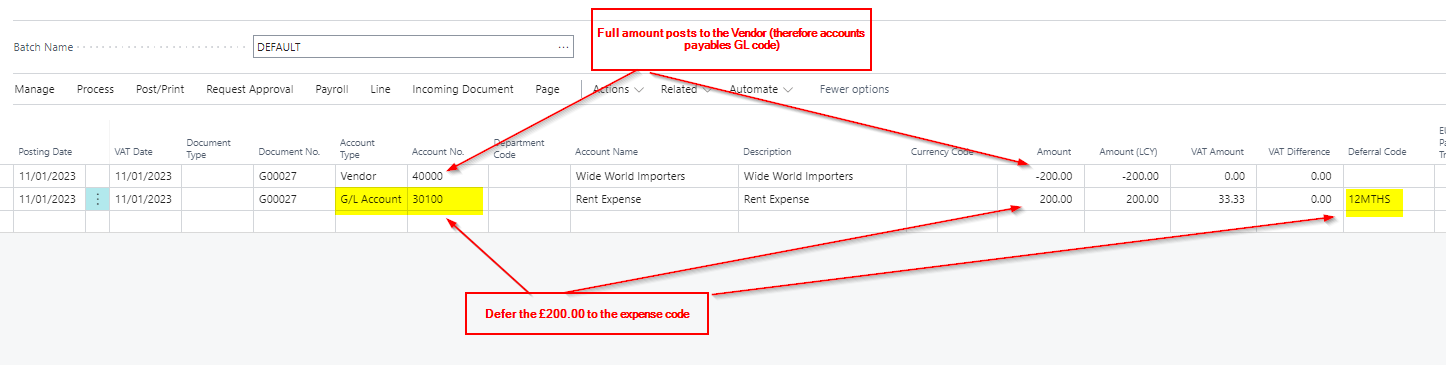
    The reason for this is you wouldn't usually defer the amount posted to the accounts payable GL code, you usually defer the amount posted to the expense.

    Therefore if you are wanting to defer the amount to the expense you would post the journal like this:
    pastedimage1673424922611v1.png

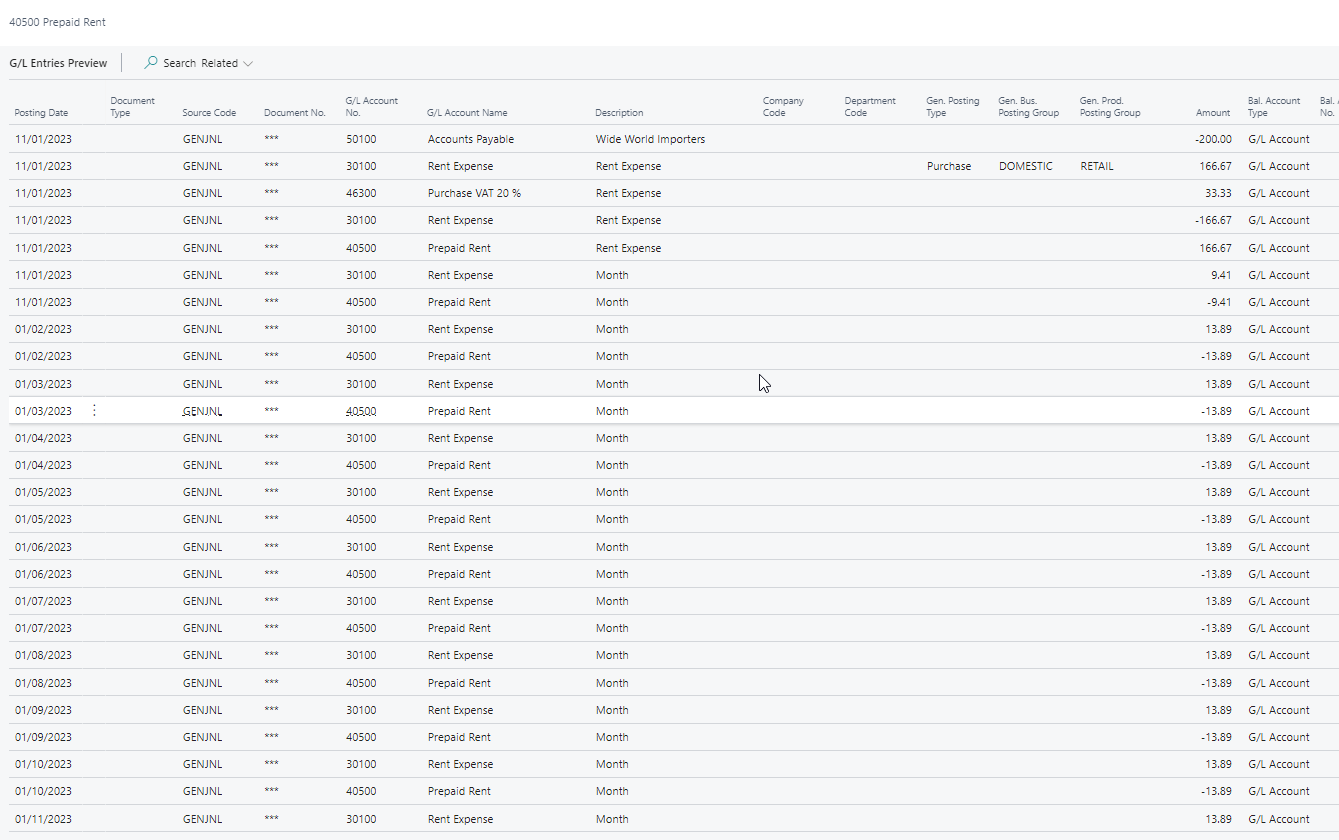
    and get GL entries like this:

    pastedimage1673424966926v2.png

    Alternatively you could do this as a one line journal using the "Balancing Account". In this scenario you enter the GL code and deferral and balance to the Vendor:

    pastedimage1673425153152v3.png

    This would give the same GL entries as the previous example.

    Hope this helps.

    Thanks

    Gavin

Under review

Thank you for your reply! To ensure a great experience for everyone, your content is awaiting approval by our Community Managers. Please check back later.

Helpful resources

Quick Links

Introducing the 2026 Season 1 community Super Users

Congratulations to our 2026 Super Stars!

Meet the Microsoft Dynamics 365 Contact Center Champions

We are thrilled to have these Champions in our Community!

Congratulations to the April Top 10 Community Leaders

These are the community rock stars!

Leaderboard > Small and medium business | Business Central, NAV, RMS

#1
OussamaSabbouh Profile Picture

OussamaSabbouh 2,059 Super User 2026 Season 1

#2
YUN ZHU Profile Picture

YUN ZHU 994 Super User 2026 Season 1

#3
Teagen Boll Profile Picture

Teagen Boll 664 Super User 2026 Season 1

Last 30 days Overall leaderboard

Featured topics

Product updates

Dynamics 365 release plans