web
You’re offline. This is a read only version of the page.
close
Skip to main content

Announcements

No record found.

News and Announcements icon
Community site session details

Community site session details

Session Id :
Customer experience | Sales, Customer Insights,...
Answered

Can't add html link in email templates

(0) ShareShare
ReportReport
Posted on by 58

Hi folks,

Users are reporting they suddenly can't add a hyperlink to en email template. I can reproduce this by going to Email templates, opening a new template, adding some text, clicking on the Link-symbol en trying to select an attribute. There are no options:
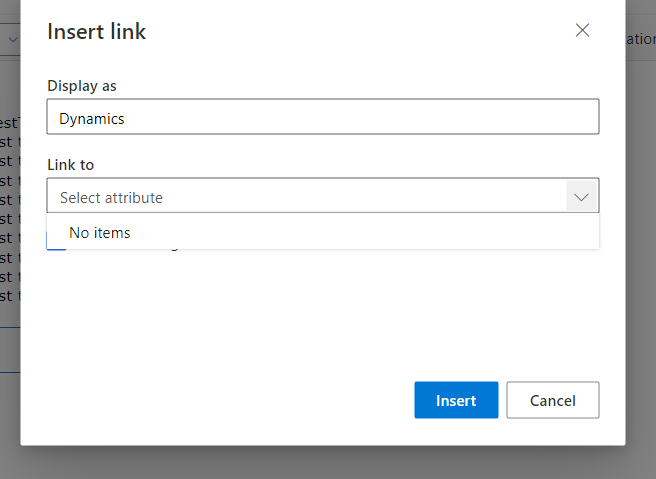
1_2D00_prod.PNG

It does however still work in our ACC environment:
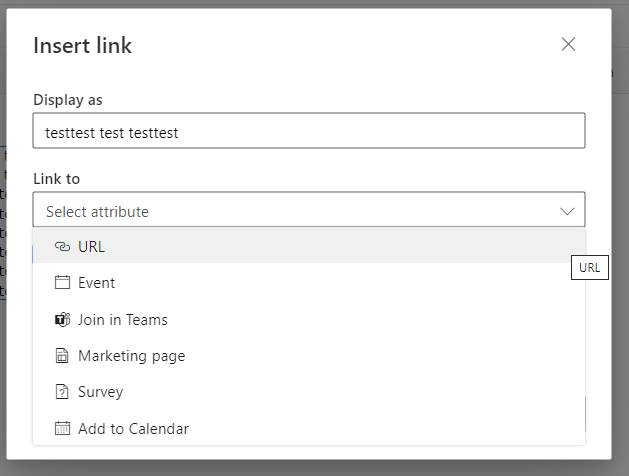
1_2D00_acc.PNG

I did a search but couldn't find any setting that could be responsible for this. Any ideas?

I have the same question (0)
  • Verified answer
    Leco Lv Profile Picture
    Microsoft Employee on at

    Hi partner,

    I checked my template and found the same issue. but two of my colleagues didn't have any problems with their "Link to". I found that the only difference between me and them may be the version, so it may be the reason for the version, you can try to update the version.

    My version:

    pastedimage1669174915864v1.png

    My colleagues:

    pastedimage1669175006390v2.png

    pastedimage1669175136609v3.png

  • Verified answer
    Leco Lv Profile Picture
    Microsoft Employee on at

    Hi partner,

    When I updated to the latest version, the problem was solved.

    pastedimage1669180863915v2.png

    pastedimage1669180794736v1.png

  • JDG Profile Picture
    58 on at

    Thanks for the tip! Since this affects production I'll wait for an appropriate time to update.

  • JDG Profile Picture
    58 on at

    This was indeed the issue; after updating to 1.89 the problem was gone.

Under review

Thank you for your reply! To ensure a great experience for everyone, your content is awaiting approval by our Community Managers. Please check back later.

Helpful resources

Quick Links

Introducing the 2026 Season 1 community Super Users

Congratulations to our 2026 Super Stars!

Meet the Microsoft Dynamics 365 Contact Center Champions

We are thrilled to have these Champions in our Community!

Congratulations to the April Top 10 Community Leaders

These are the community rock stars!

Leaderboard > Customer experience | Sales, Customer Insights, CRM

#1
Muhammad Shahzad Shafique Profile Picture

Muhammad Shahzad Sh... 69 Most Valuable Professional

#2
ManoVerse Profile Picture

ManoVerse 55 Super User 2026 Season 1

#3
11manish Profile Picture

11manish 37

Last 30 days Overall leaderboard

Product updates

Dynamics 365 release plans
