web
You’re offline. This is a read only version of the page.
close
Skip to main content

Announcements

No record found.

News and Announcements icon
Community site session details

Community site session details

Session Id :
Microsoft Dynamics AX (Archived)

Sales Invoice parameter is missing a value

(0) ShareShare
ReportReport
Posted on by

when i try to print sales invoice from invoice journal i got this message

The 'SalesInvoiceDS_CountryRegionISOCode' parameter is missing a value
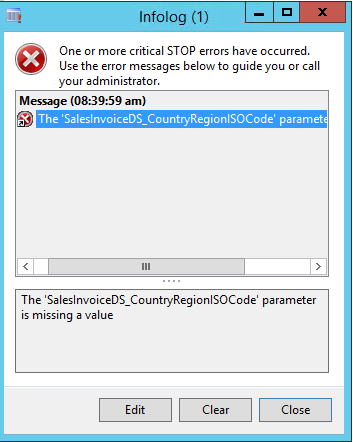
4162.Capture.PNG

i really clearing usage data and refresh cache and restart reporting services too but stil face this problem 

so i need resolve this issue asap

thanks

*This post is locked for comments

I have the same question (0)
  • Umesh Pandit Profile Picture
    9,315 User Group Leader on at
  • Verified answer
    Sohaib Cheema Profile Picture
    49,679 Super User 2026 Season 1 on at

    there can be numerous reason to issue.

    common reasons are specified here

    But, apart from reasons which are described above, you can have a look at SalesInvoiceController(class)>>

    preRunModifyContract(method)>>Line Number  114 (almost depending upon version of ax).

    salesInvoiceContract.parmCountryRegionISOCode(SysCountryRegionCode::countryInfo());

    you need to see why country region id is coming empty in your case, and if its not empty,  redeploying report from VS may resolve it.

  • DMW Profile Picture
    on at

    reson on that link not working with me as you said

    i think the problem as you said so but how be sure if country region id is coming empty?

    and look at this code of preRunModifyContract(method) below is there's any problem with it?

    7536.Capture.PNG

    protected void preRunModifyContract()
    {
        SRSTmpDataStore srsTmpDataStore;
    
        if (!salesInvoiceContract)
        {
            salesInvoiceContract = this.parmReportContract().parmRdpContract();
        }
    
        salesInvoiceContract.parmPrintCopyOriginal(printCopyOriginal);
    
        salesInvoiceContract.parmRecordId(custInvoiceJour.RecId);
        salesInvoiceContract.parmledgerJournalTransRecordId(ledgerJournalTransRecId);
        salesInvoiceContract.parmTaxInvoiceItemType(taxInvoiceItemType);
        salesInvoiceContract.parmIsTaxInvoice(isTaxInvoice);
        this.parmReportContract().parmRdlContract().parmLanguageId(custInvoiceJour.LanguageId);
    
        if (salesInvoiceJournalPrint)
        {
            // Pack the class and insert into the temporary store.
            srsTmpDataStore.Value = salesInvoiceJournalPrint.pack();
            srsTmpDataStore.insert();
    
            // Set the rec id to contract parameter
            salesInvoiceContract.parmFormLetterRecordId(srsTmpDataStore.RecId);
        }
    
        salesInvoiceContract.parmCountryRegionISOCode(SysCountryRegionCode::countryInfo());
    
        super();
    }


  • Sohaib Cheema Profile Picture
    49,679 Super User 2026 Season 1 on at

    you can put debugger on that line

  • DMW Profile Picture
    on at

    4604.Capture.PNG

    Args object not initialized.
    
    Stack trace
    
    (C)\Classes\SalesInvoiceController\initFormLetterReport - line 9
    (C)\Classes\SrsPrintMgmtFormLetterController\init - line 14
    (C)\Classes\SrsPrintMgmtFormLetterController\startOperation - line 12
    (C)\Classes\SalesInvoiceController\main - line 23


  • Sohaib Cheema Profile Picture
    49,679 Super User 2026 Season 1 on at

    after turning on debugger on that line

    go to Accounts receivable >> inquires >> journals >> Invoice Journal

    select any line of journal and click print original. it should take you to that line of code

  • DMW Profile Picture
    on at

    sorry i don't understand you what you mean turning on debugger

    i do compile but nothing can you help me how turning on debugger on that line?

  • Sohaib Cheema Profile Picture
    49,679 Super User 2026 Season 1 on at

    click on that line of code and press F9, debugger must be installed and you should be in debugging group of users.

    msdn.microsoft.com/.../gg860898.aspx

  • SomuAx2012 Profile Picture
    1,235 on at

    I know this is very old thread. But I thought of sharing my exp with this issue.

    I had this issue only in one company and In my case I don't have Primary address selected for that legal entity.

    Selecting an address as primary, fixed this issue for me.

Under review

Thank you for your reply! To ensure a great experience for everyone, your content is awaiting approval by our Community Managers. Please check back later.

Helpful resources

Quick Links

Introducing the 2026 Season 1 community Super Users

Congratulations to our 2026 Super Stars!

Meet the Microsoft Dynamics 365 Contact Center Champions

We are thrilled to have these Champions in our Community!

Congratulations to the April Top 10 Community Leaders

These are the community rock stars!

Leaderboard > 🔒一 Microsoft Dynamics AX (Archived)

#1
CP04-islander Profile Picture

CP04-islander 39

#2
Michel ROY Profile Picture

Michel ROY 14

#3
imran ul haq Profile Picture

imran ul haq 8

Last 30 days Overall leaderboard

Featured topics

Product updates

Dynamics 365 release plans
