web
You’re offline. This is a read only version of the page.
close
Skip to main content

Announcements

No record found.

News and Announcements icon
Community site session details

Community site session details

Session Id :
Small and medium business | Business Central, N...
Unanswered

Data Migration Navision 2015 - Language codes to ISO

(0) ShareShare
ReportReport
Posted on by 5

Background: I'm doing some preliminary work for migrating Navision 2015 data to Dynamics CE.

objective: i'm writing some tSQL in which i transform some Navision data so it can be integrated in Dynamics CE. For this particular attribute i'm looking to end up with [Languagecode.iso2]-[Countrycode.iso2]

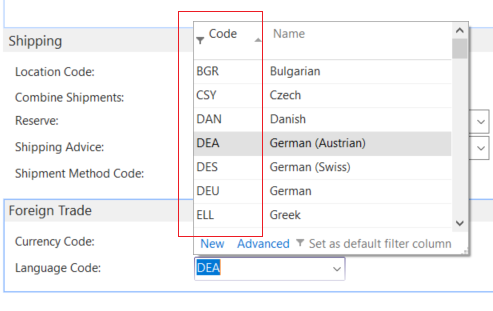
Issue: I can't map the Navision Language codes, it does not seem to be using ISO codes at all. It seems to reference some sort of stand alone windows code for indexing languages.

Question: Can I get some background on this? Where are these country codes coming from? Does anybody have a table in which I can convert these to proper standards? 

Path I took to take this image: Navision 2015 (demo) - Customer card - Foreign Trade - Language code 
screen001.png

I have the same question (0)
  • THE Italian Profile Picture
    Microsoft Employee on at

    You have to involve a NAV experts in such project or you will risk to have wrong data moved into CRM.

    For languages we have a virtual table Language table 8 that you can run it from CSIDE. Same thing for Country/Region table 9 that you can run it from CSIDE.

    Up to you what you want to do with these.

  • GenericName555 Profile Picture
    5 on at

    Dear Duilio Tacconi,

    Thank you for leaving a reply. However, I don't believe you properly understood the question. The idea is to find out where Navision gets it's ISO language/country codes from so we can map them.

    You mention maps in your post from a different source but I could not find a link to any.

    I'm sorry but your answer:

    - Did not give a descriptive background of what is going on, so I cannot continue to fix it

    - The table you said I should have a look at, was not present

    Please update you answer with appropriate information?

    thank you

Under review

Thank you for your reply! To ensure a great experience for everyone, your content is awaiting approval by our Community Managers. Please check back later.

Helpful resources

Quick Links

Introducing the 2026 Season 1 community Super Users

Congratulations to our 2026 Super Stars!

Congratulations to our 2025 Community Spotlights

Thanks to all of our 2025 Community Spotlight stars!

Leaderboard > Small and medium business | Business Central, NAV, RMS

#1
OussamaSabbouh Profile Picture

OussamaSabbouh 1,850 Super User 2026 Season 1

#2
YUN ZHU Profile Picture

YUN ZHU 1,045 Super User 2026 Season 1

#3
Dhiren Nagar Profile Picture

Dhiren Nagar 959 Super User 2026 Season 1

Last 30 days Overall leaderboard

Featured topics

Product updates

Dynamics 365 release plans
