web
You’re offline. This is a read only version of the page.
close
Skip to main content

Notifications

Announcements

No record found.

Community site session details

Community site session details

Session Id :
Supply chain | Supply Chain Management, Commerce
Unanswered

Debugging Commerce Runtime and Retail Server in Commerce SDK

(0) ShareShare
ReportReport
Posted on by 15

We are trying to migrate from Retail SDK to Commerce SDK. Doing so we are trying to debug customization done in Retail Server and Commerce Runtime using Visual Studio 2017, however the the breakpoints are not being loaded and hence we are not able to debug the solution. Any Idea how to solve it. 

I have already tried attaching the debugging to w3wp.exe process but still unable to debug the solution. Also the .dll and .pdb files are present in the ext folder of Retail Server. 
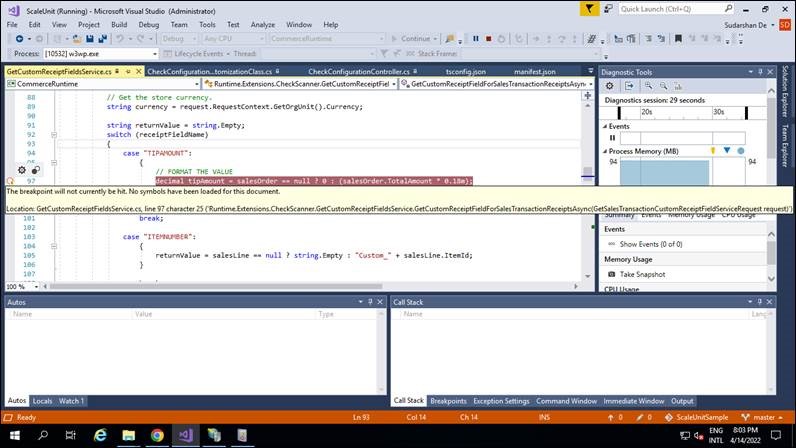
error-snaps.jpg

I have the same question (0)
  • Mugunthan Profile Picture
    on at

    This should work, try doing a clean build and drop the dlls in the bin\ext folder, also make sure you are attaching to the right retail server process.

    pastedimage1650328776214v1.png

  • SergeyP Profile Picture
    2,928 on at

    In addition to the previous answer: are you sure your extension is correctly configured in the composition? This might happen if the extension DLL was simply not loaded in case the extension is not registered correctly. You can check the extensions' "health" by leveraging 

    https://<YourRetailServerUrlWithoutCommerceSuffix>/healthcheck?testname=extensions

    to check if  your extensions are loaded.

  • MYGz Profile Picture
    2,225 on at

    Answering this for future users:

    1. Go to Debug

    2. Attach Process

    3. Follow steps in the image

    pastedimage1656945248969v1.png

    4. Follow these steps if breakpoints are still not hitting

    Remove the checkbox from 2 places,

    1. Menu > Tools > Options and 2. Menu > Dynamics 365 > Options

    uncheck "Load symbols only for items in the solution" on both places.

    pastedimage1656945388272v2.png

    also check these steps. 

    https://stackoverflow.com/questions/1899428/break-point-is-not-hitting-while-debugging

    If it is standard VHD without many changes, following these steps should fix the issue.

Under review

Thank you for your reply! To ensure a great experience for everyone, your content is awaiting approval by our Community Managers. Please check back later.

Helpful resources

Quick Links

Responsible AI policies

As AI tools become more common, we’re introducing a Responsible AI Use…

Neeraj Kumar – Community Spotlight

We are honored to recognize Neeraj Kumar as our Community Spotlight honoree for…

Leaderboard > Supply chain | Supply Chain Management, Commerce

#1
Laurens vd Tang Profile Picture

Laurens vd Tang 305 Super User 2025 Season 2

#2
André Arnaud de Calavon Profile Picture

André Arnaud de Cal... 123 Super User 2025 Season 2

#3
Gerardo Rentería García Profile Picture

Gerardo Rentería Ga... 67 Most Valuable Professional

Last 30 days Overall leaderboard

Product updates

Dynamics 365 release plans



