web
You’re offline. This is a read only version of the page.
close
Skip to main content

Announcements

No record found.

News and Announcements icon
Community site session details

Community site session details

Session Id :
Finance | Project Operations, Human Resources, ...
Answered

If else in AOT Query Object ? need advise

(0) ShareShare
ReportReport
Posted on by 10

Hello All, I am trying to build a query but not sure if it would be possible to build using the AOT query object. If this is not possible in AOT i could use some advise on what would be the best way to do this 

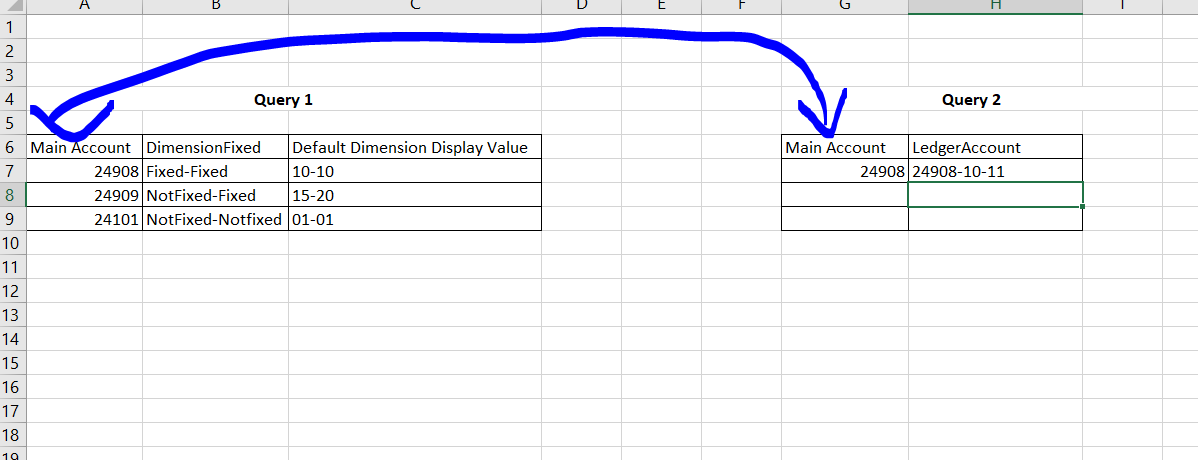
Essentially what i am trying to do is join two queries that i have created on the field MAINAccount - See below 

The main purpose of the query is to look at if the mainaccount has override dimensions in this case Query 1 pulls from the MainaccountoverideLegalEntity table 

The way the query would work is look at the field 'DimensionFixed' in Query 1 and the logic would be to return a new field as 
pastedimage1673890062207v2.png

If Dimensionfixed = "Fixed-Fixed" than take 'Default Dimension Display value' from Query 1 , Result = "10-10 "

Else if

If Dimensionfixed = "NotFixed-NotFixed" then take LedgerAccount from Query 2 , Result = 10-11

Else

If Dimensionfixed = "Not Fixed-Fixed" then take the first dimension from Query 2 and the second dimension from Query 1 which would result in 10-20 in this case  

The two main questions I have is can i do this in AOT query object, if not than do you recommend a X++ query in a Form that pulls these two query objects 

and the SECOND is can i use substring functionality to extract dimension values from these two fields 

'Default Dimension Display value' & 'LedgerAccount', they are both strored as Strings but are extended data types 

Any guidance would be appreciated, been stuck on this for quite some time 

I have the same question (0)
  • Verified answer
    André Arnaud de Calavon Profile Picture
    303,087 Super User 2026 Season 1 on at

    Hi razamatazz,

    A query itself if not able to have this if-statement. You can create a view with a calculated column. Then you can embed that view in a query or use it on a form or somewhere else.

  • razamatazz Profile Picture
    10 on at

    Thank you Andre, that is what i was looking for.

Under review

Thank you for your reply! To ensure a great experience for everyone, your content is awaiting approval by our Community Managers. Please check back later.

Helpful resources

Quick Links

Introducing the 2026 Season 1 community Super Users

Congratulations to our 2026 Super Stars!

Congratulations to our 2025 Community Spotlights

Thanks to all of our 2025 Community Spotlight stars!

Leaderboard > Finance | Project Operations, Human Resources, AX, GP, SL

#1
André Arnaud de Calavon Profile Picture

André Arnaud de Cal... 577 Super User 2026 Season 1

#2
Giorgio Bonacorsi Profile Picture

Giorgio Bonacorsi 309

#3
Diego Mancassola Profile Picture

Diego Mancassola 259

Last 30 days Overall leaderboard

Product updates

Dynamics 365 release plans
