web
You’re offline. This is a read only version of the page.
close
Skip to main content

Notifications

Announcements

No record found.

Community site session details

Community site session details

Session Id :
Microsoft Dynamics CRM (Archived)

Change Stakeholder Roles

(0) ShareShare
ReportReport
Posted on by 1,695

Hi

Im looking to edit the predefined roles in stakeholder in the opportunity entity (see below)
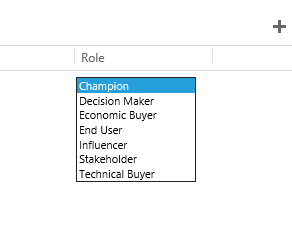
I can see that the field is coming from 'record2roleid' in the connection role area, but cant see a drop down list to edit.

Any ideas?

thanks

*This post is locked for comments

I have the same question (0)
  • Suggested answer
    Wayne Walton Profile Picture
    13,730 on at

    Look at the Connection entity.  You should be able to customize the Role there.

  • sitchey Profile Picture
    1,695 on at

    Hi

    I tried to but the boxes are greyed out and don't see a drop down list to edit either

  • sitchey Profile Picture
    1,695 on at

    and when i click the advanced edit at bottom I see this

  • Wayne Walton Profile Picture
    13,730 on at

    Not quite the right field.  That's the lookup attribute, you need the Option Set Attribute.  Sort by Field type and just skip down to the Option Sets.  

  • Verified answer
    Guido Preite Profile Picture
    54,086 Moderator on at

    you don't need to customize the entity, you need to edit the connections:

    www.wipfli.com/BlogPost_MCRM_blog_04_23_12.aspx

  • sitchey Profile Picture
    1,695 on at

    Hi Wayne

    I can only see 2 option sets under the connection entity and both show a different option list than to what is in opportunities stakeholders

    5700.5.PNG

  • sitchey Profile Picture
    1,695 on at

    Thanks Guido

    On a related mater, is it possible to expand the recent opportunities view on contacts to show not only the primary contact but anyone who has been added into the opportunity as a stakeholder

  • MNarmeen Profile Picture
    1,848 on at

    Can someone please share the solution again? I am unable to add more options in Role for Stakeholder grid.

  • Suggested answer
    Community Member Profile Picture
    on at

    Click on Advanced Find > Connection Roles > Run Query > New.

    That will get you the below form which I filled out with an example of adding a new stakeholder type called "Referrer"

    After saving the new record it is available immediately for use, no need to publish.

    7827.Untitled.png

Under review

Thank you for your reply! To ensure a great experience for everyone, your content is awaiting approval by our Community Managers. Please check back later.

Helpful resources

Quick Links

Responsible AI policies

As AI tools become more common, we’re introducing a Responsible AI Use…

Neeraj Kumar – Community Spotlight

We are honored to recognize Neeraj Kumar as our Community Spotlight honoree for…

Leaderboard > 🔒一 Microsoft Dynamics CRM (Archived)

#1
SA-08121319-0 Profile Picture

SA-08121319-0 4

#1
Calum MacFarlane Profile Picture

Calum MacFarlane 4

#3
Alex Fun Wei Jie Profile Picture

Alex Fun Wei Jie 2

Last 30 days Overall leaderboard

Featured topics

Product updates

Dynamics 365 release plans



