web
You’re offline. This is a read only version of the page.
close
Skip to main content

Notifications

Announcements

No record found.

Community site session details

Community site session details

Session Id :
Microsoft Dynamics CRM (Archived)

Chrome can access Dynamics CRM 2106 on Prem but IE can't?

(0) ShareShare
ReportReport
Posted on by

I have a problem, something changed last week and no one in our office can connect to Dynamics CRM 2016 on Prem using IE (any version) but Chrome is working fine.

IE is locked in a loop of asking for credentials and then failing after three or four attempts.

Any idea where I might start looking - This is not limited to one PC/OS or version of IE.

Thanks,

Carl.

*This post is locked for comments

I have the same question (0)
  • Sean K Profile Picture
    1,537 on at

    Hi Carl,

    This is usually a Kerberos issue. How do you usually access CRM? e.g. is it "http:// servername/organisationname"?

    Do you have Claims Based Authentication/IFD setup?

    A way to check if it is likely a Kerberos issue is to try to access from IE using the CRM server IP address, i.e. "http:// ipaddressofcrmserver/organisationname"

    If that works then you'll need to troubleshoot the Kerberos settings, for example it could be an issue with your SPNs.

    Another question is does your CRM service run under a domain account or a local account? You can check this in IIS.

  • Community Member Profile Picture
    on at

    Hi, it is a single 2012 R2 server with AD and Dynamics on the same box.

    We access from https://crm.domain.name (it is the only site on the IIS box).

    We had an unsuccessful attempt at getting Claims Based Authentication and IFD setup and I suspect that this is the issue. Federation server is uninstalled and the entries in the Dynamics Deployment manager were reset back to normal.

    IIS is locked down to only accept https with a cert so an IP connection never worked for us.

    How would I go about trouble shooting the Kerberos settings?

    Thanks for the input.

    Carl.

  • Sean K Profile Picture
    1,537 on at

    Is crm the server name or an alias?

    And does your CRM service run under a domain account or a local account?

  • Community Member Profile Picture
    on at

    The server name is server-crm and crm.domain.name is an A record on our domain name pointing at our external IP address.

    We have 5 servers and the CRM server is also the AD so it is under a domain account.

  • Sean K Profile Picture
    1,537 on at

    OK, first thing I would check is the SPNs, you can open a command prompt from any server on the domain (as long as your account has read access to AD) and type in:

    setspn -l DOMAIN\crmserviceaccountname

    This will list all of the SPNs for that account, if Kerberos is set up you should see a list of SPNs related to the CRM deployment, something like:

    HTTP/server-crm

    HTTP/server-crm.domain.com

    HTTP/crm.domain.com

    If you don't see any, try to see if there are any SPNs associated with the CRM server

    setspn -l server-crm

    (Those two commands won't change anything, they just list SPNs, the -l is for list)

    If there are no SPNs for either they were probably never set up so this may not be the issue, that or the service account was changed recently.

  • Community Member Profile Picture
    on at

    Hi, when I ran the command line with the account I used originally (the first bit) this is what I got.

    When we were trying to get Federation Server working we setup a different account for that and on the second command I used this.

    Do you think that is the problem, that we have two different accounts?

    Thanks,

    Carl.

    C:\Windows\system32>setspn -l lancast-office\ntservices

    Registered ServicePrincipalNames for CN=ntservices,OU=SBSUsers,OU=Users,OU=MyBus

    iness,DC=lancast-office,DC=local:

           MSSQLSvc/SERVER-CRM.lancast-office.local:50224

           MSSQLSvc/SERVER-CRM.lancast-office.local:LANCASTCRM

           MSCRMAsyncService/SERVER-CRM.lancast-office.local

           MSCRMAsyncService/SERVER-CRM

           MSCRMSandboxService/SERVER-CRM.lancast-office.local

           MSCRMSandboxService/SERVER-CRM

    C:\Windows\system32>setspn -l lancast-office\gmsa-crm

    Registered ServicePrincipalNames for CN=gmsa-crm,CN=Managed Service Accounts,DC=

    lancast-office,DC=local:

           host/crm.xxxx.xxx  (I took out the domain but this is our external A record)

  • Sean K Profile Picture
    1,537 on at

    Hi Carl,

    That host one looks strange to me, as far as I know the host SPNs are created only for the computer accounts in the domain (automatically). Did you add that yourself at any point?

    Also what is the purpose of the following service accounts:

    • lancast-office\ntservices
    • lancast-office\gmsa-crm

    If the second one isn't used I would try removing that host SPN

    setspn -d host/crm.xxxx.xxx lancast-office\gmsa-crm

    Also check what SPNs are on the computer account by

    setspn -l server-crm

    If you don't see any HTTP/SERVER-CRM SPNs, it might be worth adding them to see if it helps

    setspn -s HTTP/SERVER-CRM crmserviceaccount
    setspn -s HTTP/SERVER-CRM.lancast-office.local crmserviceaccount
    setspn -s HTTP/crm.xxxx.xxx crmserviceaccount

    The -s switch is to add an SPN but it checks to make sure it doesn't exist already, if the SPN already exists it won't be created. That's why it's better than the -a switch which just blindly adds the SPN.

    You can replace the -s switch with a -d switch to delete the SPN as well.

    When adding SPNs it can take up to 15 minutes for them to propagate.

    So steps I would take are;

    1. Remove the host spn from the gmsa-crm account with the setspn -d command above

    2. Check the SPNs on the server-crm computer account with the setspn -l command above

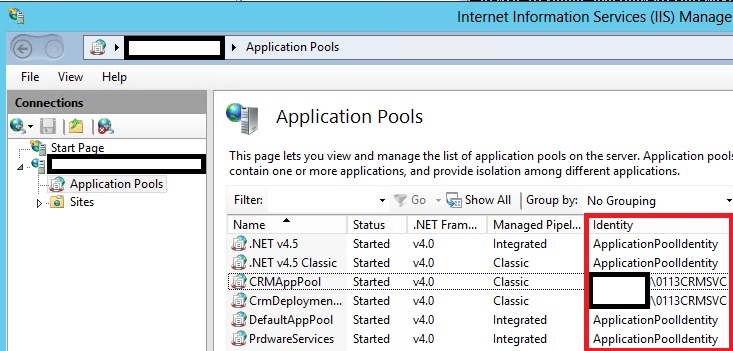
    3. Check the CRMAppPool identity in IIS, is this a domain account or NETWORK SERVICE?
    identity.jpg


    4. Check if there are any duplicate SPNs on your network by running: setspn -x
    5. Run the setspn -s commands above, substitute crmserviceaccount for the domain account found in step 3, if it is NETWORK SERVICE or something else let me know.
    6. If there are no errors adding the SPNs, set useAppPoolCredentials = true in IIS(blogs.technet.com/.../useapppoolcredentials-true-with-kerberos-delegation-on-2008.aspx)
    7. Trust the crm service account for delegation in Active Directory
    8. Perform an IIS reset
    9. Wait 15 minutes, see if you can now access

    Also, it is important to keep track of any changes you make and the order you make them, write them down somewhere. That way if you need to revert it will be much easier.

    Useful reading: devbeard.com/crm-2013-kerberos-and-spn-checklist

  • Community Member Profile Picture
    on at

    Thank you all for your replies but I am going around in circles on this one...

    Would any of you be interested in taking this on as a paid job to get us sorted out remotely? At this stage we have lost days messing about with it and we are no closer to getting sorted out.

    Feel free to email me and we can work out a plan.

    Thanks,

    Carl.

  • James Ayling Profile Picture
    on at

    Did you ever get to the bottom of this issue? I am seeing exactly the same behaviour, but for just one user.

  • Community Member Profile Picture
    on at

    We never resolved this.

    We migrated to the Online version of Dynamics365.

Under review

Thank you for your reply! To ensure a great experience for everyone, your content is awaiting approval by our Community Managers. Please check back later.

Helpful resources

Quick Links

Responsible AI policies

As AI tools become more common, we’re introducing a Responsible AI Use…

Neeraj Kumar – Community Spotlight

We are honored to recognize Neeraj Kumar as our Community Spotlight honoree for…

Leaderboard > 🔒一 Microsoft Dynamics CRM (Archived)

#1
SA-08121319-0 Profile Picture

SA-08121319-0 4

#1
Calum MacFarlane Profile Picture

Calum MacFarlane 4

#3
Alex Fun Wei Jie Profile Picture

Alex Fun Wei Jie 2

Last 30 days Overall leaderboard

Featured topics

Product updates

Dynamics 365 release plans



