web
You’re offline. This is a read only version of the page.
close
Skip to main content

Announcements

No record found.

News and Announcements icon
Community site session details

Community site session details

Session Id :
Small and medium business | Business Central, N...
Suggested Answer

Not able to post purchase order after entering values in Qty to Recieve.

(0) ShareShare
ReportReport
Posted on by 1,037

Hi All,

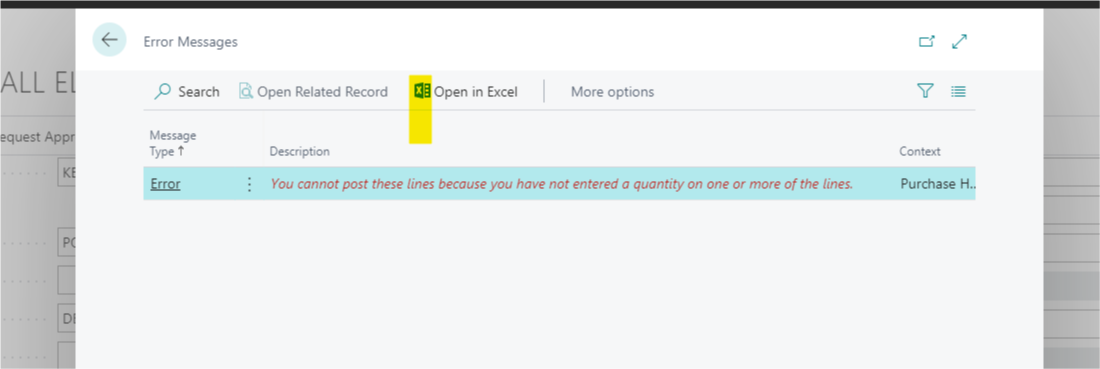
While posting a released PO. I am getting the following error when I am trying to edit the Qty. To receive field and posting.
pastedimage1618952562001v1.png

Regards,

Indira

  • Suggested answer
    JAngle Profile Picture
    161 on at

    Do the lines have a value in the “Quantity” field? Depending on your purchase & payable setup / location setup the “Qty. to Receive” will default to the “Quantity” field if you need it to.

  • Suggested answer
    Community Member Profile Picture
    on at

    Hi Indira,

    This error generally comes when there is no Quantity entered for the Purchase Line. Please make sure all your PO lines have the quantity entered.

    Can you please check all the lines and make sure that Quantity and Qty to Receive are filled in all PO Lines.

    Thanks.

  • Indira88 Profile Picture
    1,037 on at

    Hi Josh,

    Thank you for the suggestion.

    [quote user="Indira88"]

    Hi All,

    While posting a released PO. I am getting the following error when I am trying to edit the Qty. To receive field and posting.

    pastedimage1618952562001v1.png

    Regards,

    Indira

    [/quote]

    [quote user="Indira88"]

    Hi All,

    While posting a released PO. I am getting the following error when I am trying to edit the Qty. To receive field and posting.

    pastedimage1618952562001v1.png

    Regards,

    Indira

    [/quote]

    This case where the error was coming was on CheckQuantity and it was checking Quantity Base and Quantity Base Invoice.

    The Function has a way to handle the check from a event Subscription by setting the value of a boolean to true,in this case the check could be skipped,I did the following:

    [EventSubscriber(ObjectType::Codeunit, Codeunit::"Item Jnl.-Check Line", 'OnBeforeCheckEmptyQuantity', '', true, true)]
        Procedure OnBeforeCheckEmptyQuantity(ItemJnlLine: Record "Item Journal Line"; var IsHandled: Boolean)
        begin
            IsHandled := true;
        end;
    Regards,
    indira
  • Indira88 Profile Picture
    1,037 on at

    Hi Naveen,

    Thank you for the answer,Please check my fix in the above reply.

    Regards,

    Indira

  • Suggested answer
    Community Member Profile Picture
    on at

    Hi Indira,

    As per your above comment, if you make "Handled" to TRUE on OnBeforeCheckEmptyQuantity Event, then you may not face this error as you are skipping the logic of function CheckEmptyQuantity.

    This is standard business central code and it is not good idea to skip it. As it may cause other issue.

    The Handled Boolean should be used when you have handled the logic of the function by your code and you want to skip standard business central code.

    I would suggest, Please debug and found why their is no values in Quantity Base and Quantity Base Invoice rather than skipping the Standard logic.

    Thanks.

  • Indira88 Profile Picture
    1,037 on at

    Thanks for the impact analysis I have checked for the empty values in the event itself.

    Regards,

    Indira

Under review

Thank you for your reply! To ensure a great experience for everyone, your content is awaiting approval by our Community Managers. Please check back later.

Helpful resources

Quick Links

Season of Sharing Community Challenge Winners!

Congratulations to our community stars!

Women in Power Builds Momentum

Expanding mentorship, skilling, and AI innovation

Leaderboard > Small and medium business | Business Central, NAV, RMS

#1
OussamaSabbouh Profile Picture

OussamaSabbouh 671 Super User 2026 Season 2

#2
YUN ZHU Profile Picture

YUN ZHU 434 Super User 2026 Season 2

#3
Teagen Boll Profile Picture

Teagen Boll 241 Super User 2026 Season 2

Last 30 days Overall leaderboard

Featured topics

Microsoft Training Manuals

Product updates

Dynamics 365 release plans
