web
You’re offline. This is a read only version of the page.
close
Skip to main content

Announcements

No record found.

News and Announcements icon
Community site session details

Community site session details

Session Id :
Small and medium business | Business Central, N...
Answered

Marketplace inside of BC down?

(0) ShareShare
ReportReport
Posted on by

Hey! Whatsup?!

Someone have the problem described above?

When i go to Marketplace i just see a 0 extension result page
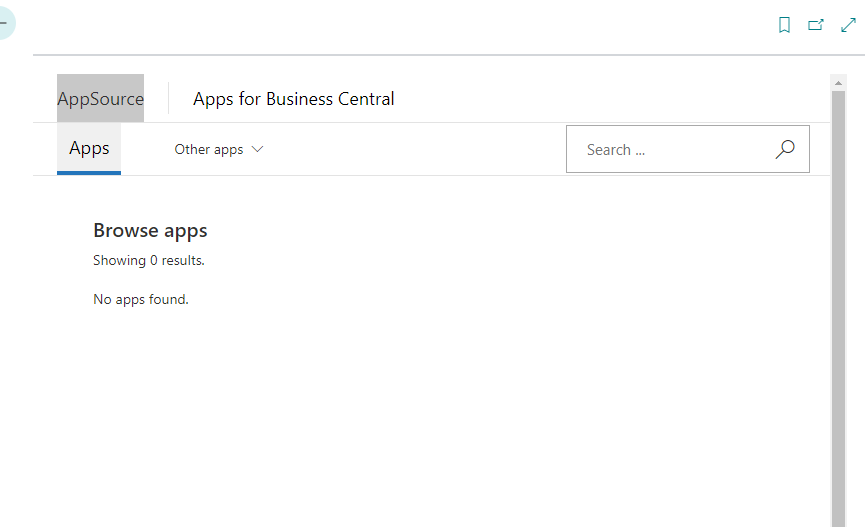
pastedimage1681999933713v1.png

I didnt look for anything.
Since i am a partner, i need this page to install some extensions that i dont own.

I tried log in with a tenant account, but i get the same result.

Asked some coworkers, and they have the same result page.

Its a bug? or a down service? (I didnt see a problem in azure service status page)

  • Suggested answer
    Nitin Verma Profile Picture
    21,812 Moderator on at

    Yes, you are right I am facing the same problem, I just checked and AU and USA version

    pastedimage1682000396706v1.png

  • Suggested answer
    YUN ZHU Profile Picture
    103,282 Super User 2026 Season 2 on at
  • Suggested answer
    Nitin Verma Profile Picture
    21,812 Moderator on at

    Hi yzhums 

    It same problem I just checked now.

    pastedimage1682040914012v1.png

  • Suggested answer
    YUN ZHU Profile Picture
    103,282 Super User 2026 Season 2 on at

    Hi, Nitin. I checked again, and it can be accessed normally in Japan.

    My URL: https://appsource.microsoft.com/en-us/marketplace/apps?exp=ubp8&search=japan&page=1

    pastedimage1682041332174v1.png

  • Suggested answer
    Nitin Verma Profile Picture
    21,812 Moderator on at

    Hi,

    I checked again with AU and US version, not working.

  • Suggested answer
    YUN ZHU Profile Picture
    103,282 Super User 2026 Season 2 on at

    Sorry, my fault. Nothing shows up in BC, but opening AppSource directly is fine.

    pastedimage1682042804216v1.png

  • Kristen Hosman Profile Picture
    5 on at

    Workaround for US at least is to click on 'Other apps' and then Dynamics 365. Search for the app and install.

    pastedimage1682049248917v1.png

  • MetaKa Profile Picture
    on at

    its just a workaround if u have a tenant account, if not, u are traped... (and thats what happening here)

    So still we can't install apps from marketplace (wich we need)

    I was expecting to be a down service, but there is no notification, It seems that Microsoft has not detected it yet...

    Ofc the real workaround is to contact the customer and ask him if u can get an admin account to install from web marketplace.

    But its not a pretty cool workaround...

  • Stefano Demiliani Profile Picture
    37,172 Most Valuable Professional on at

    In those cases you can always use the direct url access, changing APPID with the app you need to install:

    businesscentral.dynamics.com/

  • MetaKa Profile Picture
    on at

    Y... as i said... just 1 comment above... its a solution if u have a tenant account, since partners dont have one, we are stuck without a chance to install apps (so no money is entering per use until we install the apps)

    Pls read others comments before commenting, tx

Under review

Thank you for your reply! To ensure a great experience for everyone, your content is awaiting approval by our Community Managers. Please check back later.

Helpful resources

Quick Links

Season of Sharing Community Challenge Winners!

Congratulations to our community stars!

Women in Power Builds Momentum

Expanding mentorship, skilling, and AI innovation

Congratulations to the August Top 10 Community Leaders

These are the community rock stars!

Leaderboard > Small and medium business | Business Central, NAV, RMS

#1
11manish Profile Picture

11manish 9 Super User 2026 Season 2

#2
André Arnaud de Calavon Profile Picture

André Arnaud de Cal... 1 Super User 2026 Season 2

Last 30 days Overall leaderboard

Featured topics

Microsoft Training Manuals

Product updates

Dynamics 365 release plans


