web
You’re offline. This is a read only version of the page.
close
Skip to main content

Announcements

No record found.

News and Announcements icon
Community site session details

Community site session details

Session Id :
Finance | Project Operations, Human Resources, ...
Suggested Answer

Defaulting Financial Dimension value to Main Accounts

(1) ShareShare
ReportReport
Posted on by 837

I have Defaulted a Custom Financial Dimension Value in my Main Account and set it as Fixed. 

It is working on Journals but when creating Budget Register Entries, it did not populate as I picked the Main Account

How can I then automatically assign the Dimension as set-up on the Default Dimension on the Main Account when creating Budget register Entries?. I did try both Fixed and Not Fixed options for this. 

Though Derived Dimension is working from Financial Dimension to Financial Dimension, the Main Account is not included as a segment. 

Thank you in advance. 

I have the same question (0)
  • Suggested answer
    SouravDam Profile Picture
    11,730 on at

    Hi John Ray Patajo,

    Can you check if you have selected the same main account and dimension combination in below forms or not.

    --- Budgeting parameters > Workspaces settings > Expense dimension set and Revenue dimension set.

    --- Dimensions for budgeting

    --- Budget planning configuration > Parameters > Default financial dimension set

    --- Budget control configuration > Define parameters > Define financial dimensions for budget control

    --- Budget control configuration > Define budget control rules

    Best regards,
    Sourav Dam

    Please take time to click 'Yes' against the answers that help you guide in right direction to help other community members.

  • Suggested answer
    Ludwig Reinhard Profile Picture
    Microsoft Employee on at

    Hello John,

    Do you enter budget register entries manually?

    I am used to scenarios where people define their budgets outside of D365FO and import/upload their budget register entries. In those cases, all the findims are defined in the Excel upload sheet. So, dimension defaulting is never an issue.

    The fixed financial dimension settings overwrite any findims that have been configured at the time transactions are posted. When you update budget register entries there is no posting though.

    Best regards,

    Ludwig

  • John Ray Patajo Profile Picture
    837 on at

    Hi Ludwig,

    Thank you for the response!

    Though Original budget is loaded via excel, there is a need to manually create Budget Registers especially for Budget Types 'Revision' and Transfers'.

    Regards,

    JR

  • Suggested answer
    Ludwig Reinhard Profile Picture
    Microsoft Employee on at

    Hello JR,

    Got your point. Yet, rather than trying to modify something around the financial dimension framework, I would personally try using some other means such as workflows where budget managers check that findims are ok or something alike. That is because changes that you make to the findim framework need to be done with utmost care as they influence basically everything that is posted in your system.

    Best regards,

    Ludwig

  • John Ray Patajo Profile Picture
    837 on at

    Hi Ludwig,

    Yes, basically a workflow will be enabled before updating the Budget balances for validation and approval.

    Hope this will be enhanced in the future since this will minimize the errors and data input in the system.

    Hopefully, for Derived Dimensions functionality, they will add Main Account as a segment?

    Thank you again for the time.

    Regards,

    JR

  • John Ray Patajo Profile Picture
    837 on at

    Hi Sourav,

    I have configured my parameters properly but Workspace settings don't have to do with defaulting Financial Dimensions. Financial Dimension set is also just for viewing only on the balances especially.

    Nevertheless, I do appreciate for taking your time in answering this query.

    Regards,

    JR

  • SouravDam Profile Picture
    11,730 on at

    Hi John Ray Patajo,

    Appreciate if you kindly let me know which workspace settings you are referring to ?

    Best regards,
    Sourav Dam

  • Suggested answer
    John Ray Patajo Profile Picture
    837 on at

    Hi Sourav,

    This is under budgeting parameters.

    Regards,

    JR

  • Suggested answer
    SouravDam Profile Picture
    11,730 on at

    Hi John Ray Patajo,

    Even if you set the financial dimension as fixed value in Main account level, it will not be selected automatically in the budget register entry line when you select that main account where you have defaulted this dimension. But yes; in other type of journals, it will be selected as you already mentioned in previous comments. This is as per default design in D365.

    Have you tried by setting the advanced rule structure and then add that advanced rule in configure account structure form?

    Even though this setup will also not select the dimension in budget register entries automatically when you select that main account liked with it; however system will show you notification that 'Blank is not allowed for the combination' so that atleast you can be sure to select the respective dimension value for that dimension in budget register entry form.

    Below are the steps I have checked.

    --- I have a financial dimension LOB where the dimension value is AV.

    --- Created an advanced rule structure with this value in accordance with main account combination of 522110.
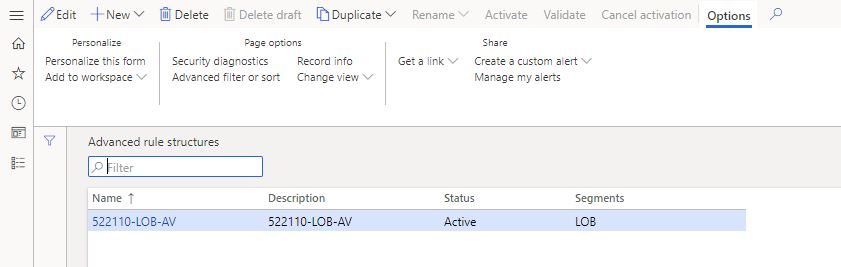
    05218.JPG

    --- Add this advanced rule structure with account structure P/L and activated the account structure.

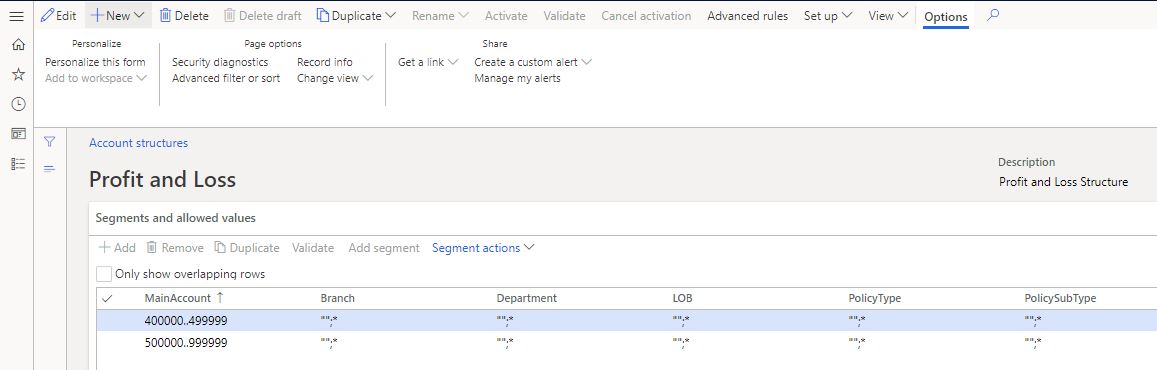
    0601.JPG   3858.JPG

    --- Now created a budget register entry with this main account without selecting any dimension. System is showing this notification.
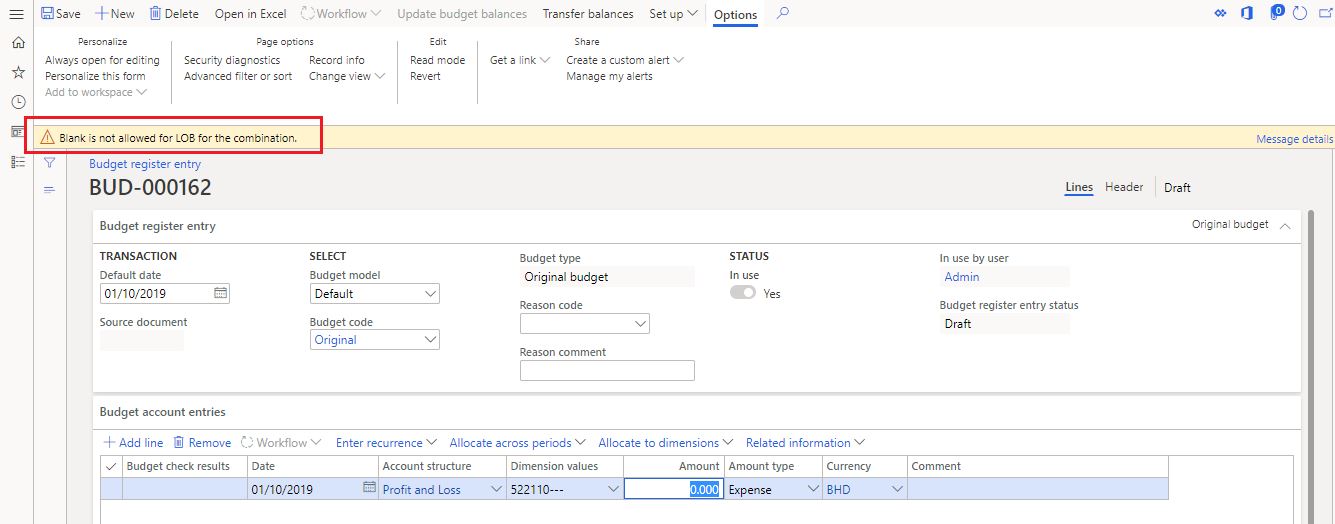
    55045.JPG

    --- Also; if I now select the dimension LOB, it will by default show me only that value (AV) which is linked in advanced rule structure.
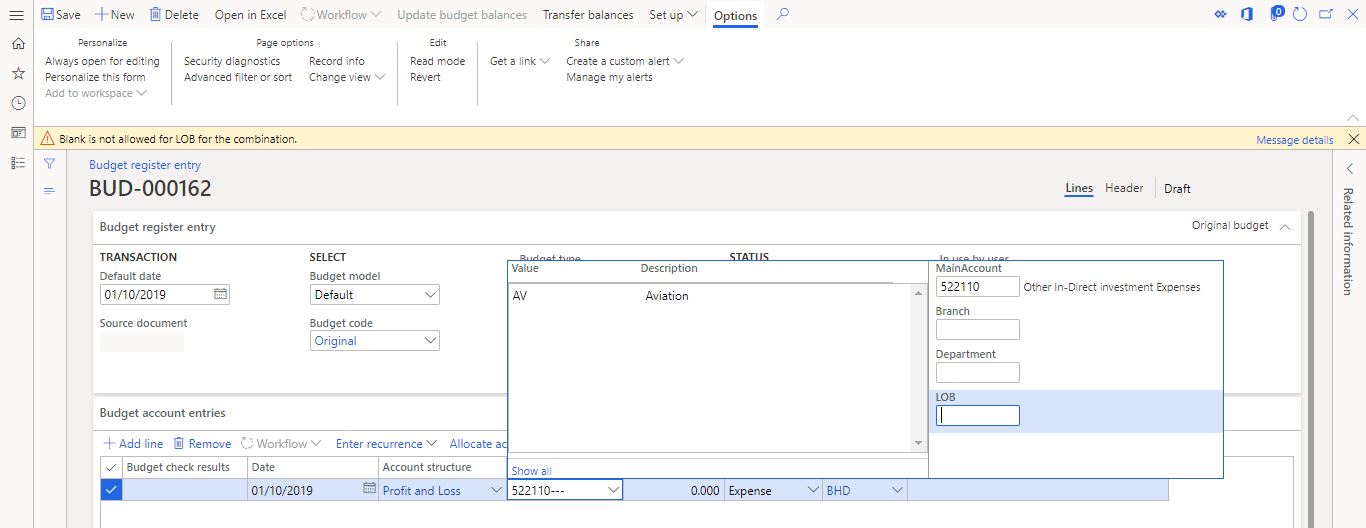
    5025.JPG

    Let us know if alternatively you can use this feature to validate financial dimension in combination with main accounts in budget register entries form.

    Best regards,
    Sourav Dam

    Please take time to click 'Yes' against the answers that help you guide in right direction to help other community members.

  • Suggested answer
    SouravDam Profile Picture
    11,730 on at

    Hi John Ray Patajo,

    Is this case sorted out?

    Kindly check the discussions made in this thread and appreciate if you kindly update for any further challenge left on this.

    Best regards,
    Sourav Dam

    Please take time to click 'Yes' against the answers that help you guide in right direction to help other community members.

Under review

Thank you for your reply! To ensure a great experience for everyone, your content is awaiting approval by our Community Managers. Please check back later.

Helpful resources

Quick Links

Introducing the 2026 Season 1 community Super Users

Congratulations to our 2026 Super Stars!

Meet the Microsoft Dynamics 365 Contact Center Champions

We are thrilled to have these Champions in our Community!

Congratulations to the March Top 10 Community Leaders

These are the community rock stars!

Leaderboard > Finance | Project Operations, Human Resources, AX, GP, SL

#1
Giorgio Bonacorsi Profile Picture

Giorgio Bonacorsi 616

#2
André Arnaud de Calavon Profile Picture

André Arnaud de Cal... 460 Super User 2026 Season 1

#3
Syed Haris Shah Profile Picture

Syed Haris Shah 331 Super User 2026 Season 1

Last 30 days Overall leaderboard

Product updates

Dynamics 365 release plans
