web
You’re offline. This is a read only version of the page.
close
Skip to main content

Announcements

No record found.

News and Announcements icon
Community site session details

Community site session details

Session Id :
Microsoft Dynamics AX (Archived)

How to dynamic link two datasources in one form

(0) ShareShare
ReportReport
Posted on by

Hi all,

I'm newbie in ax world. I really need help, i have this case :

I have Header table (Above area) and Detail table (Below area) as datasource in MyForm (illustrate as below).
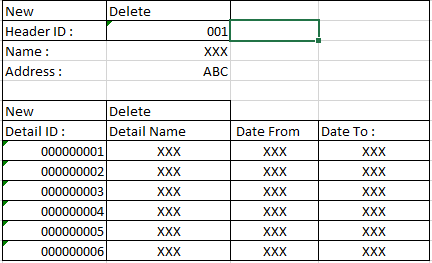
4857.a.PNG

Problem is : somehow the detail's data did not dynamically linked to Header Table. When i checked the Header Table it's illustrated like this :

7571.b.PNG

DetailID showed me combobox instead a single value, what i expected is with every details row inserted (in form) there will be each new row created for it (in header table). This give me headache. Foreign key, relationship already created between these two tables. I have set joinsource properties in Detail table datasource in form as Headertable. I also add one to many in it's relationship. Did i skipped something? Oh yeah, and one thing that i wanna know is this what they called parent-child link in form?

Thanks.

*This post is locked for comments

I have the same question (0)
  • Verified answer
    Martin Dráb Profile Picture
    239,451 Most Valuable Professional on at

    Check the LinkType you set for the Detail table datasource and make sure you set Details Table to the DataSource property of the grid with details.

    But what's the point of having DetailId in HeaderTable (as the latter image shows)? If there always is just one record with details, you can use Header ID directly. If you want more details for one header, you can't set a single ID to the header anyway. Let details to identify their header through Header ID.

  • Community Member Profile Picture
    on at

    You're right, after i changed the table design everything works now. So i did it just like you have suggested. Put HeaderID as foreign key in Detail Table. Now Detail Table has recognize it's header. Thanks.

Under review

Thank you for your reply! To ensure a great experience for everyone, your content is awaiting approval by our Community Managers. Please check back later.

Helpful resources

Quick Links

Introducing the 2026 Season 1 community Super Users

Congratulations to our 2026 Super Stars!

Meet the Microsoft Dynamics 365 Contact Center Champions

We are thrilled to have these Champions in our Community!

Congratulations to the April Top 10 Community Leaders

These are the community rock stars!

Leaderboard > 🔒一 Microsoft Dynamics AX (Archived)

#1
CP04-islander Profile Picture

CP04-islander 39

#2
Michel ROY Profile Picture

Michel ROY 14

#3
imran ul haq Profile Picture

imran ul haq 8

Last 30 days Overall leaderboard

Featured topics

Product updates

Dynamics 365 release plans
