web
You’re offline. This is a read only version of the page.
close
Skip to main content

Announcements

No record found.

News and Announcements icon
Community site session details

Community site session details

Session Id :
Microsoft Dynamics AX (Archived)

Query Add range Code : Needs Fixing

(0) ShareShare
ReportReport
Posted on by

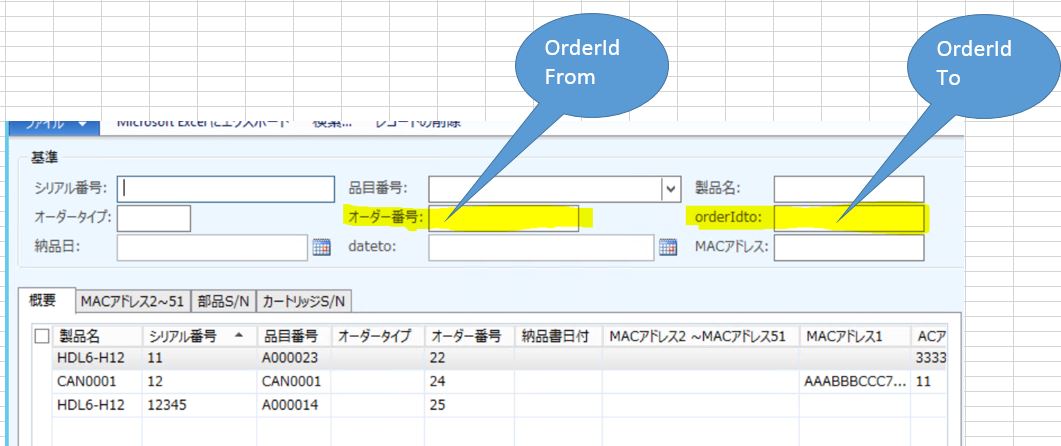
Capture33.JPG

Above is the picture of my addon Form... The User Inputs the OrderIdFrom & OrderIdTo and clicks search button ..A range of records are

supposed to be filtered in the grid below...  for example If the User does the following Inputs

OrderIdFrom = 11 ,  OrderIdTo = 15 ...   All the orderIds in the range e-g  11,12,13,14,15 etc should be filtered in the grid below


PROBLEM  :  The below ADD Range Code query displays only 2 records ... It takes into account only 2 orderIds ....How to modify it inorder to   display the whole range of OrderIds.. ???

 // add range OrderId_From
         AXW_SerialNumberTable_q.dataSourceName(AXW_SerialNumberTable_ds.name())
       .addRange( fieldNum(AXW_SerialNumberTable , OrderId))
       .value(  OrderIdFrom.text()  );


// add range OrderIdTo_to
         AXW_SerialNumberTable_q.dataSourceName(AXW_SerialNumberTable_ds.name())
        .addRange( fieldNum(AXW_SerialNumberTable , OrderId))
        .value(  OrderIdTo.text()  );

Please Help

*This post is locked for comments

I have the same question (0)
  • Verified answer
    Jonathan  Halland Profile Picture
    11,310 on at

    Hi

    You can use  AXW_SerialNumberTable_q.dataSourceName(AXW_SerialNumberTable_ds.name())

           .addRange( fieldNum(AXW_SerialNumberTable , OrderId))

           .value(  queryRange(OrderIdFrom.text(), OrderIdTo.text()  );

  • yasu Profile Picture
    on at

    Sorry it gives Error , wrong Number of Arguments has been specified for the method

  • Verified answer
    Jonathan  Halland Profile Picture
    11,310 on at

    AXW_SerialNumberTable_q.dataSourceName(AXW_SerialNumberTable_ds.name())

          .addRange( fieldNum(AXW_SerialNumberTable , OrderId))

          .value(  queryRange(OrderIdFrom.text(), OrderIdTo.text(),true) );

  • yasu Profile Picture
    on at

    Thanks It is working .....

    I will close this thread soon ..

    thanksss

Under review

Thank you for your reply! To ensure a great experience for everyone, your content is awaiting approval by our Community Managers. Please check back later.

Helpful resources

Quick Links

Introducing the 2026 Season 1 community Super Users

Congratulations to our 2026 Super Stars!

Meet the Microsoft Dynamics 365 Contact Center Champions

We are thrilled to have these Champions in our Community!

Congratulations to the March Top 10 Community Leaders

These are the community rock stars!

Leaderboard > 🔒一 Microsoft Dynamics AX (Archived)

#1
CP04-islander Profile Picture

CP04-islander 16

#2
GiacomoRovai Profile Picture

GiacomoRovai 4

#3
Douglas Noel Profile Picture

Douglas Noel 2

Last 30 days Overall leaderboard

Featured topics

Product updates

Dynamics 365 release plans
