web
You’re offline. This is a read only version of the page.
close
Skip to main content

Notifications

Announcements

No record found.

Community site session details

Community site session details

Session Id :
Supply chain | Supply Chain Management, Commerce
Suggested Answer

Issue with filtered list on personal workspace

(0) ShareShare
ReportReport
Posted on by 40

I applied a filter to the on-hand list and added this as a tile to a workspace i had created. However when I view that tile on the work space it errors showing - Queryable does not meet the criteria and is not supported.

pastedimage1602753008242v1.png

From the on-hand list the filter applied was (location begins with pack, available greater than 0, site begins with S01001 [our site name]). Within the on-hand list itself this works but when applied as a tile i got the above error and the tile shows as -- rather than a number:-

pastedimage1602753140625v2.png

How can I filter an on-hand or physical on-hand list and have this save to a workspace correctly.

I have the same question (0)
  • Suggested answer
    Junaid Idrees Profile Picture
    on at

    hi Kerry Moran,

    I doubt on "Available physical" after 0 filter.  can you remove that filter and try again just to troubleshoot this issue.

    Also Clear Usages Data from user options and Refresh the Application browser.

  • Kerry Moran Profile Picture
    40 on at

    Hi - I've just tried this and although I am no longer getting the original message the tile still does not display the count. If I click the tile it will take me into the form and the selection but I get the below message across the top and have to click 'apply' on the filters for it to actually run the filter:-

    pastedimage1602835114198v1.png

    pastedimage1602835135540v2.png

  • Suggested answer
    Junaid Idrees Profile Picture
    on at

    Hi Kerry Moran,

    Go to: System administration -> Setup -> Data cache -> Tile data cache configuration

    You will see a column there "Refresh frequency" for your tile. You can put the frequency there. In case if you want to re-initialize the tile, remove the entries for that selected tiles in this screen.

    Also please go through the below MS doc to refresh tiles count:

    docs.microsoft.com/.../tile-list-caching-workspaces

  • The.Clem Profile Picture
    53 on at

    Hi Kerry and Junaid!

    Were you able to resolve your issue?

    I'm facing the same problem and have tried a couple of workarounds;

    •  using "on-hand by location" or
    • using "best before as of"

    Neither of those worked. The "On-Hand By Location" tile just showed "1" (the number of locations filtered) while "Best Before as Of" did not display a value on the tile. 

    My usage case is that I want various locations in the warehouse to be monitored by the business team; the receiving docks, the production areas, etc to have a quick view of how many lines of stock (or units of stock) are in each. Essentially this would be for the team to identify if there is any stock that has virtually been left behind in these locations when it shouldn't be. 

    Do you have any suggestions for this? 

    Thanks!

  • Suggested answer
    Lennart Lauterbach Profile Picture
    111 on at
    [quote user="The.Clem"]

    Hi Kerry and Junaid!

    Were you able to resolve your issue?

    I'm facing the same problem and have tried a couple of workarounds;

    •  using "on-hand by location" or
    • using "best before as of"

    Neither of those worked. The "On-Hand By Location" tile just showed "1" (the number of locations filtered) while "Best Before as Of" did not display a value on the tile. 

    My usage case is that I want various locations in the warehouse to be monitored by the business team; the receiving docks, the production areas, etc to have a quick view of how many lines of stock (or units of stock) are in each. Essentially this would be for the team to identify if there is any stock that has virtually been left behind in these locations when it shouldn't be. 

    Do you have any suggestions for this? 

    Thanks!

    [/quote]

    Hi Clement,

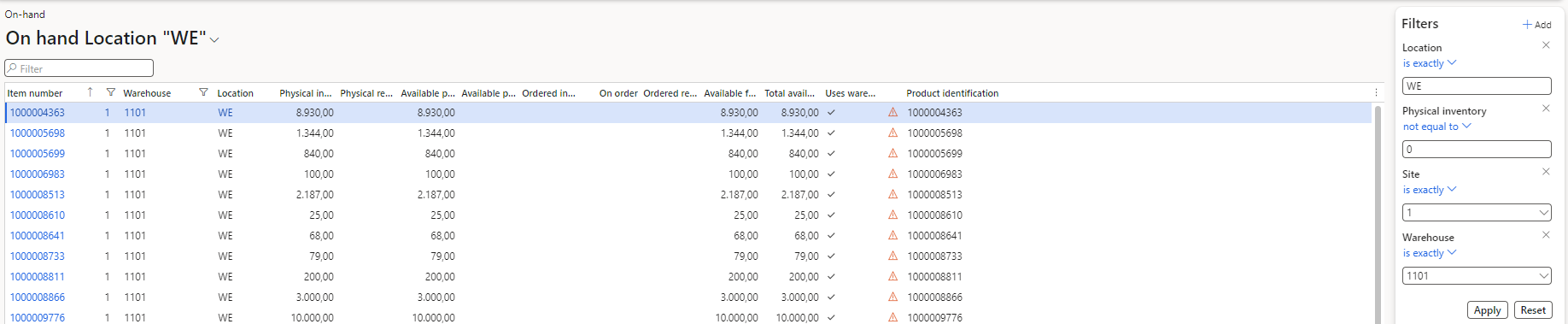
    since the On-Hand list does not support to apply filters via workspace tiles you could try add your filter (saved view) as a list to a workspace. This way you can see which items and quantities are located on a specific location.

    Set up your filter and save it as a saved view:
    pastedimage1684840886075v2.png

    Add the saved view as a list to your workspace:

    pastedimage1684840946379v3.png

    This final result on the workspace:

    Hope this helps!

  • The.Clem Profile Picture
    53 on at

    Thanks Lennart!

    I had considered this option, but was hoping to avoid it as all we really care about is the total number of lines in the grid.

    If this is the only OOB solution I'll check if the Business Team will accept it.

Under review

Thank you for your reply! To ensure a great experience for everyone, your content is awaiting approval by our Community Managers. Please check back later.

Helpful resources

Quick Links

Responsible AI policies

As AI tools become more common, we’re introducing a Responsible AI Use…

Neeraj Kumar – Community Spotlight

We are honored to recognize Neeraj Kumar as our Community Spotlight honoree for…

Leaderboard > Supply chain | Supply Chain Management, Commerce

#1
Laurens vd Tang Profile Picture

Laurens vd Tang 301 Super User 2025 Season 2

#2
André Arnaud de Calavon Profile Picture

André Arnaud de Cal... 118 Super User 2025 Season 2

#3
Siv Sagar Profile Picture

Siv Sagar 105 Super User 2025 Season 2

Last 30 days Overall leaderboard

Product updates

Dynamics 365 release plans



