web
You’re offline. This is a read only version of the page.
close
Skip to main content

Announcements

No record found.

News and Announcements icon
Community site session details

Community site session details

Session Id :
Microsoft Dynamics AX (Archived)

Loading positions using DMF

(0) ShareShare
ReportReport
Posted on by

Hi

I'm trying to load positions with very basic information, but I have found that not all fields are populated
We use DMF and the  Positions Entity with the following information:
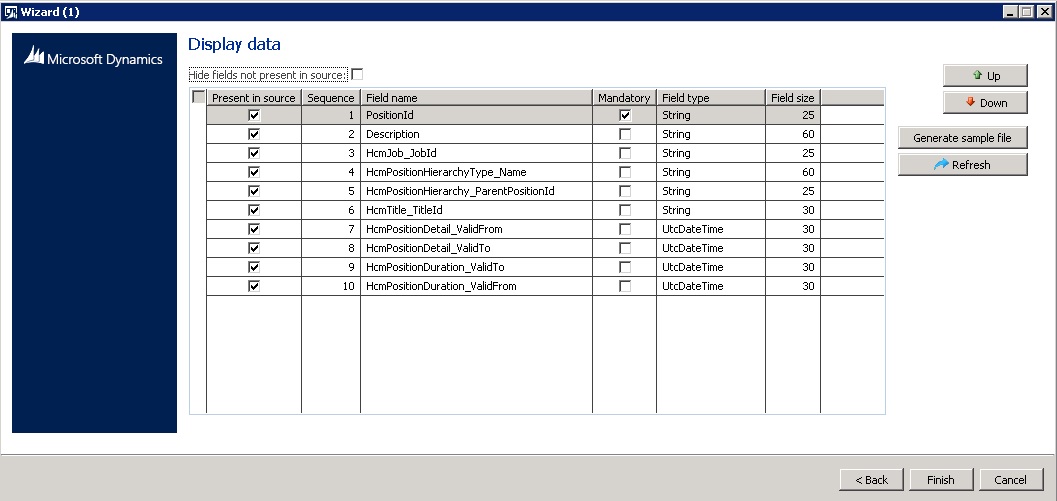
dmf_5F00_positions1.jpg

But the fields marked in red are not populated
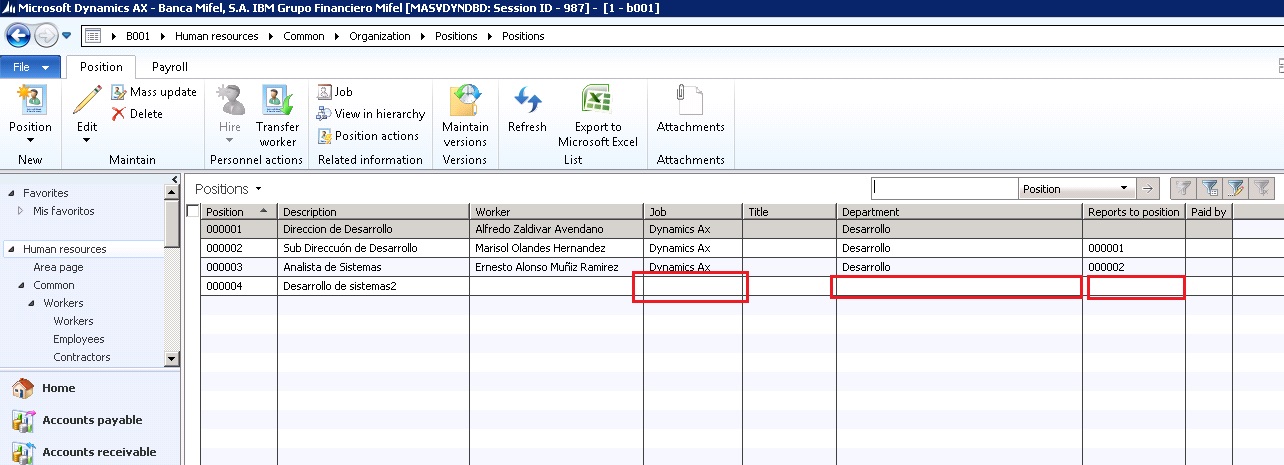
dmf_5F00_positions2.jpg

Any suggestions?

Thanks for help

Ernesto Muniz

*This post is locked for comments

I have the same question (0)
  • Verified answer
    André Arnaud de Calavon Profile Picture
    303,730 Super User 2026 Season 1 on at

    Hi Ernesto,

    From the screenshot, which records were loaded using DIXF and which were entered manually? Or were all records loaded using DIXF? Can you also provide the details of your source file?

    If all records were loaded, there should be a difference in the dates provided.

  • Verified answer
    Community Member Profile Picture
    on at

    Hi André

    Position 00004 was loaded using DIXF. Rest  was manually.

  • fatihgork Profile Picture
    3,817 on at

    Hi Ernesto,

    Like Andre said, we will need your source file to address the issue.

  • Verified answer
    André Arnaud de Calavon Profile Picture
    303,730 Super User 2026 Season 1 on at

    Hi Ernesto,

    The question is what values did you enter for the date fields. In the past I had provided the dates by using default values in the source to staging mapping.

    If you don't provide date information, it will be corrected by the entity class to have the current date/time as Valid from date. The valid to date will then be filled with the maximum value (no end date).

    If you provided a date in future for the Valid from date or the Value to date is in the past, the details will not be shown on the form.

    Did you already check if there was a record inserted in the table HCMPositionDetail?

  • Community Member Profile Picture
    on at

    Hi André, Fatih

    Follow the data to load in CSV file, is the basic information required.

    position2.jpg

    and the table HCMPositionDetail it show the record

    position2.jpg

  • Verified answer
    André Arnaud de Calavon Profile Picture
    303,730 Super User 2026 Season 1 on at

    Hi Ernesto,

    The dates seems to be OK. The Job field is missing a value. You have to include the Job field in the source as well.

  • Community Member Profile Picture
    on at

    André

    Job field is "HcmJob_JobId"  in staging mapping ? or which field is in staging mapping ?

    thanks for help

  • Verified answer
    André Arnaud de Calavon Profile Picture
    303,730 Super User 2026 Season 1 on at

    Hi Ernesto,

    Did you setup the Jobs in AX? It is trying to find an existing record with the staging value. It is not creating new jobs in the reference table.

  • Community Member Profile Picture
    on at

    André

    a new load has been processed and now it shows Job and Title, but  Department and Report to position is not displayed, but down if it shows the position to reporting.

    pisitions-3.jpg

    Workers are not  included because  are open positions.

    Thanks

  • Community Member Profile Picture
    on at

    André

    Jobs  was enter manually.

Under review

Thank you for your reply! To ensure a great experience for everyone, your content is awaiting approval by our Community Managers. Please check back later.

Helpful resources

Quick Links

Introducing the 2026 Season 1 community Super Users

Congratulations to our 2026 Super Stars!

Meet the Microsoft Dynamics 365 Contact Center Champions

We are thrilled to have these Champions in our Community!

Congratulations to the March Top 10 Community Leaders

These are the community rock stars!

Leaderboard > 🔒一 Microsoft Dynamics AX (Archived)

#1
Joris dG Profile Picture

Joris dG 5

#2
Alexey Lekanov Profile Picture

Alexey Lekanov 2

#2
Henrik Nordlöf Profile Picture

Henrik Nordlöf 2 User Group Leader

Last 30 days Overall leaderboard

Featured topics

Product updates

Dynamics 365 release plans
