web
You’re offline. This is a read only version of the page.
close
Skip to main content

Notifications

Announcements

No record found.

Community site session details

Community site session details

Session Id :
Microsoft Dynamics CRM (Archived)

Revise shared Quote: CreateAccess error

(0) ShareShare
ReportReport
Posted on by 1,090

We're having an issue Revising shared Quotes.

We're using Access Team Templates for this on both Opportunity and Quote entity. Whenever a user is added to the Sales Team of the Opportunity, all related Quote teams are updated accordingly. This works.

When a user from Business Unit A creates an Opportunity and a Quote for this Opportunity and adds a user from Business Unit B to the Opportunity Sales Team, then User B can see both the Opportunity and the Quote. Perfect.

Both users have the same Security Roles:
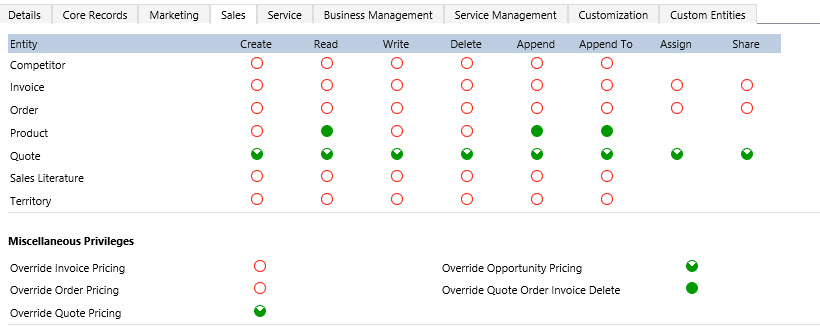
security-profile_2E00_.jpg

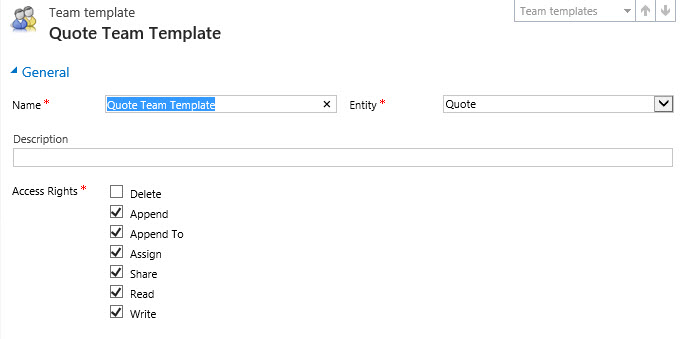
And here are screenshots of the team templates from Opportunity and Quote:

opp-team-template.jpg quote-team-template.jpg

Now the strange thing: User from Business Unit B is able to add Quotes to the Opportunity without a problem. He can also modify Quotes from user from BU A.

The one thing he CANNOT do is REVISE Quotes from user from BU A?!

How is this possible? Whenever he tries to Revise such a Quote he gets this error:

<Message>SecLib::AccessCheckEx failed. Returned hr = -2147187962, ObjectID: 00000000-0000-0000-0000-000000000000, OwnerId: a8ebe629-4f42-e511-9416-00155d1a2f05, OwnerIdType: 8 and CallingUser: fe99db9b-5242-e511-9416-00155d1a2f05. ObjectTypeCode: 1084, objectBusinessUnitId: 3dd5e629-4f42-e511-9416-00155d1a2f05, AccessRights: CreateAccess </Message>


ObjectTypeCode: 1084 is the Quote entity.

It seems that whenever he tries to Revise a Quote from a user from another Business Unit, the error happens, although the quote is shared with him and he can edit that quote perfectly (update, activate, close) and he can also add quotes to the opportunity that is shared with him.

Is this a bug?

*This post is locked for comments

I have the same question (0)
  • Community Member Profile Picture
    on at

    Make sure that the Team(s) have permission to Update a Quote or an Opportunity and Accounts. Also the User needs to have permission to Update a Quote or an Opportunity. Also check the Apend and Append to security roles.


    Hope this helps

  • RoelG Profile Picture
    1,090 on at

    They are given these priviliges through sharing. So that's not the solutions. We have opened a ticket at Microsoft to look into this issue.

  • Aileen Gusni Profile Picture
    44,524 on at

    Roel,

    it seems you need to give Create permission to Organization.

    It is based on my finding in your previous error & security setting.

    Thanks

  • RoelG Profile Picture
    1,090 on at

    Yes, then it works Aileen, but we don't want to do that... Besides, the user is perfectly able to create a new quote for the opportunity, so it should also work revising an existing quote... We've handed the issue to              Microsoft support to look futher into this.

  • Benoit Delvaux Profile Picture
    870 on at

    If I remember well we also had to give Read and Write accesses in addition to Create.

    Then it becomes trivial to use Sales Teams :)

Under review

Thank you for your reply! To ensure a great experience for everyone, your content is awaiting approval by our Community Managers. Please check back later.

Helpful resources

Quick Links

Responsible AI policies

As AI tools become more common, we’re introducing a Responsible AI Use…

Neeraj Kumar – Community Spotlight

We are honored to recognize Neeraj Kumar as our Community Spotlight honoree for…

Leaderboard > 🔒一 Microsoft Dynamics CRM (Archived)

#1
SA-08121319-0 Profile Picture

SA-08121319-0 4

#1
Calum MacFarlane Profile Picture

Calum MacFarlane 4

#3
Alex Fun Wei Jie Profile Picture

Alex Fun Wei Jie 2

Last 30 days Overall leaderboard

Featured topics

Product updates

Dynamics 365 release plans