web
You’re offline. This is a read only version of the page.
close
Skip to main content

Announcements

No record found.

News and Announcements icon
Community site session details

Community site session details

Session Id :
Service | Customer Service, Contact Center, Fie...
Unanswered

Dynamics Portal - Confirmation on submit by Web Forms similar to Entity Forms

(0) ShareShare
ReportReport
Posted on by

Hi

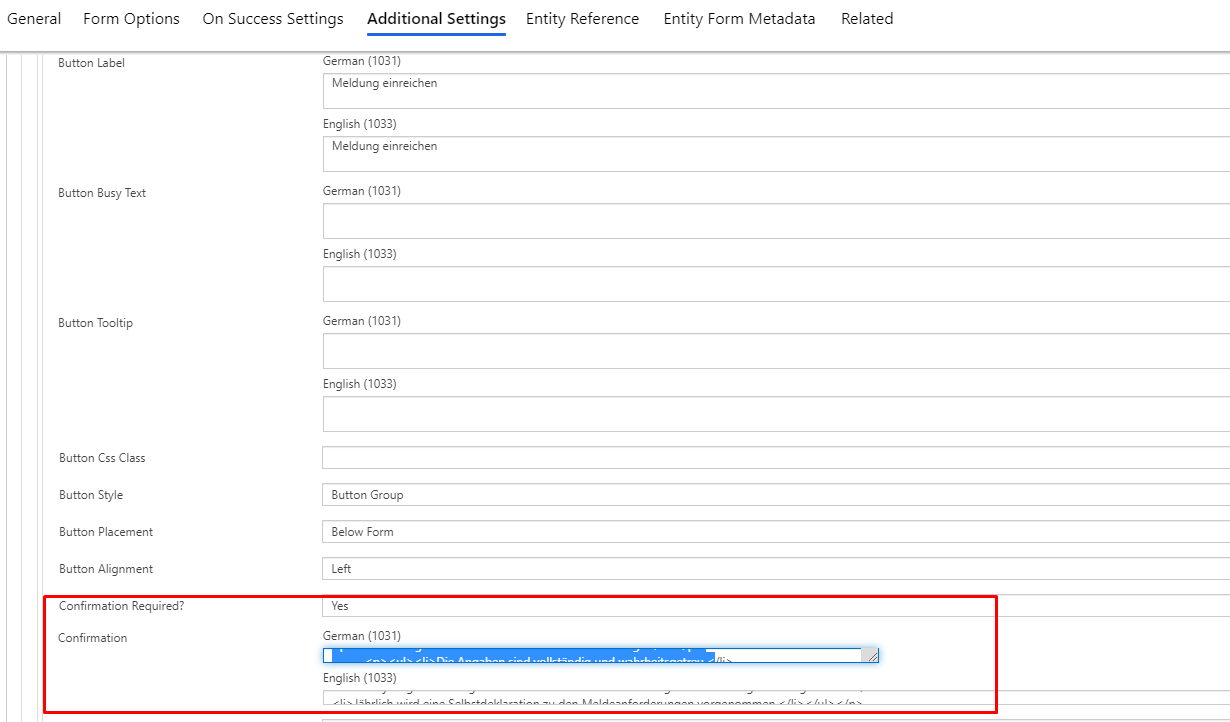
I need a "confirmation" before submit is send in a web form (on the last step). I have a similar confirmation on submit on an entity form. There you can find by the submit button advanced settings the confirmation config (see Screenshot):
pastedimage1597403766416v1.png

In Webform steps we have also the "Additional Settings"-Tab and i can config similar stuff like on the entity form settings, but the "Submit" button configuration are missing. Is this a BUG, or just not built in yet? Or is the setting stored on a other place? 

If the confirmation config not a built-in-feature in Webforms, how else can I solve this. Probably with javascript... Or?

I have the same question (0)
  • LeoAlt Profile Picture
    16,331 Moderator on at

    Hi Partner,

    Unfortunately it is by design, we could only configure the submit ribbon text and success message in web form.

    pastedimage1597628881446v1.png

    pastedimage1597628894692v2.png

    You could raise an idea to Microsoft for this requirement.

    https://experience.dynamics.com/ideas/

    And you could also add a confirmation message bind on the submit button in portal with JS.

    https://debajmecrm.com/2020/03/11/quick-tip-save-a-record-in-powerapps-portals-using-custom-button-on-entity-form/

    Best Regards,

    Leo

  • Dy365Fan Profile Picture
    on at

    thx for your help, but the method on the link with "own confirmation" doesnt work. Is there a another "guide".

Under review

Thank you for your reply! To ensure a great experience for everyone, your content is awaiting approval by our Community Managers. Please check back later.

Helpful resources

Quick Links

Introducing the 2026 Season 1 community Super Users

Congratulations to our 2026 Super Stars!

Meet the Microsoft Dynamics 365 Contact Center Champions

We are thrilled to have these Champions in our Community!

Congratulations to the March Top 10 Community Leaders

These are the community rock stars!

Leaderboard > Service | Customer Service, Contact Center, Field Service, Guides

#1
Jimmy Passeti Profile Picture

Jimmy Passeti 35 Most Valuable Professional

#1
11manish Profile Picture

11manish 35

#3
ManoVerse Profile Picture

ManoVerse 34 Super User 2026 Season 1

Last 30 days Overall leaderboard

Featured topics

Product updates

Dynamics 365 release plans
