web
You’re offline. This is a read only version of the page.
close
Skip to main content

Notifications

Announcements

No record found.

Community site session details

Community site session details

Session Id :
Supply chain | Supply Chain Management, Commerce
Unanswered

Not able to Activate D365 Retail MPOS from Visual Studio 2015

(0) ShareShare
ReportReport
Posted on by

Hi All,

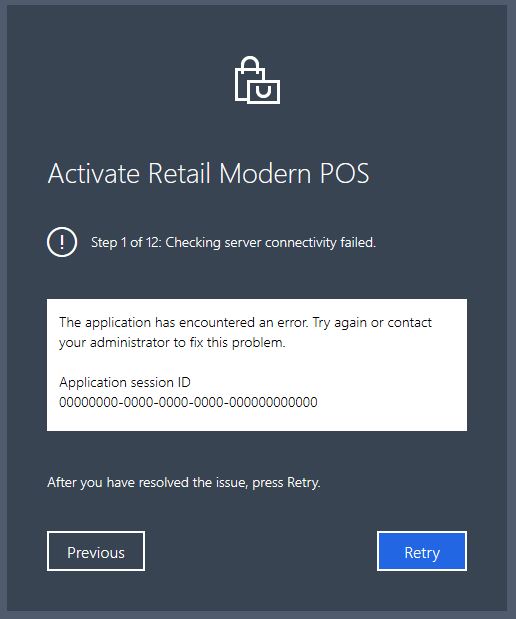
I am able to activate Retail MPOS from installer, but facing below activation error while running SDK from Visual Studio 2015.

It was working fine for me before 4 months, but I don't know what happened currently when I tried again from the visual studio.

Any support will be highly appreciated, Thanks in Advance.

Please find the below step by step images.

step 1                                                                                                                                                                      

5466.pastedimage1587367681210v1.png     

  step 2  - entering the same credential as entering in the installer.     

7723.pastedimage1587368445750v4.png  

step3

8546.Capture.JPG

I have the same question (0)
  • André Arnaud de Calavon Profile Picture
    301,130 Super User 2025 Season 2 on at

    Moved to the Dynamics 365 Commerce (Retail) forum.

  • Jay Stock Profile Picture
    on at

    Hi Arseela,

    We do not believe it is a problem with MS Visual studio, it seems at the moment that the Activation is failing on seeing the Retail Server communication.  Are you sure that the URL has not changed or the Retail Server is running?

    I would suggest you open a case ticket to have a member of our team work with you on this case issue.

    Suggestion for now is you could try first to get a health check that communication can be seen

    Get Retail URL from Customer LCS and then remove "Commerce" from end of it and add the below so it look like the example:


    Customer Retail Server URL gathered from LCS

    https://<Customers server from LCS link>.operations.dynamics.com/Commerce/


    Health check link to use:

    https://<Customers server from LCS link>.operations.dynamics.com/healthcheck?testname=ping

    Should see a small table with DBCheck and Realtime service "Successful"

    Helpful links:

    Links for activation of MPOS troubleshooting to help you

    https://docs.microsoft.com/en-us/dynamics365/commerce/retail-modern-pos-device-activation

    https://docs.microsoft.com/en-us/dynamics365/commerce/dev-itpro/retail-POS-activation-changes#update-the-retail-modern-pos-configuration

    Please be aware that I believe that i saw something about 2015 VBS might not be supported now and you should be using 2016/2017 or higher for MPOS standard and SDK.  But activation might be caused by that due to the communication step in error, but there could be a small chance this could be part reason for latest version of D365 MPOS and SDK not activating.

    We need a case opened by you to progress with this issue if the above information does not help you.

  • Community Member Profile Picture
    on at

    Health check was successfull, I will try to compile using 2016/2017.

  • Community Member Profile Picture
    on at

    I tried...no luck...

    Please find the below message getting from vs2015, might help some one to answer the above.

    'WWAHost.exe' (Script): Loaded 'Script Code (MSAppHost/3.0)'.

    Exception was thrown at line 93, column 21 in ms-appx://microsoft.dynamics.retail.pos/Platform/Pos.Platform.js

    0x8007000e - JavaScript runtime error: Not enough memory resources are available to complete this operation.

    Exception was thrown at line 46034, column 17 in ms-appx://microsoft.dynamics.retail.pos/Commerce.Core.js

    0x800a138f - JavaScript runtime error: Unable to get property 'getManager' of undefined or null reference

  • Shashank55 Profile Picture
    20 on at

    This post is really nice. Thank you for sharing this. I have got so much relevant information from this post. Now, I am coming to my portion. If you want to know about IJ Start Canon so you simply need to visit on the given link.

  • Jay Stock Profile Picture
    on at

    Hi Arseela,

    As mentioned before in the above, can you please open a Support Case Ticket with Commerce D365 Customer Support Team who someone from team will pick this up and work further with you.

    This is an open forum and more in depth details of your environment and issue will probably have to be discussed more privately within the case ticket.

    Can you put the error you have and what you have done so far in the case ticket you create.

    Also add the App Version of MPOS SDK you are using e.g. 10.0.9

    and also add to case ticket if you were you able to activate on same version 4 months before with VSM2015.

    Add in the ticket if you have tried on version 2016 or 2017 or above to activate MPOS also and what error you got with them if they still did not work.

    It could be the version of Visual Studio Manager you are using to activate the MPOS.

Under review

Thank you for your reply! To ensure a great experience for everyone, your content is awaiting approval by our Community Managers. Please check back later.

Helpful resources

Quick Links

Responsible AI policies

As AI tools become more common, we’re introducing a Responsible AI Use…

Neeraj Kumar – Community Spotlight

We are honored to recognize Neeraj Kumar as our Community Spotlight honoree for…

Leaderboard > Supply chain | Supply Chain Management, Commerce

#1
Laurens vd Tang Profile Picture

Laurens vd Tang 301 Super User 2025 Season 2

#2
André Arnaud de Calavon Profile Picture

André Arnaud de Cal... 118 Super User 2025 Season 2

#3
Siv Sagar Profile Picture

Siv Sagar 105 Super User 2025 Season 2

Last 30 days Overall leaderboard

Product updates

Dynamics 365 release plans