web
You’re offline. This is a read only version of the page.
close
Skip to main content

Announcements

No record found.

News and Announcements icon
Community site session details

Community site session details

Session Id :
Microsoft Dynamics AX (Archived)

Sales Line Sub-Bom Not passing to planned orders

(0) ShareShare
ReportReport
Posted on by 3,668

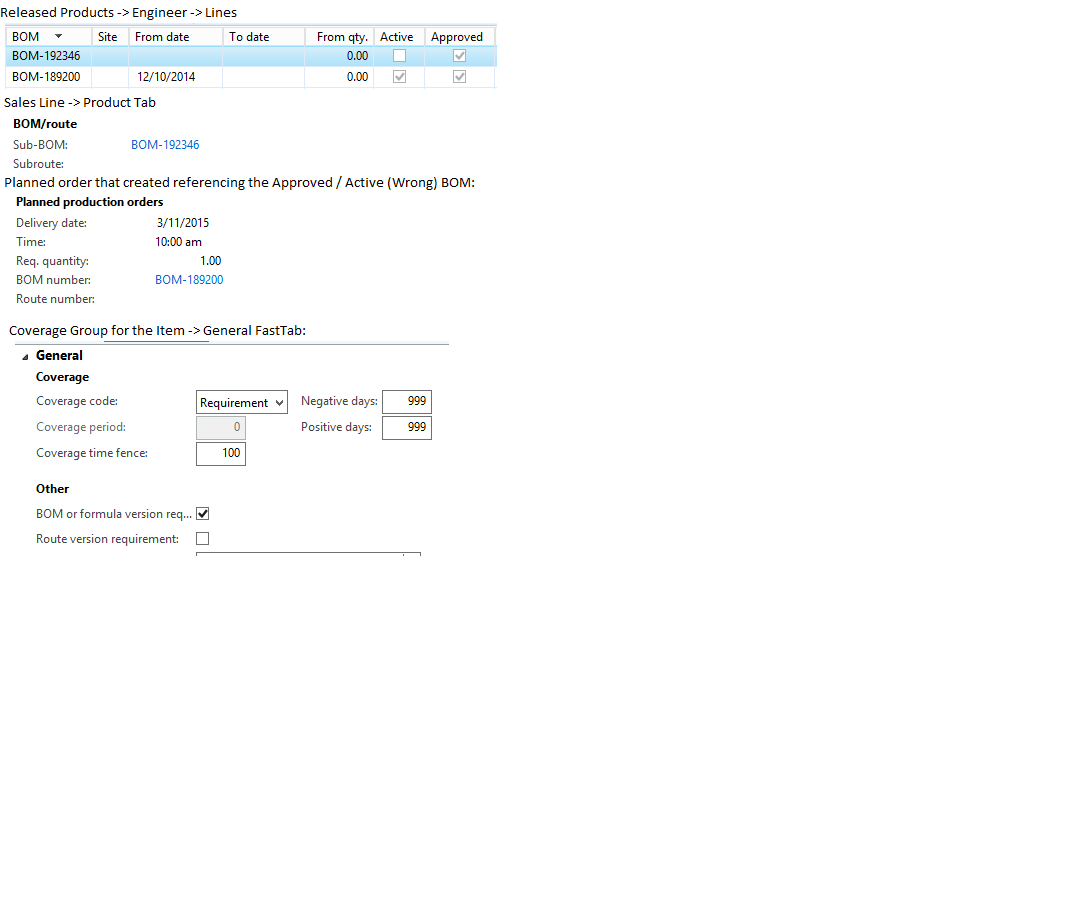
I've used Sales Line Sub-Bom's in the past to cause a planned order to create with a specific BOM version.  Trying to do this in  2012 R3 and not having much success.  Here is what I have done:

  1. There is an existing approved & activated BOM for my item. 
  2. I created a new BOM & BOM version and approved, but did not activate it. 
  3. I added a sales line that referred to my new BOM version on the Sales Line -> Sub Bom field. 
  4. Run master planning, and the default approved / activated BOM version is on the planned order pegged to my sales line.  
  5. Tried turning the "Bom Version..." flag on / off on the Coverage Group that this item is part of.  No results. 

What am I overlooking here?
*This post is locked for comments

I have the same question (0)
  • Verified answer
    ColbyGallagher Profile Picture
    3,668 on at

    We found the issue:  2012 R3 CU8 seems to have removed this functionality by removing:

    If (_reqPO.ItemBOMID)

       Return _ReqPO.ItemBomId;  

    from the BomID method in the ReqSetup class.  

    Adding this code back in resolved the issue.  I don't quite understand why this would get removed, having a Sub-BOM at the Sales Order line is very useful.

  • willp Profile Picture
    on at

    Do you know is this has been addressed in a Hotfix for CU8?

  • ColbyGallagher Profile Picture
    3,668 on at

    Not sure, this is the latest I have from Microsoft:

    "The update is that the issue is still under review.  There has been another report of this issue by a different customer as well, so that would definitely support this being a valid bug, and will hopefully speed up timeline for the fix. "

    Maybe you are that other customer?

  • willp Profile Picture
    on at

    Thanks we just discovered this today so was looking for additional information before discussing with MSFT. Was there any type of identifier created for this that I can refer to?

  • ColbyGallagher Profile Picture
    3,668 on at

    The person I am working with stated he entered this as issue 14960.  

Under review

Thank you for your reply! To ensure a great experience for everyone, your content is awaiting approval by our Community Managers. Please check back later.

Helpful resources

Quick Links

Introducing the 2026 Season 1 community Super Users

Congratulations to our 2026 Super Stars!

Meet the Microsoft Dynamics 365 Contact Center Champions

We are thrilled to have these Champions in our Community!

Congratulations to the March Top 10 Community Leaders

These are the community rock stars!

Leaderboard > 🔒一 Microsoft Dynamics AX (Archived)

#1
Joris dG Profile Picture

Joris dG 5

#2
Alexey Lekanov Profile Picture

Alexey Lekanov 2

#2
Henrik Nordlöf Profile Picture

Henrik Nordlöf 2 User Group Leader

Last 30 days Overall leaderboard

Featured topics

Product updates

Dynamics 365 release plans
