web
You’re offline. This is a read only version of the page.
close
Skip to main content

Announcements

No record found.

News and Announcements icon
Community site session details

Community site session details

Session Id :
Microsoft Dynamics AX (Archived)

Cost price of specific item is not calculated in "BOM Calculation Form"

(0) ShareShare
ReportReport
Posted on by 145

I have selected on tracking dimensions following setups for highlighted Item 

  1. Serial Number, Batch Number Active True
  2. Serial Number, Batch Number Physical Inventory True
  3. Serial Number, Batch Number  Financial Inventory True

Production Item and all raw materials are weighted average costing method

Costing Version [Costing Type] is planned cost and cost price model is calculation group

I am not able to get price of specific item while run BOM calculation, is there any way to see price while run BOM calculation with above Tracking Dimensions setup.
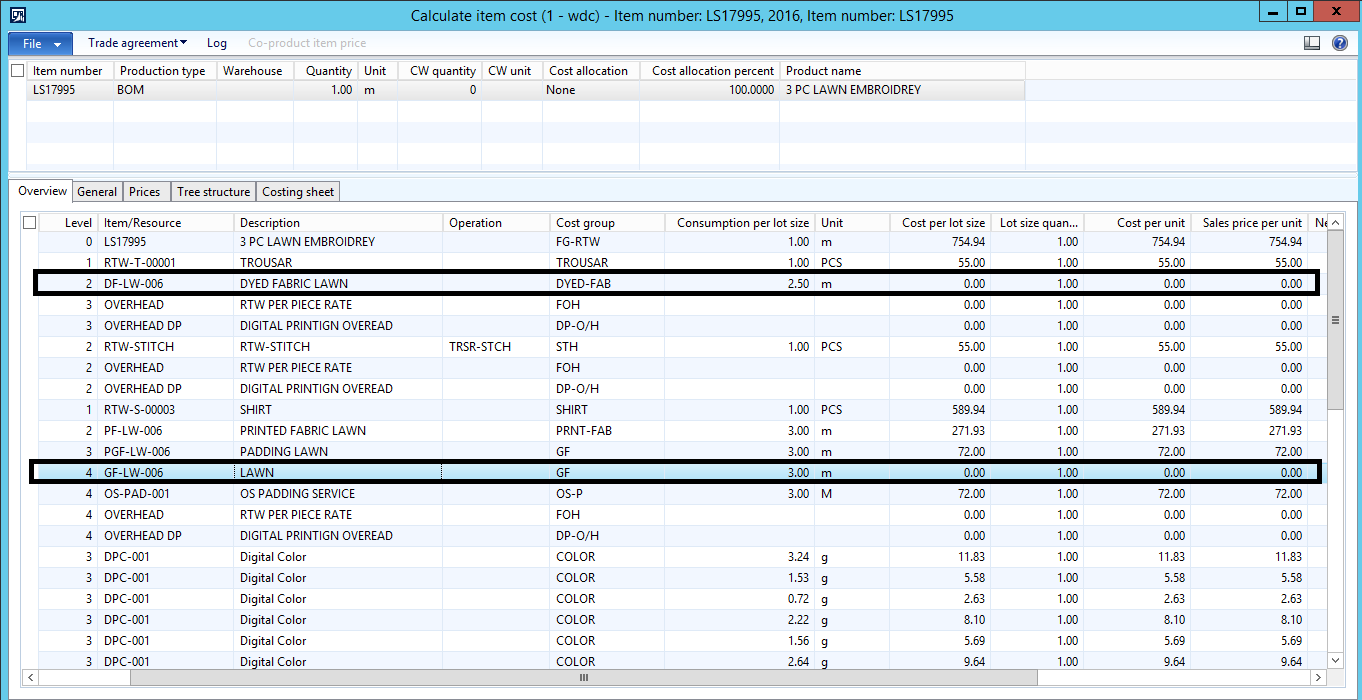
6082.Cost-price-not-picked-to-run-Calculation-in-BOM.png

I am expecting weighted average cost while run BOM calculation.

Would please help me to achieve this requirements 

Note: Item which have tracking dimensions None[Batch active false, Batch Primary false, Physical inventory false, Financial inventory false], system get the price while run the BOM calculation.

*This post is locked for comments

I have the same question (0)
  • Nagendra Varma K Profile Picture
    on at

    Hi Muhammad,

    Can you compare both the items for which cost is calculated and not calculated, on the item master whether any parameters are missing. Also check whether Items where cost is zero has any product dimensions. whether activate cost by dimension is enabled or not in the product form. Also check purchase prices of Items whether activated or not.

    Thanks

    Nagendra Varma K

  • Community Member Profile Picture
    on at

    Hi Muhammad,
    More likely the parts haven't got the purchase price added neither active price calculated for them, therefore when you run your BOM calculation you see 0.00 value for those items unless they are free of charge items.
    Regards,
    V

  • Yohann Rolland Axcible Profile Picture
    3,111 on at

    Hi, also check this : do you have specific calculation group for those 2 items which may be different from the other items ? -> then check the origin of the cost calculation it's probably 0. (purchase agreement, price stock, etc)

    Could you update your tag because the screenshot looks like a AX 2012 version and not a current version ?

  • Muhammad Burhan Zahoor Profile Picture
    145 on at

    Thanks for reply

    I have similar configure both Items. Item which have tracking dimension mentioned in above blog has not pick up the cost in calculation Form.

  • Suggested answer
    Community Member Profile Picture
    on at
    Hi Muhammad 
    I had the same problem and noticed that the zero value item in the BOM had an old zero value pending cost price, as well as a current correct value active price.  I deleted the old zero value pending cost price and re-calculated the price for the BOM item, this fixed the problem.   

Under review

Thank you for your reply! To ensure a great experience for everyone, your content is awaiting approval by our Community Managers. Please check back later.

Helpful resources

Quick Links

Introducing the 2026 Season 1 community Super Users

Congratulations to our 2026 Super Stars!

Meet the Microsoft Dynamics 365 Contact Center Champions

We are thrilled to have these Champions in our Community!

Congratulations to the March Top 10 Community Leaders

These are the community rock stars!

Leaderboard > 🔒一 Microsoft Dynamics AX (Archived)

#1
CP04-islander Profile Picture

CP04-islander 39

#2
Michel ROY Profile Picture

Michel ROY 14

#3
imran ul haq Profile Picture

imran ul haq 8

Last 30 days Overall leaderboard

Featured topics

Product updates

Dynamics 365 release plans
