web
You’re offline. This is a read only version of the page.
close
Skip to main content

Announcements

No record found.

News and Announcements icon
Community site session details

Community site session details

Session Id :
Customer experience | Sales, Customer Insights,...
Answered

Audience Insights Customer Profile Address

(1) ShareShare
ReportReport
Posted on by 125

Hi,

On the Customer cards these fields (amongst others) are displayed.

pastedimage1645436856698v1.png

The Address is composed of four fields from the unified profiles:

Street,

City, Postalcode

Country

So the housenumber (address1_line2) is not included, instead it is mentioned under 'Additional fields'.

These are the datatypes I assigned to the fields, I tried with address1_line2 as Location.Address as well, but that didn't solve it.
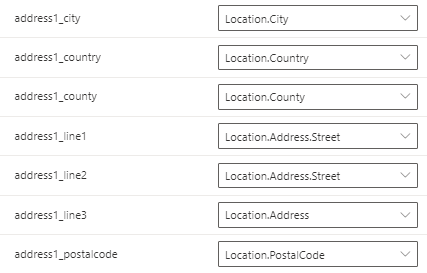
pastedimage1645437026332v2.png

How can I configure the Address to be displayed on Customer card as 

Street, housenumber (or swapped, that would be okay too)

City, postcalcode

Country

Thanks again

I have the same question (0)
  • Paulien Lb Profile Picture
    125 on at

    Hi Community,

    Anyone has a suggestion?

    Do other users have the same experience perhaps?

    w/regards

    Paulien

  • Suggested answer
    Bill Ryan Profile Picture
    8 on at

    If I'm following you correctly, I think (assuming you're using Power Query) you can just concatenate those fields into Address one and it'll show up like you want. That's probably the easiest path to get there that I can think of.  Would that work?

  • Verified answer
    Nils Ke Profile Picture
    Microsoft Employee on at

    Hi Pauline,

    The Customer Insights web app cannot be customized. The behavior which groups fields together within "Address" is happening upon rendering those fields in our web app only. This web app serves as a basic example of what data is available for a single specific customer. This page is not aiming to be a main consumption place of CI data for our users.

    With Customer Insights data being available in Dataverse, we recommend our customers to use Dataverse API and connectors for their consumption scenarios. Learn more about CI and Dataverse.

    Best regards,

    Nils Keller

  • Paulien Lb Profile Picture
    125 on at

    Sorry, very late reply.

    That would work indeed, I'll consider it (along with Nils' comment below).

    Thanks

Under review

Thank you for your reply! To ensure a great experience for everyone, your content is awaiting approval by our Community Managers. Please check back later.

Helpful resources

Quick Links

Introducing the 2026 Season 1 community Super Users

Congratulations to our 2026 Super Stars!

Congratulations to our 2025 Community Spotlights

Thanks to all of our 2025 Community Spotlight stars!

Leaderboard > Customer experience | Sales, Customer Insights, CRM

#1
ManoVerse Profile Picture

ManoVerse 120 Super User 2026 Season 1

#2
Jimmy Passeti Profile Picture

Jimmy Passeti 46 Most Valuable Professional

#3
NeerajPawar Profile Picture

NeerajPawar 41

Last 30 days Overall leaderboard

Product updates

Dynamics 365 release plans
