web
You’re offline. This is a read only version of the page.
close
Skip to main content

Notifications

Announcements

No record found.

Community site session details

Community site session details

Session Id :
Microsoft Dynamics CRM (Archived)

How to hide items on menu. Using privileges case error message

(0) ShareShare
ReportReport
Posted on by 1,532

Hi,

I am using the Sitemap tool to hide menus.  Everything is working great.

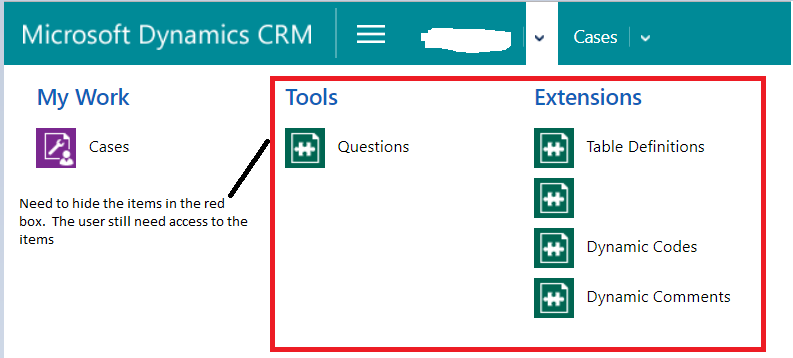
However, I have a user menu that I only want to show the CASE.  The user needs to have access to the entities in the red box but I do not want the users to see the entities on the menu.

I tried using privileges but that cause the user to encounter error message in the case when setting the privileges on the entities in the red box.  Is there a way to hide the items so that the user will not loose access.
3225.Menu.PNG

*This post is locked for comments

I have the same question (0)
  • Suggested answer
    a33ik Profile Picture
    84,331 Most Valuable Professional on at

    Hello,

    Just remove items from the SiteMap and publish it.

  • rthompson Profile Picture
    1,532 on at

    Hi Andrew,

    I can't remove the items from the menu.  The menu is control by privileges.  I have other users that see different items on the same menu.

  • Verified answer
    gdas Profile Picture
    50,091 Moderator on at

    Hi ,

    You need to remove entity read permission for those entities in the security roles.

    Another options to create custom  entity and let's say you give the READ access in the security role of the custom entity.

    Now let say if the custom entity has READ access then you want to hide 4 entities in the screenshot.

    So you simple create a privileges in the sitemap under each above screenshot entity and put the custom entity name and give other access apart from READ to hide all the button. Which means the security role which having READ access can not see all the entities but other than security role having all the access apart from READ case see those menu.

  • Suggested answer
    Arun Vinoth Profile Picture
    11,615 Moderator on at

    Lets say, UserA & UserB having same security role & privileges, but you want to show these SubArea (lets take Questions & Dynamics codes for example) to UserA & hide for UserB, though UserB can enter data from other place but should not see this item for navigation.

    Then you have to have a dummy entity for maintaining/controlling its visibility so that entity privilege can decide this behavior. Thats the only option. Or else you have to do Apps concept which can keep its own navigation for different user base.

    community.dynamics.com/.../creating-a-role-based-sitemap-navigation-in-dynamics-crm

  • rthompson Profile Picture
    1,532 on at

    Thanks Goutam,

    I was hoping that I would not have to use Sitemap.  But your suggestion did the job.

Under review

Thank you for your reply! To ensure a great experience for everyone, your content is awaiting approval by our Community Managers. Please check back later.

Helpful resources

Quick Links

Responsible AI policies

As AI tools become more common, we’re introducing a Responsible AI Use…

Neeraj Kumar – Community Spotlight

We are honored to recognize Neeraj Kumar as our Community Spotlight honoree for…

Leaderboard > 🔒一 Microsoft Dynamics CRM (Archived)

#1
SA-08121319-0 Profile Picture

SA-08121319-0 4

#1
Calum MacFarlane Profile Picture

Calum MacFarlane 4

#3
Alex Fun Wei Jie Profile Picture

Alex Fun Wei Jie 2

Last 30 days Overall leaderboard

Featured topics

Product updates

Dynamics 365 release plans
