web
You’re offline. This is a read only version of the page.
close
Skip to main content

Announcements

No record found.

News and Announcements icon
Community site session details

Community site session details

Session Id :
Finance | Project Operations, Human Resources, ...
Answered

Review Project Invoice Proposal Workflow - Approver Type: Hierarchy

(0) ShareShare
ReportReport
Posted on by

Hello,

I am trying to setup the Review Project Invoice Proposal Workflow. It is required that the superior of the person who has submitted the workflow should approve this document. So if the Invoice proposal has been finalized -> it must be approved -> then it can be posted.

I know from the procurement process that you can use position hierarchies for such cases. But for this workflow it does not work, I get the message:

Stopped (error): X++ Exception: A worker with a personnel number of was not found.
at SysWorkflowHierarchyProvider-resolve
SysWorkflowHierarchyProvider-resolveHierarchy
SysWorkflowQueue-resume

I tried then the purchase order workflow and there it worked fine with the position hierarchy. So the setup in the position hierarchy is fine.

If I check the "Review Project Invoice Proposal Workflow," the Hierarchy type Managerial Hierarchy starts from USER ID.
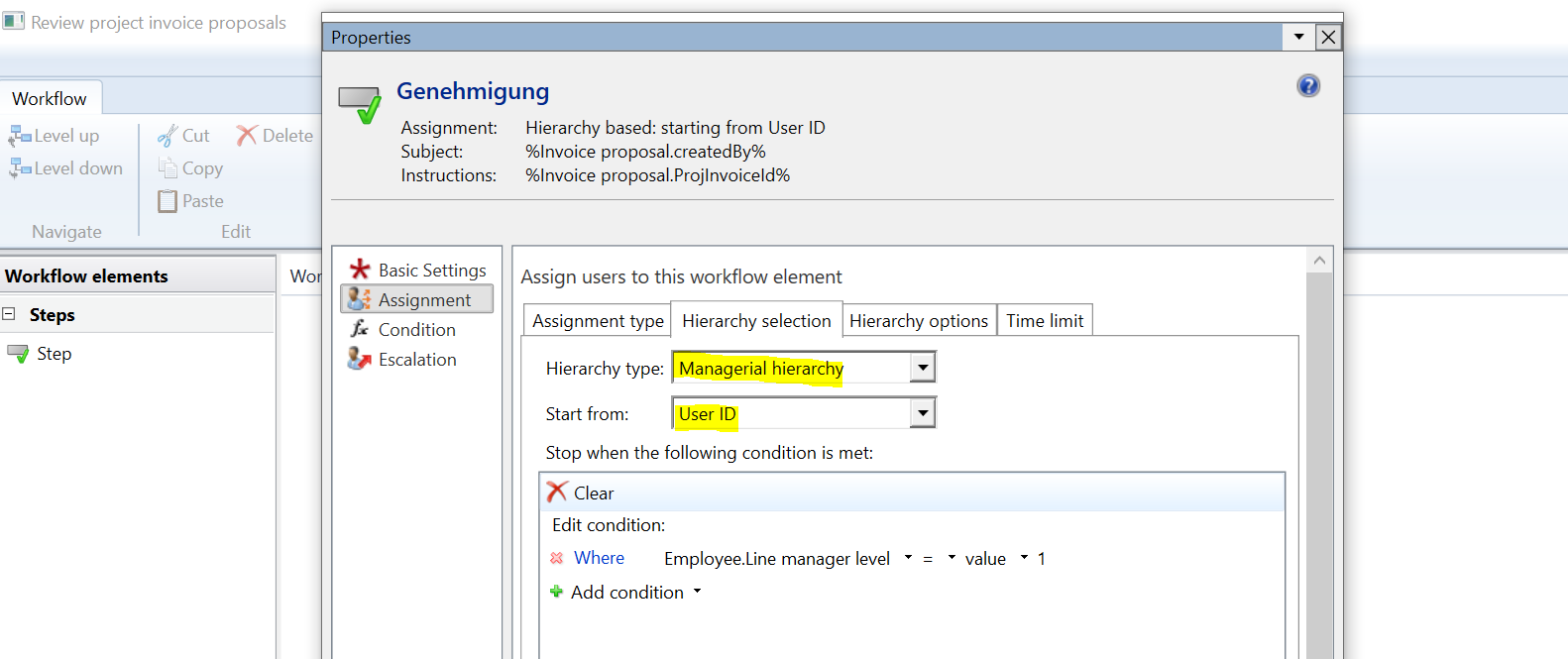
pastedimage1634045393325v1.png

What does that mean? Because for other Workflows (for example the purchase order workflow or the purchase requisition workflow) it starts from preparer or requester. It seems to me that "Review Project Invoice Proposal Workflow" is not related to the position hierarchy?

Anyone has an Idea what to do? Can someone help please? For some reason the Hierarchy Token USER ID has to be there...

I have the same question (0)
  • Verified answer
    Michal Krejza Profile Picture
    Microsoft Employee on at

    Hello DNC,

    Have you tried to change the Star from to "Workflow Originator" ?

    4846.Community.png

    I would expect it should work, Why it has to be set to "User ID" ?

  • DNC Profile Picture
    on at

    Thanks, it works the way you described it.

Under review

Thank you for your reply! To ensure a great experience for everyone, your content is awaiting approval by our Community Managers. Please check back later.

Helpful resources

Quick Links

Introducing the 2026 Season 1 community Super Users

Congratulations to our 2026 Super Stars!

Meet the Microsoft Dynamics 365 Contact Center Champions

We are thrilled to have these Champions in our Community!

Congratulations to the April Top 10 Community Leaders

These are the community rock stars!

Leaderboard > Finance | Project Operations, Human Resources, AX, GP, SL

#1
Giorgio Bonacorsi Profile Picture

Giorgio Bonacorsi 802

#2
André Arnaud de Calavon Profile Picture

André Arnaud de Cal... 636 Super User 2026 Season 1

#3
Subra Profile Picture

Subra 534

Last 30 days Overall leaderboard

Product updates

Dynamics 365 release plans
