web
You’re offline. This is a read only version of the page.
close
Skip to main content

Announcements

No record found.

News and Announcements icon
Community site session details

Community site session details

Session Id :
Small and medium business | Business Central, N...
Suggested Answer

Item Charge Assignment

(0) ShareShare
ReportReport
Posted on by 175

Hi All, 

I have posted a purchase receipt. The currency code on this USD. Then I am creating a separate purchase Invoice for item charge which is in Local Current AED. When I try to assign this invoice to the Posted purchase receipt, the system is converting the value to USD. Screenshot below for your understanding. Wanted to know why this happens. I need only the local currency to be applied to it. 
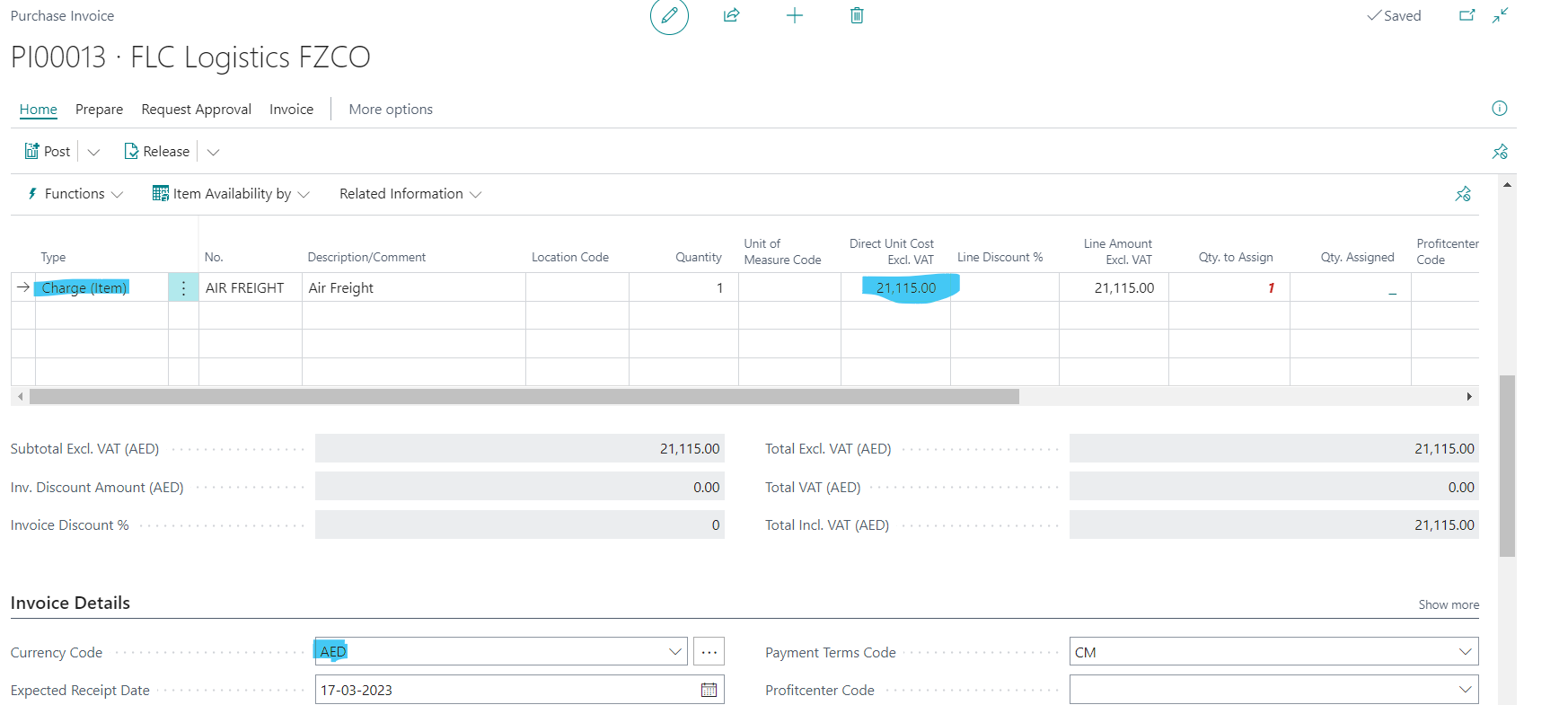
pastedimage1686568603211v1.png

The preview posting screenshot showing the entries, 
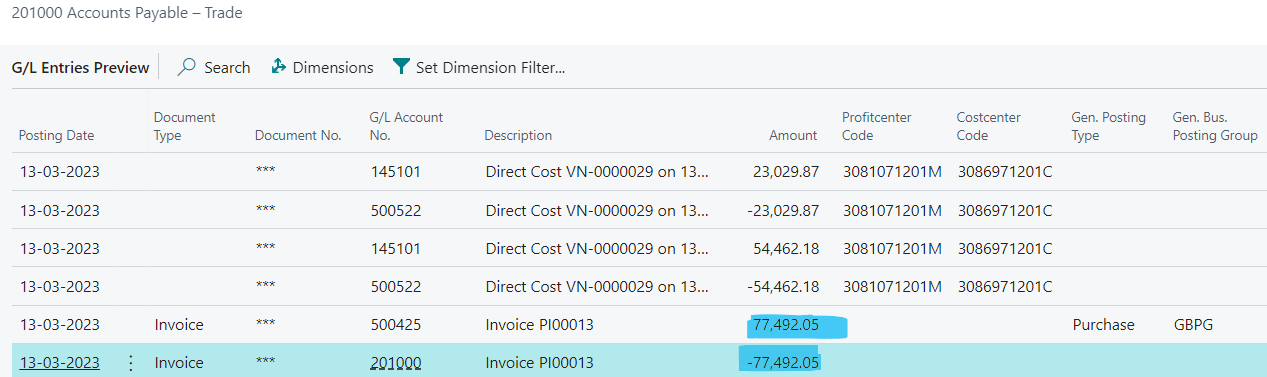
pastedimage1686568658853v2.png

Appreciate the help. 

I have the same question (0)
  • Suggested answer
    Jun Wang Profile Picture
    8,216 Moderator on at

    this is normal behavior. the original transaction is in USD, which might be the default currency for the vendor. when you create a purchase invoice for that vendor, BC default the currency to USD. user needs to change the currency to the desired one manually and assign it. 

  • Suggested answer
    IB-29041624-0 Profile Picture
    1,177 Moderator on at

    Assigning Item charges should not change the currency used on the purchase invoice.

    Are you sure the screenshots you have attached are the correct ones?

    Can you show the posted purchase invoice for the item charge?

  • MANJUNATH DHANAPAL Profile Picture
    175 on at

    Hi Mr. Bruvik,

    Please find the posted purchase invoice screenshot below,

  • MANJUNATH DHANAPAL Profile Picture
    175 on at

    Hi Mr. Bruvik,

    I have attached the screenshot. Please let me know what can be done.. I am stuck here.

    Thank you for your help.

  • MANJUNATH DHANAPAL Profile Picture
    175 on at

    Hi Bruvik,

    I found the issue. There was some mismatch on the currency card and I fixed it. Anyways, thank you for your response.

    Regards,

    MD

  • MANJUNATH DHANAPAL Profile Picture
    175 on at

    Hi App,

    I found the issue. There was some mismatch on the currency card and I fixed it. Anyways, thank you for your response.

    Regards,

    MD

Under review

Thank you for your reply! To ensure a great experience for everyone, your content is awaiting approval by our Community Managers. Please check back later.

Helpful resources

Quick Links

Introducing the 2026 Season 1 community Super Users

Congratulations to our 2026 Super Stars!

Meet the Microsoft Dynamics 365 Contact Center Champions

We are thrilled to have these Champions in our Community!

Congratulations to the April Top 10 Community Leaders

These are the community rock stars!

Leaderboard > Small and medium business | Business Central, NAV, RMS

#1
OussamaSabbouh Profile Picture

OussamaSabbouh 1,948 Super User 2026 Season 1

#2
YUN ZHU Profile Picture

YUN ZHU 936 Super User 2026 Season 1

#3
Teagen Boll Profile Picture

Teagen Boll 616 Super User 2026 Season 1

Last 30 days Overall leaderboard

Featured topics

Product updates

Dynamics 365 release plans
