web
You’re offline. This is a read only version of the page.
close
Skip to main content

Notifications

Announcements

No record found.

Community site session details

Community site session details

Session Id :
Microsoft Dynamics CRM (Archived)

D365 V8.2 On Premises ADFS 4.0 OAuth 2.0 token missing claims information

(0) ShareShare
ReportReport
Posted on by 30

Hello,

My current setup includes D365 V8.2 On Premises , ADFS 4.0. I am trying to generate a OAuth 2.0 token for accessing WebAPI. For doing so u have created an Application Group and setup appropriate rules. I am using postman to get the OAuth Token. 

i am following this blog to generate the token 

https://www.cloudriven.fi/en/cloud-9-videos/how-to-do-a-dynamics-365-web-api-request-using-oauth2/

Following is my setting as it appears on postman
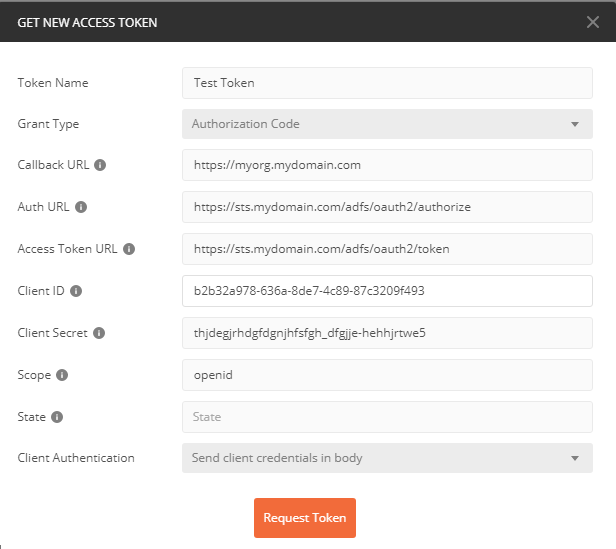
GetAccessToken.png

This provides me an access token as well however when i try to examine the token on jwt.io i can see that claim information is missing. Also i have noted that "aud" in the token is set to"urn:microsoft:userinfo" which should have been the resource i am trying to access. 

Without claim information the CRM WebAPI calls return 401 authorised.  Any help in this regard will be much appreciated.

*This post is locked for comments

I have the same question (0)
  • Shaner Profile Picture
    35 on at

    I'm having this exact issue.  Would love to know if anyone has got a solution.

    Edit: I'n my case I'm using a Grant Type of Password, and its still not working.  You may want to try OP as I think to get the claim you will have to pass a user credential. 

  • Suggested answer
    Kokulan Profile Picture
    18,054 on at

    Hi

    Please have look at these links

    medium.com/.../the-mystery-of-the-missing-adfs-jwt-claims-7658d9cdeaac

    nzpcmad.blogspot.com/.../adfs-adfs-40-with-spa.html

    Hope these help

  • Verified answer
    Shaner Profile Picture
    35 on at

    I don't think you can get a claim using Postman because you need to add to the request body.  

    Using Fiddler and its composer I'm now getting the claim with the token.

    Follow the video, ensuring the claims configured for the Application Group.

    Fiddler:

    2437.adfs.jpg

    POST: https://your.auth.server/adfs/oauth2/token

    Header:

    Content-Type: application/x-www-form-urlencoded

    Body (I've separated it so its easy to read but paste it as a single line):

    grant_type=password
    &username=domain%5Cuser
    &password=XXXXXXXX
    &scope=openid
    &client_id=xxxxxxx-xxxx-xxxx-xxxx-xxxxxxxxxxx
    &client_secret=xxxxxxxxxxxxxxxxxxxxxxxxxxxxxxxxxxxxxxxxxx
    &response_mode=form_post
    &https://your.crm.local/crm/api/data/v8.2/

    If you have an IFD then use this format:

    &resource=https://your.crm.com/api/data/v8.2/

    Results:

    2437.adfs.jpg

    https://jwt.io/

    jwt.io.jpg

  • Misael Pérez Profile Picture
    100 on at

    Hi, Did you were able to find a soluiton? Im facing the same issue (also tried the verified response, but no luck).

    Thanks,   

       Misael  

  • Shaner Profile Picture
    35 on at

    Follow the instructions in the video. Use Fiddler or SoapUI to test so that you can set the body of the request. Make sure you include all of the parameters. Inspect the response in https://jwt.io for the claim.

  • Suggested answer
    Community Member Profile Picture
    on at

    Please check this:- https://jkdynamicscrm.blogspot.com/2021/06/blog-post.html

    Do not forget to register claims; while creating the client and secret Id's.

    Please verify if this is valid answer. Thanks!

Under review

Thank you for your reply! To ensure a great experience for everyone, your content is awaiting approval by our Community Managers. Please check back later.

Helpful resources

Quick Links

Responsible AI policies

As AI tools become more common, we’re introducing a Responsible AI Use…

Neeraj Kumar – Community Spotlight

We are honored to recognize Neeraj Kumar as our Community Spotlight honoree for…

Leaderboard > 🔒一 Microsoft Dynamics CRM (Archived)

#1
SA-08121319-0 Profile Picture

SA-08121319-0 4

#1
Calum MacFarlane Profile Picture

Calum MacFarlane 4

#3
Alex Fun Wei Jie Profile Picture

Alex Fun Wei Jie 2

Last 30 days Overall leaderboard

Featured topics

Product updates

Dynamics 365 release plans
