
web
You’re offline. This is a read only version of the page.
close
Skip to main content

Notifications

Announcements

Community site session details

Community site session details

Session Id :
Microsoft Dynamics AX (Archived)

Coverage Item with Batch number

(0) ShareShare
ReportReport
Posted on by 1,094

Coverage-plan-by-dimension.JPG

Hi,... have try this feature? ... Item Coverage.

for standard Item Coverage,using Storage Dimension Group, i am not having a problem.

but sometimes Item have a batch number. so we have to setup the Coverage plan by Dimension on Tracking Dimension Group.select the Batch number then checklist the Coverage plan by Dimension.
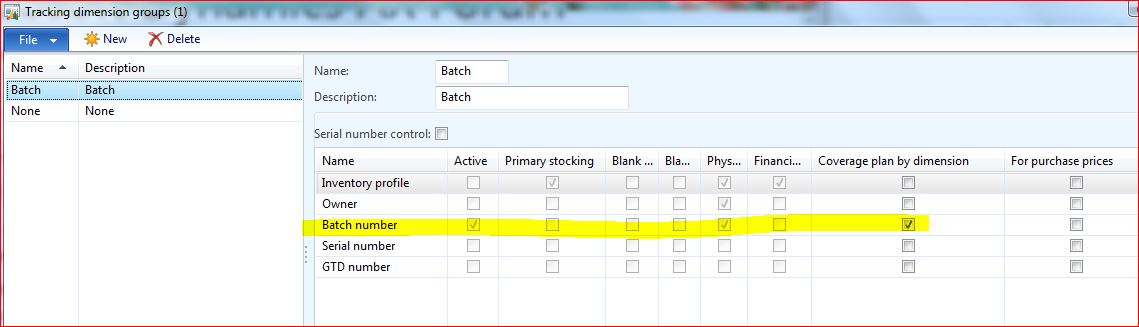
But when i run the Item Coverage Wizard, the option for Batch number is not showed in the Item Coverage Wizard.

Does anyone know how to setup Item Coverage for Item with Bacthnumber?

*This post is locked for comments

I have the same question (0)
  • Verified answer
    André Arnaud de Calavon Profile Picture
    301,741 Super User 2025 Season 2 on at

    Hi Husna,

    If your question is answered, would you mind to mark one or more answers so this thread will get the status answered?

  • Husna Yusuf Profile Picture
    1,094 on at

    Hi Andre,

    Ok ... tahnk you.

    Regards,

    Husna

  • Husna Yusuf Profile Picture
    1,094 on at

    Hi Steven,

    Thank you for your explanation.

    Regards,

    Husna

  • Weaveriski Profile Picture
    23,620 Moderator on at

    Not really advisable to set a coverage by a batch number. In essence you would be stating you need 10 of Batch A in stock and when you have 9 order more of Batch A. Very few industries have the capability of batch reuse like this, it is a tracking mechanism only. Attributes of a batch to get a similar like, but once a batch is used it is used, you need more of the item, and the batch will be a new batch.

  • Suggested answer
    André Arnaud de Calavon Profile Picture
    301,741 Super User 2025 Season 2 on at

    Hi Husna,

    The dimensions Batch number, Serial number and Pallet ID are ignored on the Item coverage form. These are regardless of the setting on the Tracking dimension group not enabled.

Under review

Thank you for your reply! To ensure a great experience for everyone, your content is awaiting approval by our Community Managers. Please check back later.

Helpful resources

News and Announcements

Season of Giving Solutions is Here!

Quick Links

Responsible AI policies

As AI tools become more common, we’re introducing a Responsible AI Use…

Neeraj Kumar – Community Spotlight

We are honored to recognize Neeraj Kumar as our Community Spotlight honoree for…

Leaderboard > 🔒一 Microsoft Dynamics AX (Archived)

#1
TAHER Mehdi Profile Picture

TAHER Mehdi 3

#2
Martin Dráb Profile Picture

Martin Dráb 2 Most Valuable Professional

#2
Volodya Profile Picture

Volodya 2

Last 30 days Overall leaderboard

Featured topics

Product updates

Dynamics 365 release plans
