web
You’re offline. This is a read only version of the page.
close
Skip to main content

Notifications

Announcements

No record found.

Community site session details

Community site session details

Session Id :
Microsoft Dynamics GP (Archived)

blank space between sections in a Word template

(0) ShareShare
ReportReport
Posted on by 75

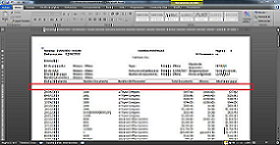
When I was printing a Word template for the modified report "PM Historical Aged TB - Detail" I saw a blank space between the sections of the report. I got rid of the space between the tables in the template.

When I print the standard version there is not any blank space and everything is ok. This only happens with the Word template.

What is causing this blank space?

Thanks for your help.
*This post is locked for comments

I have the same question (0)
  • Lyn Barr Profile Picture
    1 on at

    Your template probably contains two separate tables, one that holds the header info and one that holds the line detail.  The space is caused because Word automatically puts a space between the two tables.

    So that is probably WHY this is happening to you.

    As for how to fix it, I haven't figured that out yet!  If you modify the template to remove the space between the tables, it will actually merge the two tables into one, which can cause a whole other set of problems.  Typically, you will want to keep the two tables separate, and just not show the space in between.  However, you can certainly try merging the two tables to see if that solves your problem.  (Just modify the template, delete the space, and the merge should happen automatically.)

    I need to keep my two tables separate, so I tried making the font size on that dividing line 1pt, but that did not work, either.

    If you figure out how to keep two separate tables, yet not show the extra space, please share it here!

    Good luck,

    Lyn

  • Suggested answer
    Jorge A. Raigoza Profile Picture
    15 on at

    It can be solved reasigning the bookmarks, to see it go to option, advance, the bookmars icon is in the insert menu

  • Lyn Barr Profile Picture
    1 on at

    Jorge, what would you do with the bookmarks, exactly?  There aren't any bookmarks in the spaces between tables, and Microsoft Support was not able to help me eliminate the space between tables.  Also, the bookmarks in the Word Templates typically need to be in very specific spots in order for the template to work properly.

    If you have managed to somehow eliminate this space between tables, please describe your process more precisely.  Thanks!

  • Suggested answer
    Community Member Profile Picture
    on at

    Hi Lyn,

    It's been a while since your post, but thought I'd mention this anyways.  When you make the font size on that dividing line 1pt set this as the default font for the document.  It will keep the line at that row height when printing from GP.

    Cale

  • Lyn Barr Profile Picture
    1 on at

    Sweet!  I just tried it, and it worked!  Thanks, Cale!

Under review

Thank you for your reply! To ensure a great experience for everyone, your content is awaiting approval by our Community Managers. Please check back later.

Helpful resources

Quick Links

Responsible AI policies

As AI tools become more common, we’re introducing a Responsible AI Use…

Neeraj Kumar – Community Spotlight

We are honored to recognize Neeraj Kumar as our Community Spotlight honoree for…

Leaderboard > 🔒一 Microsoft Dynamics GP (Archived)

#1
Community Member Profile Picture

Community Member 2

#2
mtabor Profile Picture

mtabor 1

#2
Victoria Yudin Profile Picture

Victoria Yudin 1

Last 30 days Overall leaderboard

Featured topics

Product updates

Dynamics 365 release plans



