Hi to all,
I have to install BC spring 2019 CU 14 IT lang. I download the zip pachage. I experience the error of the long path and I extract it with 7zip in folder "CU14BC"
I start the installation and I select only database component, server manager and server. All come to install expect the server.
This is the log
=== Logging started: 2020/07/13 15:15:52 ===
Executable: D:\CU 14 Dynamics 365 Business Central Spring 19 Update IT\setup.exe v14.0.43793.0
Computer : MDMNAVSRV02
--- logging level: standard ---
RegistrySearch: Id = 'SqlServerInstalled', checking registry key existence.
Id = 'SqlServerInstalled', Key = 'SYSTEM\CurrentControlSet\Services\', Exists = '1'
RegistrySearch: Id = 'SqlNCLIInstalled', checking registry key existence.
Id = 'SqlNCLIInstalled', Key = 'SOFTWARE\Microsoft\SQLNCLI11', Exists = '1'
RegistrySearch: Id = 'DotNetFxRelease', searching for registry key value.
Id = 'DotNetFxRelease', Key = 'SOFTWARE\Microsoft\NET Framework Setup\NDP\v4\Full', Value = '528040'
RegistrySearch: Id = 'VstoInstalled', searching for registry key value.
Id = 'VstoInstalled', Key = 'SOFTWARE\Microsoft\VSTO Runtime Setup\v4R', Value = '1'
RegistrySearch: Id = 'PowerShell30Installed', searching for registry key value.
Id = 'PowerShell30Installed', Key = 'SOFTWARE\Microsoft\PowerShell\3\PowerShellEngine', Value = '5.1.18362.1'
RegistrySearch: Id = 'WindowsSearchInstalled', checking registry key existence.
Id = 'WindowsSearchInstalled', Key = 'SYSTEM\CurrentControlSet\Services\WSearch', Exists = '1'
RegistrySearch: Id = 'Excel14Installedx86', searching for registry key value.
Id = 'Excel14Installedx86', Registry key not found. Key = 'SOFTWARE\Microsoft\Office\14.0\Excel\InstallRoot'
RegistrySearch: Id = 'Excel14Installedx64', searching for registry key value.
Id = 'Excel14Installedx64', Registry key not found. Key = 'SOFTWARE\Microsoft\Office\14.0\Excel\InstallRoot'
RegistrySearch: Id = 'Outlook', checking registry key existence.
Id = 'Outlook', Key = 'SOFTWARE\Microsoft\Windows\CurrentVersion\App Paths\OUTLOOK.EXE', Exists = '0'
RegistrySearch: Id = 'Outlook15', checking registry key existence.
Id = 'Outlook15', Key = 'Software\Microsoft\Office\15.0\Outlook\Setup', Exists = '0'
RegistrySearch: Id = 'Outlook16', checking registry key existence.
Id = 'Outlook16', Key = 'Software\Microsoft\Office\16.0\Outlook\Setup', Exists = '0'
RegistrySearch: Id = 'VCPPSpLevel', searching for registry key value.
Id = 'VCPPSpLevel', Key = 'SOFTWARE\Microsoft\DevDiv\VC\Servicing\12.0', Value = '0'
RegistrySearch: Id = 'VCPPInstalled', checking registry key existence.
Id = 'VCPPInstalled', Key = 'SOFTWARE\Microsoft\DevDiv\VC\Servicing\12.0', Exists = '1'
RegistrySearch: Id = 'VCPP64Installed', checking registry key existence.
Id = 'VCPP64Installed', Key = 'SOFTWARE\Microsoft\DevDiv\VC\Servicing\12.0', Exists = '1'
RegistrySearch: Id = 'VCPP201764Installed', checking registry key existence.
Id = 'VCPP201764Installed', Key = 'SOFTWARE\Microsoft\DevDiv\VC\Servicing\14.0', Exists = '1'
RegistrySearch: Id = 'IISInstalled', checking registry key existence.
Id = 'IISInstalled', Key = 'SOFTWARE\Microsoft\InetStp', Exists = '1'
RegistrySearch: Id = 'IISWinAuthInstalled', searching for registry key value.
Id = 'IISWinAuthInstalled', Key = 'SOFTWARE\Microsoft\InetStp\Components', Value = '1'
RegistrySearch: Id = 'IISASPNETInstalled', searching for registry key value.
Id = 'IISASPNETInstalled', Registry value not found. Key = 'SOFTWARE\Microsoft\InetStp\Components', Value = 'ASPNET'
RegistrySearch: Id = 'IISASPNET45Installed', searching for registry key value.
Id = 'IISASPNET45Installed', Key = 'SOFTWARE\Microsoft\InetStp\Components', Value = '1'
RegistrySearch: Id = 'IISNETFXInstalled', searching for registry key value.
Id = 'IISNETFXInstalled', Registry value not found. Key = 'SOFTWARE\Microsoft\InetStp\Components', Value = 'NetFxExtensibility'
RegistrySearch: Id = 'IISNETFX45Installed', searching for registry key value.
Id = 'IISNETFX45Installed', Key = 'SOFTWARE\Microsoft\InetStp\Components', Value = '1'
RegistrySearch: Id = 'IISISAPEXInstalled', searching for registry key value.
Id = 'IISISAPEXInstalled', Key = 'SOFTWARE\Microsoft\InetStp\Components', Value = '1'
RegistrySearch: Id = 'HttpActivationInstalled', checking registry key existence.
Id = 'HttpActivationInstalled', Key = 'SYSTEM\CurrentControlSet\Services\WAS', Exists = '1'
RegistrySearch: Id = 'IISISAPIFIInstalled', searching for registry key value.
Id = 'IISISAPIFIInstalled', Key = 'SOFTWARE\Microsoft\InetStp\Components', Value = '1'
RegistrySearch: Id = 'IISREQSTFIInstalled', searching for registry key value.
Id = 'IISREQSTFIInstalled', Key = 'SOFTWARE\Microsoft\InetStp\Components', Value = '1'
RegistrySearch: Id = 'IISSTATICInstalled', searching for registry key value.
Id = 'IISSTATICInstalled', Key = 'SOFTWARE\Microsoft\InetStp\Components', Value = '1'
RegistrySearch: Id = 'WebComponentsPrerequisitesInstalled', searching for registry key value.
Id = 'WebComponentsPrerequisitesInstalled', Registry key not found. Key = 'SOFTWARE\Microsoft\Microsoft Dynamics NAV\140\Web Components Prerequisites'
RegistrySearch: Id = 'IdentityFoundationInstalled', checking registry key existence.
Id = 'IdentityFoundationInstalled', Key = 'SOFTWARE\Microsoft\Windows Identity Foundation\Setup\v3.5', Exists = '1'
Configuring package. Id = 'ARP'
MSI log file set to: C:\Users\ADMINI~1\AppData\Local\Temp\setup.wix.msi.1.log
Done configuring package. Id = 'ARP' ReturnCode = 0
Configuring package. Id = 'IdentityExtension64'
MSI log file set to: C:\Users\ADMINI~1\AppData\Local\Temp\setup.wix.msi.2.log
Done configuring package. Id = 'IdentityExtension64' ReturnCode = 0
Configuring package. Id = 'WebClientDependency'
Path to executable = 'D:\CU 14 Dynamics 365 Business Central Spring 19 Update IT\WebClientDependencyInstaller.exe', Arguments = '/install'
Done configuring package. Id = 'WebClientDependency' ReturnCode = 0
Configuring package. Id = 'DotNetCore'
Path to executable = 'D:\CU 14 Dynamics 365 Business Central Spring 19 Update IT\Prerequisite Components\DotNetCore\dotnet-hosting-2.1.14-win.exe', Arguments = '/quiet /install /norestart'
Done configuring package. Id = 'DotNetCore' ReturnCode = 0
Configuring package. Id = 'RoleTailoredClient'
MSI log file set to: C:\Users\ADMINI~1\AppData\Local\Temp\setup.wix.msi.3.log
Done configuring package. Id = 'RoleTailoredClient' ReturnCode = 0
Configuring package. Id = 'ServiceTier'
MSI log file set to: C:\Users\ADMINI~1\AppData\Local\Temp\setup.wix.msi.4.log
Windows Installer: Error: Service 'Microsoft Dynamics 365 Business Central Server [BCNAV]' (MicrosoftDynamicsNavServer$BCNAV) failed to start. Verify that you have sufficient privileges to start system services.
Done configuring package. Id = 'ServiceTier' ReturnCode = 1603
Configuring package. Id = 'WebClient'
MSI log file set to: C:\Users\ADMINI~1\AppData\Local\Temp\setup.wix.msi.5.log
Done configuring package. Id = 'WebClient' ReturnCode = 0
Configuring package. Id = 'NavHelpServer'
MSI log file set to: C:\Users\ADMINI~1\AppData\Local\Temp\setup.wix.msi.6.log
Done configuring package. Id = 'NavHelpServer' ReturnCode = 0
Configuring package. Id = 'WebHelp_IT'
MSI log file set to: C:\Users\ADMINI~1\AppData\Local\Temp\setup.wix.msi.7.log
Done configuring package. Id = 'WebHelp_IT' ReturnCode = 0
SUCCESS: Package Componenti di installazione di Microsoft Dynamics 365 Business Central executed sucessfully.
SUCCESS: Package Microsoft Identity Extensions executed sucessfully.
SUCCESS: Package Prerequisiti IIS per i componenti server Web executed sucessfully.
SUCCESS: Package Microsoft .NET Core Windows Server Hosting executed sucessfully.
SUCCESS: Package Componenti client executed sucessfully.
ERROR: Package Componenti di Microsoft Dynamics 365 Business Central Server failed with error. See detailed message above.
SUCCESS: Package Componenti server Web executed sucessfully.
SUCCESS: Package Microsoft Dynamics 365 Business Central Help Server executed sucessfully.
SUCCESS: Package Modulo lingua (it-IT) per Microsoft Dynamics 365 Business Central Help Server executed sucessfully.
=== Logging stopped: 2020/07/13 15:27:37 ===
The strange thing is that in the BC Central Administration I find the Microsoft dynamics 365 business central on the left but there is not any instance on the right and I receive this error message.
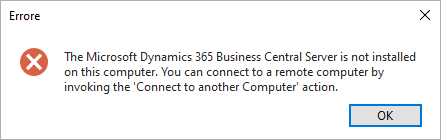
There is not any instance even in the services panel of windows. But if I enter in the prgram and features in the control panel of windows I find the instance as it was installed.
I try to instal at least 20 times but the result is the same, also in different pc. At moment I try on windows 10 pro.
In the event viewer I see this event repeated:
Product: Microsoft Dynamics 365 Business Central Server -- Error 1920. Service 'Microsoft Dynamics 365 Business Central Server [BC140]' (MicrosoftDynamicsNavServer$BC140) failed to start. Verify that you have sufficient privileges to start system services.
BUT I HAVE ADMIN RIGHTS, I try with all user admin.
Impossibile trovare la descrizione per l'ID evento 216 dall'origine MicrosoftDynamicsNavServer$BC140. Il componente che ha generato l'evento non è installato nel computer locale oppure l'installazione è danneggiata. È possibile installare o ripristinare il componente nel computer locale.
Impossibile trovare la descrizione per l'ID evento 701 dall'origine MicrosoftDynamicsNavServer$BC140. Il componente che ha generato l'evento non è installato nel computer locale oppure l'installazione è danneggiata. È possibile installare o ripristinare il componente nel computer locale.
Impossibile trovare la descrizione per l'ID evento 708 dall'origine MicrosoftDynamicsNavServer$BC140. Il componente che ha generato l'evento non è installato nel computer locale oppure l'installazione è danneggiata. È possibile installare o ripristinare il componente nel computer locale.







