web
You’re offline. This is a read only version of the page.
close
Skip to main content

Notifications

Announcements

No record found.

Community site session details

Community site session details

Session Id :
Microsoft Dynamics GP (Archived)

Can't insert Duplicate Key Sales All Transaction Inquiry

(0) ShareShare
ReportReport
Posted on by 12

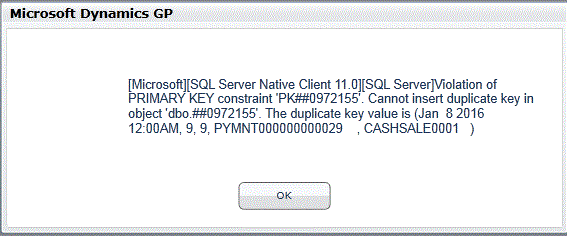
Client clicks on All Sales Transactions on the Sales Navigation Panel and gets the following error
Duplicate-Error-in-All-Sales-Transaction.GIF

The developer of a custom application that they work with has looked at the temp table and does not find any duplicate data.

I have looked at an error similar to this on the following thread, but, we have tried both suggestions and the error is still present.

https://community.dynamics.com/gp/f/32/t/85492

All suggestions welcome at this point.

*This post is locked for comments

I have the same question (0)
  • Bill Campbell Profile Picture
    12 on at

    One quick update - we looked at the fact that the error appears to be in the TEMPDB and there considered the option of shutting down the SQL Server - however the developer does not believe that will make a difference due to the fact that he can not find a duplicate in any data.

    Suggestions?

  • Verified answer
    Richard Wheeler Profile Picture
    75,850 Moderator on at

    Looking at the document number of CASHSALE01 you have either just started using GP or just started entering receipts. If you do an inquiry on AR document numbers and enter CASHSALE01 do you see more than one entry? If your developer is writing these records than he/she has created a duplicate. The code needs to be revised to get the correct next document number. The error is telling you a record with this document already exists. The table names with the ## prefix is telling you GP is trying to create a temp table  which means GP will aggregate data from both open and history tables and bring them into this temp table. So most likely this document number exists in both the open and history tables which is why your code can insert the record but the temp table cannot be populated because it results in a duplicate record.

  • Suggested answer
    Bill Campbell Profile Picture
    12 on at

    So client went back into custom app after the developer says all good and does something with the cash customer and pow the problem goes away.

    Seems that they were in the middle of processing something on the customer record but did not commit it on the other side - just a twek in the custom system and we are fixed.

    Thanks for the direction looking for the OPEN and HISTORY

Under review

Thank you for your reply! To ensure a great experience for everyone, your content is awaiting approval by our Community Managers. Please check back later.

Helpful resources

Quick Links

Responsible AI policies

As AI tools become more common, we’re introducing a Responsible AI Use…

Neeraj Kumar – Community Spotlight

We are honored to recognize Neeraj Kumar as our Community Spotlight honoree for…

Leaderboard > 🔒一 Microsoft Dynamics GP (Archived)

#1
mtabor Profile Picture

mtabor 1

Last 30 days Overall leaderboard

Featured topics

Product updates

Dynamics 365 release plans
