web
You’re offline. This is a read only version of the page.
close
Skip to main content

Announcements

No record found.

News and Announcements icon
Community site session details

Community site session details

Session Id :
Microsoft Dynamics AX (Archived)

BI Default Cubes Deployment Error in AX 2012 R3

(0) ShareShare
ReportReport
Posted on by

I'm run the SQL Server Analysis Service Project Wizard in the Microsoft Dynamics AX 2012 R3 Client.

There appear the following Warning and Errors:

Infolog: Message:

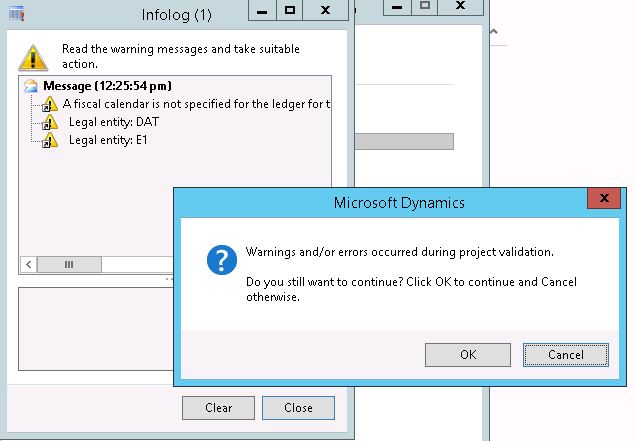
A fiscal calendar is not specified for the ledger for the legal entities listed below. A fiscal calendar must be assigned to each legal entity’s ledger in order for cube reports to run correctly and to analyze cube data in Microsoft Excel. Select a fiscal calendar for the ledger in each legal entity to correct this error.

Legal entity: DAT

Legal entity: E1
8255.infolog.jpg

Next Infolog: Error:

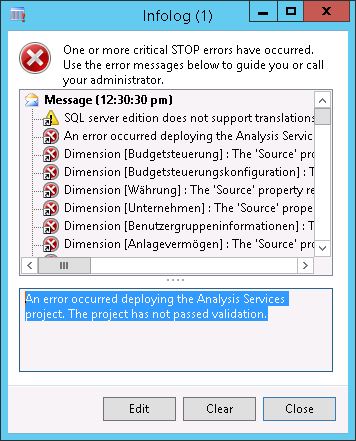
An error occurred deploying the Analysis Services project. The project has not passed validation.
infolog1.jpg

Any permissions on the SSAS exist for service account also the business connector are assigned and by member of local MSAS Group on the target SQL 2014 Analysis Server.

*This post is locked for comments

I have the same question (0)
  • Verified answer
    Iulian Cordobin Profile Picture
    8,201 on at

    So, basically have you checked that the legal entities that he is complaining about have Fiscal Calendars defined? You can check this for every entity by going to General Ledger -> Setup -> Ledger and making sure you have a Fiscal calendar defined.

  • Community Member Profile Picture
    on at

    Hi Iulian,

    Thank you for your grateful hint, after assign fiscal calendar the warning disappear, but now got the next error:

    An error occurred deploying the Analysis Services project. The project has not passed validation.

    Dimension [Budgetsteuerung] : The 'Source' property references unknown 'Data Source View' with ID='REGETEST'.

    .. appears many more of this!

  • Iulian Cordobin Profile Picture
    8,201 on at

    One question: is this one of the standard AX Analysis projects that come OOB or a new project / std. project customized?

  • Community Member Profile Picture
    on at

    I try to deploy default DAT, However presumably that the customer using another BI tool, do you think that therefore the database structure was changed ? In this case, the dynamics AX OLAP would not be needed ?

  • Verified answer
    Iulian Cordobin Profile Picture
    8,201 on at

    On one hand, I was asking about the project you are deploying because I can see it's trying to create a dimension linked to a table called REGETEST with is not a standard object in AX.

    So, yes maybe you are missing some items (tables) in your instance. I do not think it's another BI tool, just something is missing.

  • Verified answer
    Lance [MSFT] Profile Picture
    on at

    This error means the analysis services project you tried to deploy does not build and therefore cannot be deployed.  

    Is this a project you built or someone else's project?  How was it created?

    To fix this the project owner needs to open the analysis services project and fix the problems in it.  If this is a project in AOT, find it and run the Edit command on the context menu to open it in sql data tools.

    This particular error means that data source view's Id property has been renamed somehow and there are dimensions or measure in the project that are referring to it by the old id value.   The reset of the data source view name and id can happens if the project was previously deployed and then opened in dql data tools by importing it off the analysis services server.    

    That data source view file defines a DataSourceView element with a Name and Id property.  The Id property on the DataSource view and the Id property values for all the source properties in dimensions and measure needs to be the same value.  To fix this, right click on the .dsv file in the project and choose View Code.  Find the Id property on the data source view element and change it to REGETEST.  Or you could find all the source properties where the data source view id is set to REGETEST and update those to match the data source view Id value.

    Hope this helps,

    --Lance

Under review

Thank you for your reply! To ensure a great experience for everyone, your content is awaiting approval by our Community Managers. Please check back later.

Helpful resources

Quick Links

Introducing the 2026 Season 1 community Super Users

Congratulations to our 2026 Super Stars!

Meet the Microsoft Dynamics 365 Contact Center Champions

We are thrilled to have these Champions in our Community!

Congratulations to the April Top 10 Community Leaders

These are the community rock stars!

Leaderboard > 🔒一 Microsoft Dynamics AX (Archived)

#1
CP04-islander Profile Picture

CP04-islander 24

#2
Michel ROY Profile Picture

Michel ROY 14

#3
Jagadabi Profile Picture

Jagadabi 6

Last 30 days Overall leaderboard

Featured topics

Product updates

Dynamics 365 release plans
