web
You’re offline. This is a read only version of the page.
close
Skip to main content

Notifications

Announcements

No record found.

Community site session details

Community site session details

Session Id :
Microsoft Dynamics 365 | Integration, Dataverse...
Suggested Answer

Microsoft Flow and when a record is updated step is not available

(0) ShareShare
ReportReport
Posted on by 26

I am trying to create a flow and I don't see the trigger of "When a record is updated"

Why?

pastedimage1619106090625v1.png

I have the same question (0)
  • Suggested answer
    Wahaj Rashid Profile Picture
    11,321 on at

    Hi,

    Thank you for your query.

    Please make sure, Flow is created with Automated trigger.

    Common Data Service (Dataverse) triggers show when you create an Automated Flow.

    pastedimage1619124399895v1.png

    pastedimage1619124470453v2.png

    Please note, depending on your region, you might see Dataverse connector instead of Common Data Service.

    pastedimage1619124537985v3.png

  • Suggested answer
    Community Member Profile Picture
    on at

    Hi USA80,

    Common Data Service has been renamed to Microsoft Dataverse.

    Reshape the future of work with Microsoft Dataverse for Teams—now generally available | Microsoft Power Apps

    pastedimage1619143425047v1.png

    You can choose either of these two to achieve your goal:

    1.Microsoft Dataverse--When a row is added, modified or deleted.

    pastedimage1619143523114v2.png

    Common Data Service--When a row is modified.

    pastedimage1619143766886v3.png

    Regards,

    Leah Ju

    Please mark as verified if the answer is helpful. Welcome to join hot discussions in Dynamics 365 Forums.

  • USA80 Profile Picture
    26 on at

    I am only seeing these options, why is that?  This doesn't look right.

    pastedimage1619185058764v1.png

  • USA80 Profile Picture
    26 on at

    Now, in this box I don't get any pop up.  I need to create flow that when the Account address gets updated, it needs to update all the child contact records address that it is tied to as well.

    pastedimage1619185382528v1.png

  • USA80 Profile Picture
    26 on at

    I guess if someone can show me from start to finish on how to do this, I would appreciate it, then I will have it for my notes, thank you.

  • Community Member Profile Picture
    on at

    Hi USA80,

    From your screenshot, you have selected Microsoft Dataverse--When a row is added, modified or deleted,

    Use the filtering columns box to define a set of comma-separated, unique names for the table, so you need fill logic name of the fields.

    You can refer following link to know more about it:

    Trigger flows when a row is added, modified, or deleted - Power Automate | Microsoft Docs

    Then you can refer following steps.

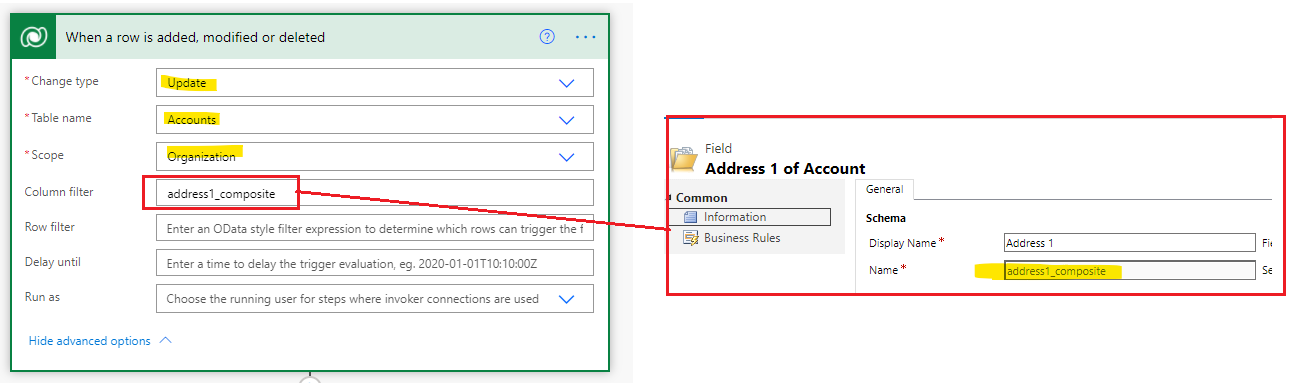
    1.Trigger:

    I selected composite address1 as trigger filter, you can also select other fields as your needs.
    pastedimage1619418028613v1.png

    2.List Rows.

    pastedimage1619418171892v2.png

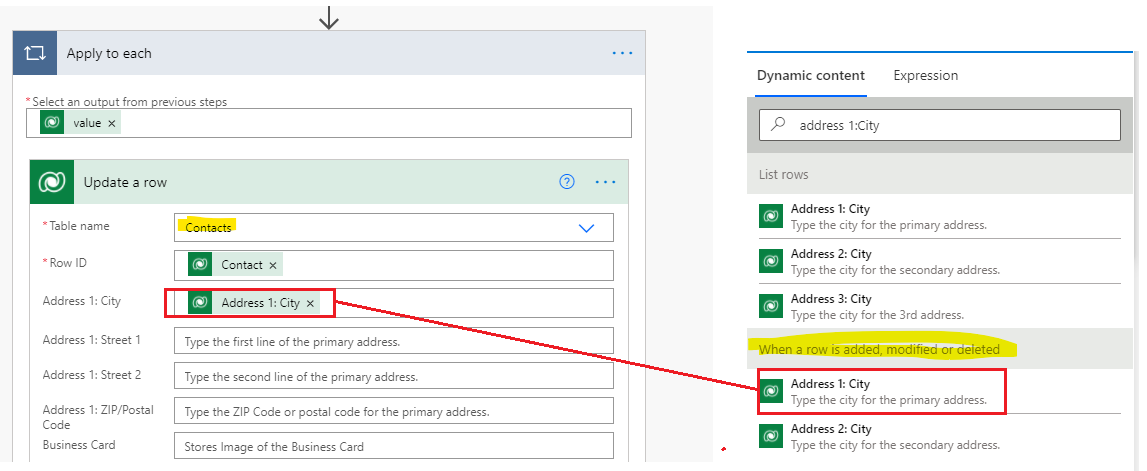
    3.Update a row.

    For example, i just use one address1(city) field to test, you need fill fields of address as your needs.
    pastedimage1619418235372v3.png

    Overview:

    pastedimage1619418369574v4.png

    Regards,

    Leah Ju

    Please mark as verified if the answer is helpful. Welcome to join hot discussions in Dynamics 365 Forums.

  • USA80 Profile Picture
    26 on at

    I don't 'see the account unique identifier

    pastedimage1619451460831v1.png

  • Community Member Profile Picture
    on at

    Hi USA80,

    It's so strange, maybe you can try to roll down the list directly without inserting any words to find it(Unique identifier of the account).

    pastedimage1619489713706v1.png

    Regards,

    Leah Ju

    Please mark as verified if the answer is helpful. Welcome to join hot discussions in Dynamics 365 Forums.

  • USA80 Profile Picture
    26 on at

    I tried that, it doesn't show up.

  • Community Member Profile Picture
    on at

    Hi USA80,

    It’s so strange.

    1.Making sure that you are in the correct environment.

    2.You can try to set another entity as trigger to check unique identifier exists or not.

    pastedimage1619574788119v1.png

    Regards,

    Leah Ju

Under review

Thank you for your reply! To ensure a great experience for everyone, your content is awaiting approval by our Community Managers. Please check back later.

Helpful resources

Quick Links

Responsible AI policies

As AI tools become more common, we’re introducing a Responsible AI Use…

Neeraj Kumar – Community Spotlight

We are honored to recognize Neeraj Kumar as our Community Spotlight honoree for…

Leaderboard > Microsoft Dynamics 365 | Integration, Dataverse, and general topics

#1
Siv Sagar Profile Picture

Siv Sagar 93 Super User 2025 Season 2

#2
#ManoVerse Profile Picture

#ManoVerse 74

#3
Martin Dráb Profile Picture

Martin Dráb 64 Most Valuable Professional

Last 30 days Overall leaderboard

Product updates

Dynamics 365 release plans
