web
You’re offline. This is a read only version of the page.
close
Skip to main content

Announcements

No record found.

News and Announcements icon
Community site session details

Community site session details

Session Id :
Customer experience | Sales, Customer Insights,...
Suggested Answer

'The entity with a name = '<relationship name>' with namemapping = 'Logical' was not found in the MetadataCache.' Error while deleting a managed solution.

(0) ShareShare
ReportReport
Posted on by 40

I have an online Dynamics 365 environment where I have installed a managed solution. This managed solution consists of a N: N relationship component between a Custom and System User entity. 

When I am trying to delete the managed solution getting the below error,  
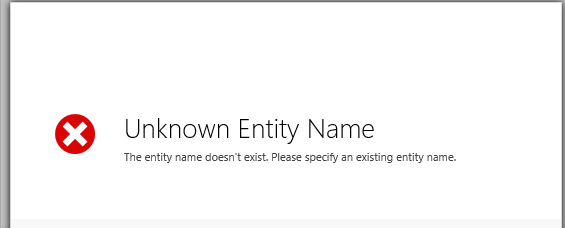
pastedimage1594825967006v1.png

If I download the log file it gives me the following error, "The entity with a name = 'XXXXX' with namemapping = 'Logical' was not found in the MetadataCache."

Here, 'XXXXX' is the relationship name of User and custom entity. Any idea what could be the reason for this? 

I have the same question (0)
  • Suggested answer
    Wahaj Rashid Profile Picture
    11,321 on at

    Hi Vaibhav,

    Do you mean to say you have two N:N relationships with an entity part of the managed solution?

    If yes, can you first try deleting these relationships and then try uninstalling the managed solution.

    Also, try "Publish All Customizations" before deleting the solution.

    Let me know the results.

    Best,

    Wahaj

  • Vaibhav Ghorpade Profile Picture
    40 on at

    I have one N:N relationship with an entity as a part of managed solution. As this is a part of managed solution it does not allow me to delete the relationship.

    Also I tried by first publishing all the customization but no changes in the error.  

  • Wahaj Rashid Profile Picture
    11,321 on at

    Hi,

    I'm sorry it didn't work out.

    Lets look at this in following perspective:

    As per my understanding you have a N:N relationship in your managed solution between an entity (of managed solution) and an entity not part of the managed solution. If this is correct, the other entity is a system entity or a custom entity from default/other solution? 

    In this case, one way is to update unmanaged version of the problematic solution by adding the entity required in N:N relationship. Then deploy and upgrade of this solution to Production environment and try deleting it.

    Look at following article which explains how we can add/remove components to a managed solution (by deploying an upgrade to existing managed solution):

    https://community.dynamics.com/crm/b/henryjammespowerblog/posts/how-to-delete-components-from-a-managed-solution

    However, if this solution is provided by a 3rd party publisher (and you do not have access to development (unmanaged) version of this solution), seek help from the publisher.

    Feel free to share status and discuss.

    Thanks,

    Wahaj

Under review

Thank you for your reply! To ensure a great experience for everyone, your content is awaiting approval by our Community Managers. Please check back later.

Helpful resources

Quick Links

Introducing the 2026 Season 1 community Super Users

Congratulations to our 2026 Super Stars!

Congratulations to our 2025 Community Spotlights

Thanks to all of our 2025 Community Spotlight stars!

Leaderboard > Customer experience | Sales, Customer Insights, CRM

#1
ManoVerse Profile Picture

ManoVerse 180 Super User 2026 Season 1

#2
CU11031447-0 Profile Picture

CU11031447-0 100

#3
11manish Profile Picture

11manish 92

Last 30 days Overall leaderboard

Product updates

Dynamics 365 release plans
