web
You’re offline. This is a read only version of the page.
close
Skip to main content

Notifications

Announcements

No record found.

Community site session details

Community site session details

Session Id :
Microsoft Dynamics AX (Archived)

I can't edit "From Warehouse" field in Planned Transfer Order!

(0) ShareShare
ReportReport
Posted on by 69

I'm trying to firm a Planned Transfer Order, but I can't insert the source warehouse in "From Warehouse" because this field is not editable as the following picture shows:-
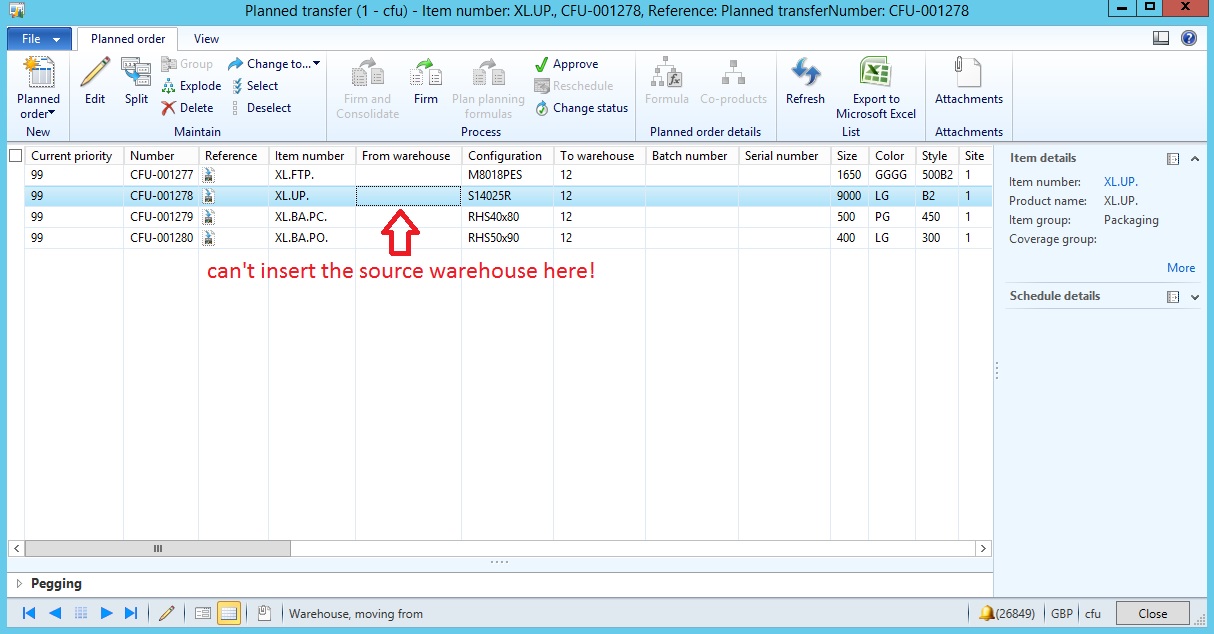
4405.5.jpg

so I get the following error when I firm the Planned Transfer!
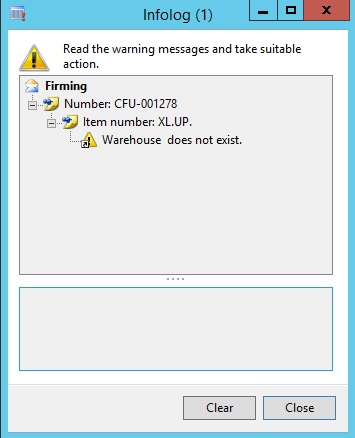
5758.6.jpg

*This post is locked for comments

I have the same question (0)
  • gkumar Profile Picture
    740 on at

    hi Mostafa,

    In the warehouse master for warehouse 12 , mention the replenishing warehouse ,you cannot edit the same for system generated planned transfer orders.

    It is editable and can be filled for only manually created transfer orders.

    Thanks,

    Ganesh

  • Mostafa Khafagy Profile Picture
    69 on at

    Thank you very much Ganesh for your reply, but can you tell me how to mention the replenishing warehouse In the warehouse master for warehouse 12 ?

    Can you give me the path for this setup screen?

  • Suggested answer
    gkumar Profile Picture
    740 on at

    hi Mostafa,

    go to Inventory management>setup>Inventory breakdown>Warehouses>Select (12 warehouse record)>Master planning(tab)> Select Refilling check box  to YES and mention Refilling warehouse

    Thanks

    Ganesh

  • Mostafa Khafagy Profile Picture
    69 on at

    Hi Ganesh,

    This setup obligates me with one refilling warehouse, but I need to change the "From warehouse" manually.

  • Konrad U Profile Picture
    804 on at

    Planned transfers have to have a warehouse to plan from so they can complete the chain of demand, for example to order more for the source warehouse if needed.  You need to establish a supply chain or do manual transfers.

Under review

Thank you for your reply! To ensure a great experience for everyone, your content is awaiting approval by our Community Managers. Please check back later.

Helpful resources

Quick Links

Responsible AI policies

As AI tools become more common, we’re introducing a Responsible AI Use…

Neeraj Kumar – Community Spotlight

We are honored to recognize Neeraj Kumar as our Community Spotlight honoree for…

Leaderboard > 🔒一 Microsoft Dynamics AX (Archived)

#1
Martin Dráb Profile Picture

Martin Dráb 4 Most Valuable Professional

#1
Priya_K Profile Picture

Priya_K 4

#3
MyDynamicsNAV Profile Picture

MyDynamicsNAV 2

Last 30 days Overall leaderboard

Featured topics

Product updates

Dynamics 365 release plans
