web
You’re offline. This is a read only version of the page.
close
Skip to main content

Notifications

Announcements

No record found.

Community site session details

Community site session details

Session Id :
Microsoft Dynamics AX (Archived)

Currency Symbol not showing correctly in the "Customer posted payment journal" SSRS Report

(0) ShareShare
ReportReport
Posted on by 810

Hi,

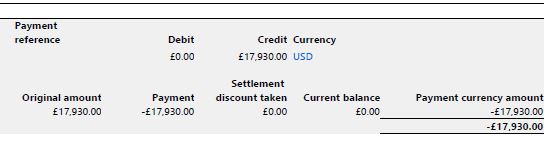
i m facing the issue in the "Customer posted payment journal" ssrs report, in the report currency, credit and debit amount columns is correct but Currency symbol is wrong as below image.
06834.Capture.JPG

can anyone help me out  from this issue?

*This post is locked for comments

I have the same question (0)
  • Community Member Profile Picture
    on at

    Hi, where I can find this report?

  • UmesH@ Profile Picture
    810 on at

    Hi Tatiana Garcia Ramos Ramirez,

    Please see this link.

    technet.microsoft.com/.../hh433481.aspx

  • UmesH@ Profile Picture
    810 on at

    Hi Tatiana Garcia Ramos Ramirez,

    you can find this report from below path

    Accounts receivable > Reports > Transactions > Payments > Customer posted payment journal

    Note:- (CAN, USA) This report is available only to legal entities whose primary address is in Canada or the United States.

  • Community Member Profile Picture
    on at

    The currency is taking from LedgerJournalTrans.CurrencyCode.

    Can you tell me which currency do see in that transaction?

  • Verified answer
    Community Member Profile Picture
    on at

    I know what is happening:

    The fields: Debit and Credit has a numeric custom format in the SSRS report:

    40847.Capture.PNG

    And this currency is taking by the languange set in the system (windows).

    your currency in the transaction is correct, but your symbol is wrong because that format they used for the report.

    You need to change this property in all the fields that are displaying wrong.

    Thanks!

  • UmesH@ Profile Picture
    810 on at

    In the customer transaction currency is USD but i m facing issue on the currency symbol only even i can not debug report class.

    415734.Capture.JPG

  • UmesH@ Profile Picture
    810 on at

    can you please suggest me which formatting option will be good for this fields?

  • Community Member Profile Picture
    on at

    Yes, this must be change it in the SSRS design report.

  • UmesH@ Profile Picture
    810 on at

    Can i select "Default" in the formatting option?

  • Verified answer
    Community Member Profile Picture
    on at

    No, that custom format is taking the language system, you can try to create your own custom format, are you using multi currencies?

    What I will do is remove that custom format and modify the class using string fields example:

    7571.Picture1.png

    Add the new field in the temp table, and change the logic in the DP class.

    Then replace the standard fields for the new fields.

    :)

Under review

Thank you for your reply! To ensure a great experience for everyone, your content is awaiting approval by our Community Managers. Please check back later.

Helpful resources

Quick Links

Responsible AI policies

As AI tools become more common, we’re introducing a Responsible AI Use…

Neeraj Kumar – Community Spotlight

We are honored to recognize Neeraj Kumar as our Community Spotlight honoree for…

Leaderboard > 🔒一 Microsoft Dynamics AX (Archived)

#1
Martin Dráb Profile Picture

Martin Dráb 4 Most Valuable Professional

#1
Priya_K Profile Picture

Priya_K 4

#3
MyDynamicsNAV Profile Picture

MyDynamicsNAV 2

Last 30 days Overall leaderboard

Featured topics

Product updates

Dynamics 365 release plans
