web
You’re offline. This is a read only version of the page.
close
Skip to main content

Notifications

Announcements

No record found.

Community site session details

Community site session details

Session Id :
Microsoft Dynamics 365 | Integration, Dataverse...
Suggested Answer

Lookup table and display a field

(0) ShareShare
ReportReport
Posted on by 10

This is probably really simple...I created a new view and one of the columns is a Location code.  I want to display the location description instead of the code in the  column.  How is this done?

Thanks!

I have the same question (0)
  • Suggested answer
    Wahaj Rashid Profile Picture
    11,321 on at

    Hi,

    As far as I understood, you have a lookup and for it's view, instead of Location Code you need to show the Description field.

    For this purpose, you have created a new view.

    To use this view in the lookup field, you have to perform following steps:

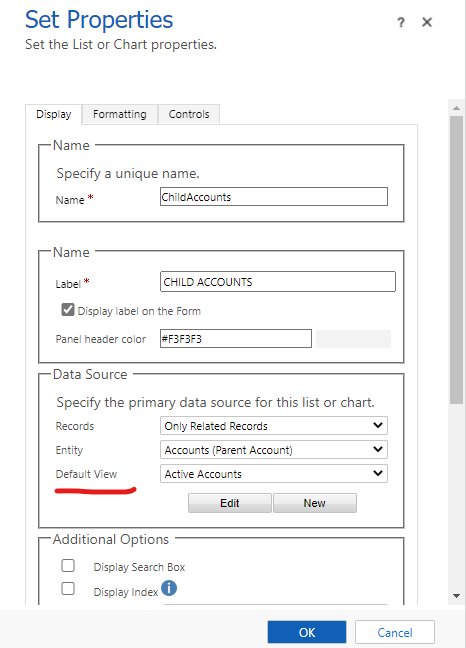
    • Open the form in design mode (on which you have the location lookup), and double click on lookup field to open properties tab.
    • Select the new view under Default view setting and click Ok.
    • Save and Publish the form.

    pastedimage1617224599700v1.png

  • susanpm Profile Picture
    10 on at

    Thanks for your help. I already figured out that if I go into mu customized view I need to edit the field properties , change the source table, and select the appropriate field.

Under review

Thank you for your reply! To ensure a great experience for everyone, your content is awaiting approval by our Community Managers. Please check back later.

Helpful resources

Quick Links

Responsible AI policies

As AI tools become more common, we’re introducing a Responsible AI Use…

Neeraj Kumar – Community Spotlight

We are honored to recognize Neeraj Kumar as our Community Spotlight honoree for…

Leaderboard > Microsoft Dynamics 365 | Integration, Dataverse, and general topics

#1
iampranjal Profile Picture

iampranjal 41

#2
Martin Dráb Profile Picture

Martin Dráb 38 Most Valuable Professional

#3
Satyam Prakash Profile Picture

Satyam Prakash 35

Last 30 days Overall leaderboard

Product updates

Dynamics 365 release plans