web
You’re offline. This is a read only version of the page.
close
Skip to main content

Announcements

No record found.

News and Announcements icon
Community site session details

Community site session details

Session Id :
Finance | Project Operations, Human Resources, ...
Unanswered

Customizations in SalesEditLines form only specific Sales order Packing Slip Posting

(0) ShareShare
ReportReport
Posted on by 625

Hi All,

Hope you all are doing good.

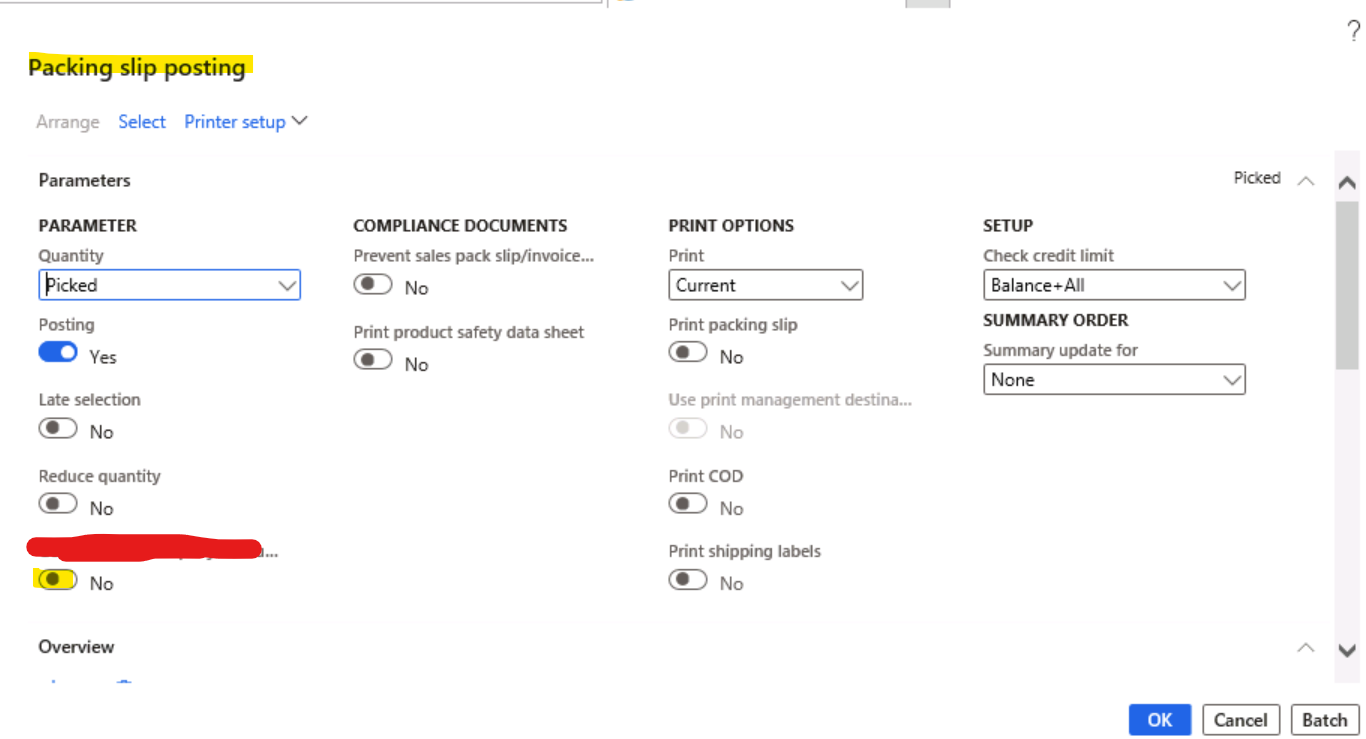
I have requirement where I had to add a enum field on SalesEditLines form like below during the time of Sales Order Packing Slip Posting, so I added that field in SalesParmUpdate Table : 
pastedimage1635401476364v1.png

Now I wanted to populate this custom enum field to Yes whenever Packing Slip Posting form is opened only if a related intercompany Purchase Order exists for that particular Sales order. 

Can someone please explain in detail how can i achieve this? Where exactly to code?

Also how can I make this custom enum field visible in Sales Edit Lines form only during Packing Slip posting process? As this form is being using in other process, like sales order confirmation,etc.

Please help!!!

Thanks in Advance.

I have the same question (0)
  • huijij Profile Picture
    19,813 on at

    Hi AXBOY,

    You can use the following code to check whether the Purchase Order exists for that particular Sales order, if so, set to yes otherwise no, the code can be written in the init() method of this form:

    InterCompanyPurchSalesReference reference;
    
    while select reference where reference.PurchId == 'PO_001'
    {
        info(reference.SalesId);
    }

  • Gunjan Bhattachayya Profile Picture
    35,429 on at

    Hi AXBOY,

    You can check for the Intercompany purchase order condition as  Judy mentioned. As for the method where you could do this, you can try creating a CoC on updateQueryDocumentRanges method in SalesFormletterParmDataPackingslip class. However, I am not sure how this will work in case you have multiple sales orders selected for packing slip. You can try with something like this code and see if that works for you.

    protected int updateQueryDocumentRanges(container _datasourceRecordsPackedMap, boolean _abortOnError = false)
    {
        SalesTable      localSalesTable;
        boolean			isInterCompanyPO;
        
        int ret = next updateQueryDocumentRanges(_datasourceRecordsPackedMap, _abortOnError);
        
        Map map = Map::create(_datasourceRecordsPackedMap);
        MapEnumerator mapEnumerator = map.getEnumerator();
        
        while (mapEnumerator.moveNext())
        {
            localSalesTable = mapEnumerator.currentValue();
            //Logic for inter company POs
            //isInterCompanyPO = 
            if (isInterCompanyPO)
            {
                ttsbegin;
                
                select forupdate salesParmUpdate
                    where salesParmUpdate.ParmId == parmId;
                    
                salesParmUpdate. = NoYes::Yes;
                salesParmUpdate.update();
                
                ttscommit;
            }
        }
        
        return ret;
    }

    As for controlling the visibility of the field, you can create a CoC on init method in SalesEditLines form and make this field visible only in case of packing slip. Make sure the control in the form extension has Auto Declaration set to "Yes".

    void  init()
    {
        boolean isFieldVisible;
        
        next init();
        
        isFieldVisible = (documentStatus == DocumentStatus::PackingSlip) ? true : false;
        CustomControl.visible(isFieldVisible);
    }

Under review

Thank you for your reply! To ensure a great experience for everyone, your content is awaiting approval by our Community Managers. Please check back later.

Helpful resources

Quick Links

Introducing the 2026 Season 1 community Super Users

Congratulations to our 2026 Super Stars!

Meet the Microsoft Dynamics 365 Contact Center Champions

We are thrilled to have these Champions in our Community!

Congratulations to the April Top 10 Community Leaders

These are the community rock stars!

Leaderboard > Finance | Project Operations, Human Resources, AX, GP, SL

#1
Giorgio Bonacorsi Profile Picture

Giorgio Bonacorsi 804

#2
André Arnaud de Calavon Profile Picture

André Arnaud de Cal... 639 Super User 2026 Season 1

#3
Subra Profile Picture

Subra 528

Last 30 days Overall leaderboard

Product updates

Dynamics 365 release plans
