web
You’re offline. This is a read only version of the page.
close
Skip to main content

Announcements

No record found.

News and Announcements icon
Community site session details

Community site session details

Session Id :
Microsoft Dynamics AX (Archived)

Error when applying hotfix: access to file denied

(0) ShareShare
ReportReport
Posted on by 1,400

Hi guys. I was trying to install a hotfix necessary to run the data upgrade process, when I came accross the following error:
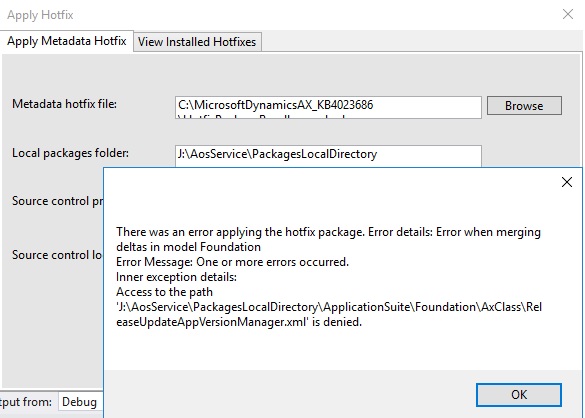
hotfixError.jpg

This hotfix is key for this process to finish succesfully, because otherwise, the deployable package installation throws an error regarding system version information. I've already tried installing the hotfix from command line with the same result.

Has anyone ran into this problem? What can I do to solve it?

Thanks.

*This post is locked for comments

I have the same question (0)
  • André Arnaud de Calavon Profile Picture
    303,730 Super User 2026 Season 1 on at

    Hi Danilo,

    Which hotfix are you trying to install on what exact version (platform and application) of Dynamics 365? Is that hotfix compatible for this version? I do assume you are installing this hotfix using Visual Studio on a DEV box?

  • greengrimms Profile Picture
    1,400 on at

    Hi Andre. Yes, I'm working on a dev environment running the latest app release (July 2017) and on platform update 11, I'm upgrading from U7. The hotfix is KB4023686.... I tried installing the deployable package without applying the Hotfix first and I got the error that the hotfix is supposed to fix, so my guess is that the solution Is not included in the version I'm working on. Thank you for answering!

  • Verified answer
    Fedir Kryvyi Profile Picture
    1,026 on at

    Danilo,

    I would suggest to stop all AX related services + stop AOS from IIS, and make sure that you run VS with admin rights, and then try to apply hotfix. Some of the processes might lock some file and that is what causing the issue.

  • greengrimms Profile Picture
    1,400 on at

    Hi Fedir. Yes, I've already tried stopping, with no luck, the AOSService in IIS, along with the following services:

    - Microsoft Dynamics 365 Unified Operations: Batch Management Service

    - Microsoft Dynamics 365 Unified Operations: Data Import Export Framework Service

    - World Wide Web Publishing Service.

    Am I missing another process that might be locking the App. Foundation files?

  • Verified answer
    greengrimms Profile Picture
    1,400 on at

    Nevermind, I was trying to apply the hotfix on the wrong environment...

    Sorry for wasting your time and thanks for the help.

  • Fedir Kryvyi Profile Picture
    1,026 on at

    No problem :D

    Everyone make mistakes, glad that you were able to fix your issue.

    Please mark this question as resolved

  • greengrimms Profile Picture
    1,400 on at

    Will do. Thanks for the help Fedir!

Under review

Thank you for your reply! To ensure a great experience for everyone, your content is awaiting approval by our Community Managers. Please check back later.

Helpful resources

Quick Links

Introducing the 2026 Season 1 community Super Users

Congratulations to our 2026 Super Stars!

Meet the Microsoft Dynamics 365 Contact Center Champions

We are thrilled to have these Champions in our Community!

Congratulations to the March Top 10 Community Leaders

These are the community rock stars!

Leaderboard > 🔒一 Microsoft Dynamics AX (Archived)

#1
Joris dG Profile Picture

Joris dG 5

#2
Alexey Lekanov Profile Picture

Alexey Lekanov 2

#2
Henrik Nordlöf Profile Picture

Henrik Nordlöf 2 User Group Leader

Last 30 days Overall leaderboard

Featured topics

Product updates

Dynamics 365 release plans
