web
You’re offline. This is a read only version of the page.
close
Skip to main content

Announcements

No record found.

News and Announcements icon
Community site session details

Community site session details

Session Id :
Microsoft Dynamics AX (Archived)

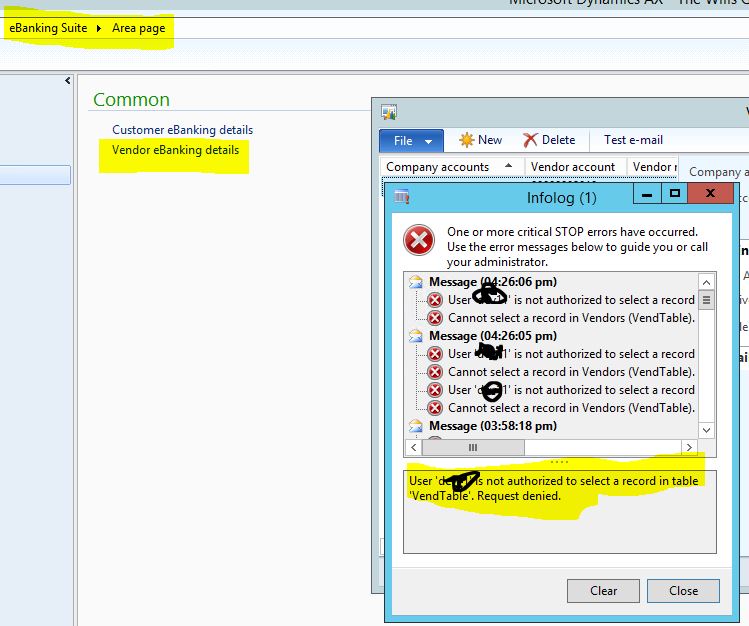
User is not authorized to select a record in table'VendTable', Reqest denied.

(0) ShareShare
ReportReport
Posted on by

Hello Frds,

Today I am facing a issue with user role. Actually i created new role for my user. In eBanking module, when i click on Vendor eBanking details under "Common", then i got this error message. Any insights please?

kindly check image. please
61430.Capture.JPG

*This post is locked for comments

I have the same question (0)
  • Verified answer
    André Arnaud de Calavon Profile Picture
    304,038 Super User 2026 Season 1 on at

    Hi Hassan,

    It can be caused by the Table Permissions Framework. In that case, you have to additionally add the VendTable under the table permissions of the role or the privilege and grant access.

    I do think that eBanking is an add-on from an implementation partner? When they did build another form based on a new data source and uses display methods from the VendTable, you also have to add the VendTable under the table permissions node.

  • Community Member Profile Picture
    on at

    wow.

    it works.

    thanks for help

  • Community Member Profile Picture
    on at

    Hello Andre,

    Now I am facing different issue in GL. when i try to run Trial balance in "common" using same role. I got this error message.  kindly check this image. please

    0027.Capture.JPG

  • Community Member Profile Picture
    on at

    above mention issue related to Trial balance. it is resolved now. I just did the same you told me for table. Now I did for method and add it in server methods under permission node. thanks

  • Community Member Profile Picture
    on at

    Andre,

    today its my 2nd error which i am facing in GL Inquiries. When i run "Subliedger journal entries not yet transferred" using newly created role then i got this error message. I could not understand it.

    can you tell me how to resolve it? please

    3240.Capture1.JPG

  • Community Member Profile Picture
    on at

    Andre,

    Basically this form used view.  I was considering it as a table. but when i dig it more deeper then I became to know that its a view. so I just did the same as for table. this issue also has gone. thanks for you help

  • André Arnaud de Calavon Profile Picture
    304,038 Super User 2026 Season 1 on at

    Hi Hassan,

    Great to see that you were able to find the solutions for the follow up questions yourself. Thanks for the feedback!

  • Community Member Profile Picture
    on at

    Hello Andre,

    I really appreciate your help.

    Today I am facing an other error which made me confused. so again I need your help.

    Actually in GL ----->Periodic ------. Journals ------> Periodic journals. when i click on it. a form is opened and there I want to see Line button on the top of it. which i did't see in new created role.

    using tool development tools, I try to expand it maximum but i could not find any thing wrong with it.

    I also try to add this privilege (LedgerJournalTableMaintain) to my role. but it not showing up. I am also sharing pic. kindly check it

    thanks

    ff2.JPG

    Security development tools pic.

    ff2.JPG

  • André Arnaud de Calavon Profile Picture
    304,038 Super User 2026 Season 1 on at

    Hi Hassan,

    What exact periodic journal duty or privilege did you include in your role?

  • Community Member Profile Picture
    on at

    Hello Andre,

    I created my own and using Security development tool I gave full access to this privilege.

Under review

Thank you for your reply! To ensure a great experience for everyone, your content is awaiting approval by our Community Managers. Please check back later.

Helpful resources

Quick Links

Introducing the 2026 Season 1 community Super Users

Congratulations to our 2026 Super Stars!

Meet the Microsoft Dynamics 365 Contact Center Champions

We are thrilled to have these Champions in our Community!

Congratulations to the March Top 10 Community Leaders

These are the community rock stars!

Leaderboard > 🔒一 Microsoft Dynamics AX (Archived)

#1
Basit Profile Picture

Basit 1

#1
GL-01081504-0 Profile Picture

GL-01081504-0 1

#1
Roya Profile Picture

Roya 1

Last 30 days Overall leaderboard

Featured topics

Product updates

Dynamics 365 release plans
