web
You’re offline. This is a read only version of the page.
close
Skip to main content

Notifications

Announcements

No record found.

Community site session details

Community site session details

Session Id :
Microsoft Dynamics CRM (Archived)

getEventArgs().preventDefault not working

(0) ShareShare
ReportReport
Posted on by 1,821

Hi,

I replaced event.returnValue with getEventArgs().preventDefault() but it is not working.  Please find below the scripts and screen-shots for you reference.  It give error and save record.  Please help to find solution.
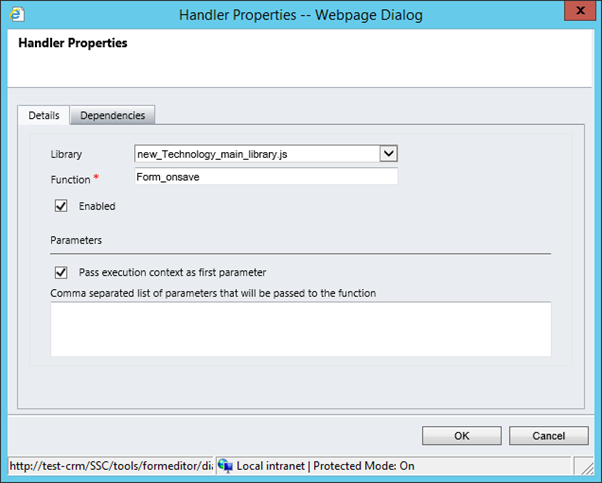
 

s11.png

function Form_onsave(executionOb)

{

if((Xrm.Page.getAttribute("new_accountid").getValue() != null ) &&

(Xrm.Page.getAttribute("new_name").getValue() == null ))

{

 var results = GetRelatedcontacts();

 if (results != 0)

   {

   alert("Technology details of this account is already in CRM. Please close this window and select existing record from view");

           Xrm.Page.getAttribute("new_name").setValue() =null;

           Xrm.Page.getControl("new_accountid").setFocus(true);

           executionObj.getEventArgs().preventDefault();

         }

   }

}

It display the alert message and give below error but save record.
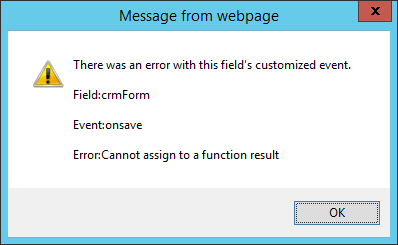
 6283.s1.png


*This post is locked for comments

I have the same question (0)
  • Suggested answer
    jlattimer Profile Picture
    24,562 on at
    Try:
     Xrm.Page.getAttribute("new_name").setValue() =null
    //Should be
     Xrm.Page.getAttribute("new_name").setValue(null)
  • P NOUSHAD Profile Picture
    1,821 on at

    Hi,

    I have corrected parameter name.  but I am getting the below error please check and save the record.  Do I have declare the variable in script.

    s111.png

    function Form_onsave(executionObj)
    {

    if((Xrm.Page.getAttribute("new_accountid").getValue() != null ) &&
    (Xrm.Page.getAttribute("new_name").getValue() == null ))
    alert("1");
    {

    var results = GetRelatedcontacts();

     if (results != 0)
       {
         alert("2");
      alert("Technology details of this account is already in CRM. Please close this window and select existing record from view");
               Xrm.Page.getAttribute("new_name").setValue(null);
               Xrm.Page.getControl("new_accountid").setFocus(true);
               executionObj.getEventArgs().preventDefault();

          } 
      }

    }

  • Community Member Profile Picture
    on at

    Use this code:

    function Form_onsave(executionObj)

    {

    if((Xrm.Page.getAttribute("new_accountid").getValue() != null ) &&

    (Xrm.Page.getAttribute("new_name").getValue() == null ))

    {

    alert("1");

    var results = GetRelatedcontacts();

    if (results != 0)

      {

        alert("2");

     alert("Technology details of this account is already in CRM. Please close this window and select existing record from view");

              Xrm.Page.getAttribute("new_name").setValue(null);

              Xrm.Page.getControl("new_accountid").setFocus(true);

              executionObj.getEventArgs().preventDefault();

         }

     }

    }

  • P NOUSHAD Profile Picture
    1,821 on at

    let me know where is change in your code

  • Community Member Profile Picture
    on at

    Is it working??

    I changed from:

    alert("1");

    {

    to

    {

    alert("1");

  • Community Member Profile Picture
    on at

    Share your Skype id

  • P NOUSHAD Profile Picture
    1,821 on at

    It is not working

  • P NOUSHAD Profile Picture
    1,821 on at

    Please any update

  • Suggested answer
    Community Member Profile Picture
    on at

    Hi Noushad,

    Please check the execution context, whether you did pass it to the function or not.

    The executionObj is getting null, so it is not able to access the getEventArgs method of context.

    Hope this helped.

    Thanks

    Phanidhar

  • Suggested answer
    shivaram Profile Picture
    3,315 on at

    Hi Noushad,

    You set null value like 

      Xrm.Page.getAttribute("new_name").setValue() =null;

    It should be 

      Xrm.Page.getAttribute("new_name").setValue(null);


    And your context name is different.

    On Form_Save function you pass context name is executionOb

    And while Prevent you gave executionObj.

    So final code should be

    function Form_onsave(executionObj)

    {

    if((Xrm.Page.getAttribute("fieldname").getValue() != null ) &&

    (Xrm.Page.getAttribute("fieldname").getValue() != null ))

    {
    var result=getContactDetails();
    if(result!=null){


    alert("Technology details of this account is already in CRM. Please close this window and select existing record from view");

    Xrm.Page.getAttribute("fieldname").setValue(null);

    Xrm.Page.getControl("fieldname").setFocus(true);

    executionObj.getEventArgs().preventDefault();

    }

    }

    }

    Hope it helps you

    Thanks

Under review

Thank you for your reply! To ensure a great experience for everyone, your content is awaiting approval by our Community Managers. Please check back later.

Helpful resources

Quick Links

Responsible AI policies

As AI tools become more common, we’re introducing a Responsible AI Use…

Neeraj Kumar – Community Spotlight

We are honored to recognize Neeraj Kumar as our Community Spotlight honoree for…

Leaderboard > 🔒一 Microsoft Dynamics CRM (Archived)

#1
SA-08121319-0 Profile Picture

SA-08121319-0 4

#1
Calum MacFarlane Profile Picture

Calum MacFarlane 4

#3
Alex Fun Wei Jie Profile Picture

Alex Fun Wei Jie 2

Last 30 days Overall leaderboard

Featured topics

Product updates

Dynamics 365 release plans



