web
You’re offline. This is a read only version of the page.
close
Skip to main content

Notifications

Announcements

No record found.

Community site session details

Community site session details

Session Id :
Microsoft Dynamics 365 | Integration, Dataverse...
Suggested Answer

How to retrieve data job download guid from power automate or logic app?

(0) ShareShare
ReportReport
Posted on by 15

Hi D365 community!!

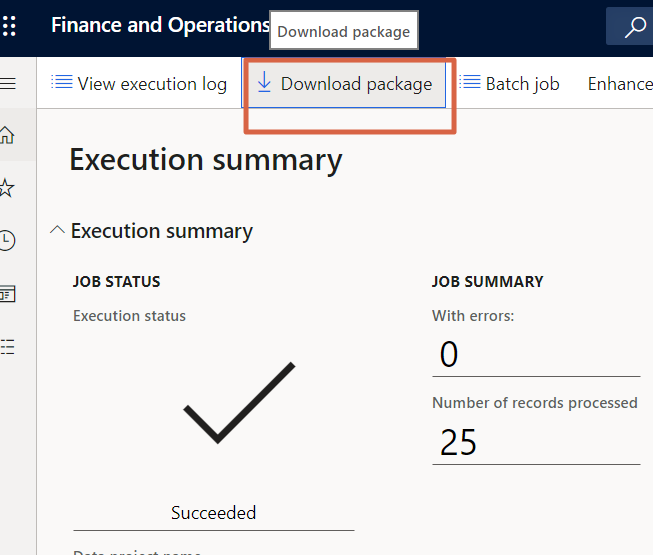
I'm working on exporting D365 FO data to 3rd party cloud service folder with power automate, after downloading the file, I would like to rename it with the guid of 'download data job' as it's from D365 FO, see the below image, click on the download package (data management> data project > job history > select job ID >download package) , you'll have a zip package with a fixed guid number, I would like to know what is this number? and where does this guid number come from? Is it possible to to retrieve it from power automate or logic apps? 

Thanks a lot for any precious hints or insights!!
pastedimage1678130436167v1.png

I have the same question (0)
  • Suggested answer
    Parag Chapre Profile Picture
    12,254 Most Valuable Professional on at

    Hi Devfv,

    You can achieve this by using Power automate or Logic Apps.

    Please check my blog post on this.

    paragchapre.com/.../

  • devfv Profile Picture
    15 on at

    Hi Parag!

    Thank you !! definitely will try it out!! would this flow upload only main xml file to FTP?

    other question is , any idea how to add this guid to the xml file after <Message ID>?

  • Suggested answer
    Shawnsauve Profile Picture
    1,093 on at

    Hey there! When you download a package from Data Management in D365 FO, you'll notice that the file name has a GUID (Globally Unique Identifier) appended to it. This GUID is a unique identifier that is assigned to the package when it's created in D365 FO.

    The GUID is generated by D365 FO and is used to ensure that each package has a unique identifier. This is important because it helps to prevent any potential conflicts or data loss that could occur if two packages had the same name.

    In terms of retrieving the GUID from Power Automate or Logic Apps, it's possible to do so by using the "List Data Management Package" action. This action will return a list of all the packages that have been created in D365 FO, along with their associated GUIDs.

    You can then use the GUID to rename the downloaded file using Power Automate or Logic Apps. To do this, you can use the "Rename File" action and set the new file name to include the GUID.

Under review

Thank you for your reply! To ensure a great experience for everyone, your content is awaiting approval by our Community Managers. Please check back later.

Helpful resources

Quick Links

Responsible AI policies

As AI tools become more common, we’re introducing a Responsible AI Use…

Neeraj Kumar – Community Spotlight

We are honored to recognize Neeraj Kumar as our Community Spotlight honoree for…

Leaderboard > Microsoft Dynamics 365 | Integration, Dataverse, and general topics

#1
Siv Sagar Profile Picture

Siv Sagar 93 Super User 2025 Season 2

#2
#ManoVerse Profile Picture

#ManoVerse 74

#3
Martin Dráb Profile Picture

Martin Dráb 64 Most Valuable Professional

Last 30 days Overall leaderboard

Product updates

Dynamics 365 release plans
