web
You’re offline. This is a read only version of the page.
close
Skip to main content

Notifications

Announcements

No record found.

Community site session details

Community site session details

Session Id :
Microsoft Dynamics AX (Archived)

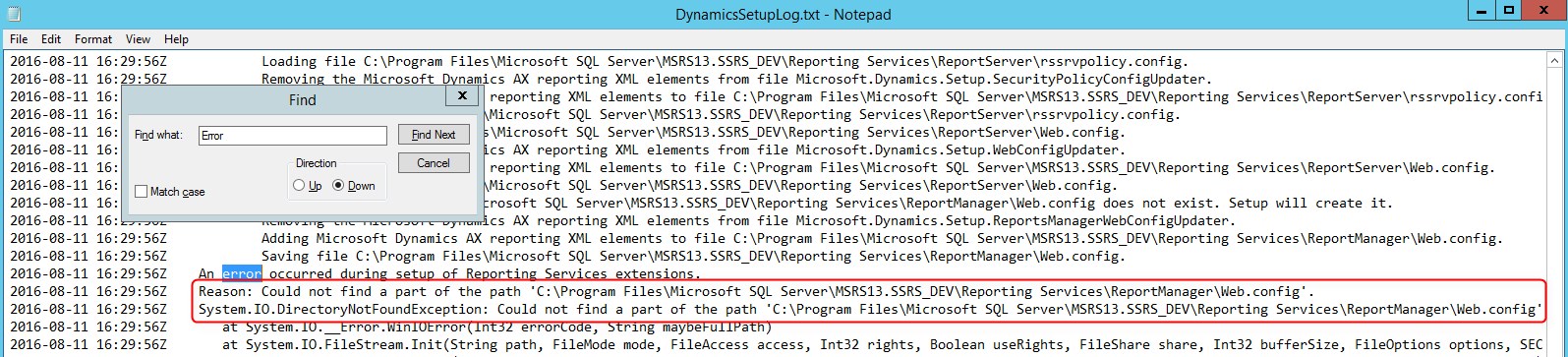
Could not find a part of the path of ReportManager's Web.config

(0) ShareShare
ReportReport
Posted on by 25

Could not find a part of the path 'C:\Program Files\Microsoft SQL Server\MSRS13.[SSRSInstanceName]\Reporting Services\ReportManager\Web.config
SSRS2016_5F00_AX60R3CU11.jpg

Environment

- Windows Server 2012 R2 Standard Edition 64 bit

- SQL Server 2016 Reporting Services Standard Edition 64 bit

- Dynamics AX 2012 R3 CU11

I've configured on the Reporting Services Configuration Manager, Web service and Report Manager can access.

Then install Dynamics AX 2012 R3 CU11 Reporting Services extensions and it's failed with error 

"Could not find a part of the path 'C:\Program Files\Microsoft SQL Server\MSRS13.[SSRSInstanceName]\Reporting Services\ReportManager\Web.config"

Locate to the SSRS instance root directory and not found the "ReportManager" folder.

ReportManagerFolder.png

Regards.

*This post is locked for comments

I have the same question (0)
  • Iulian Cordobin Profile Picture
    8,201 on at

    SQL Server 2012 SP1 Management Objects (SMO) package needs to be installed to use the Reporting Services extensions feature.

  • Community Member Profile Picture
    on at

    There is a hot fix for this.

    You may install KB3184496 to fix AX2012 R3 reporting extensions issue with SQL 2016.

    mbs2.microsoft.com/.../KBDisplay.aspx;EN-US;3184496

  • Community Member Profile Picture
    on at

    where is install ?  AOS or Report Manager Server

  • Handy Profile Picture
    25 on at

    Hi genious, It's on the Report server.

  • Community Member Profile Picture
    on at

    thank you so much !!!

  • Suggested answer
    Shafeeque P. Profile Picture
    6,533 Moderator on at

    Just create a folder named ReportManager and copy the web.config file from ReportServer folder.

Under review

Thank you for your reply! To ensure a great experience for everyone, your content is awaiting approval by our Community Managers. Please check back later.

Helpful resources

Quick Links

Responsible AI policies

As AI tools become more common, we’re introducing a Responsible AI Use…

Neeraj Kumar – Community Spotlight

We are honored to recognize Neeraj Kumar as our Community Spotlight honoree for…

Leaderboard > 🔒一 Microsoft Dynamics AX (Archived)

#1
Martin Dráb Profile Picture

Martin Dráb 4 Most Valuable Professional

#1
Priya_K Profile Picture

Priya_K 4

#3
MyDynamicsNAV Profile Picture

MyDynamicsNAV 2

Last 30 days Overall leaderboard

Featured topics

Product updates

Dynamics 365 release plans
